

Address Line 1 vs Address Line 2: What They Mean and How to Use Them Properly

Address fields look simple. In reality, they’re one of the easiest places for users to get confused.
I’ve seen this repeatedly while collecting leads and customer information. People pause. They reread the labels. Then they enter something that feels safe and move on.
The problem usually isn’t the address itself. It’s the form. “Address Line 1” and “Address Line 2” describe order, not intent. When intent isn’t clear, users guess.
This guide breaks down what each field is actually for, how to use them properly, and how to avoid the mistakes that quietly damage address data later.
Why address fields confuse users
Well, the confusion arises with the ambiguity. Simply put, users perceive addresses as a single unit, but in an address field, as they are separated as Line 1 and Line 2, it sounds more technical. Which challenges the common perception of users, and they struggle with what to put in Line 2.
International differences are also one of the reasons for confusion. The formatting varies globally – address structures, abbreviations (St. vs. Street), and element order (state/province placement), making forms difficult for international users.
I also experienced that many online forms lack proper labeling and structure. They go with generic labels like ‘Address Line 1’ and ‘Address Line 2’, offering little guidance; this forces users to guess if they should split information or put it all in Line 1.
Sometimes, splitting into many sub-fields (House, Entrance, Apt) can confuse users who don’t have those specific details.
What Address Line 1 is meant for
Address Line 1 exists to capture the primary street address – the part that identifies where the building is located.
I’ll use the same example throughout this article, and break it down where needed. Let’s say we have Alex Carter who lives at 456 Oak Street, Apartment 12B, Austin, Texas.
For Alex, Address Line 1 should be:
456 Oak St
This field usually includes:
- Building or house number
- Street name
- Street suffix (St, Ave, Blvd, etc.)
It should not include apartment numbers, directions, landmarks, or notes. Address Line 1 defines where the building is, not who or what is inside it.
That’s why this field is almost always required.
What Address Line 2 is actually for
Address Line 2 should include secondary information that specifies a particular location within a larger address. These details help narrow down where inside a building or complex the person or business is located.
Here are the most common examples:
- Apartment number:
Used in residential buildings with multiple units. For Alex Carter, this would be Apt 12B in “456 Oak St, Apt 12B.” - Suite number:
Common in office or commercial buildings. If Alex received mail at an office, something like Suite 210 would identify the correct workspace within the building. - Unit number:
Often used instead of apartment numbers in residential or mixed-use complexes. Unit 12B serves the same purpose as an apartment number and belongs in Address Line 2. - Room number:
Used in buildings like hospitals, campuses, or hotels. A value like Room 302 helps pinpoint a specific room within a shared address. - Floor number:
Specifies the floor within a multi-level building, such as Floor 3, when that detail is necessary for delivery or internal routing. - Department identifier:
Used in larger organizations to route mail internally. An entry like Dept 45 directs mail to the correct team within the same address. - P.O. Box number:
When mail is delivered to a post office box instead of a residence, the box number (for example, P.O. Box 456) belongs in Address Line 2.
Each of these examples shares the same purpose: they add precision without replacing the primary street address. If the information helps identify a specific recipient within a larger location, it belongs in Address Line 2.
Helper text that reduces mistakes
If you want to reduce mistakes, a small line of helper text makes a big difference. These are simple, effective options you can use as-is:
- “Apartment, suite, unit, floor, etc. (optional)”
- “Only fill this if your address has an apartment, suite, or unit number.”
- “For apartment or suite numbers only – no delivery instructions.”
- “Leave blank if not applicable.”
Clear helper text prevents people from guessing, repeating information, or adding notes that don’t belong in address fields.
A clean example of a full address with identifiers
A properly structured address keeps each piece of information in its place.
- Name: Alex Carter
- Address Line 1: 456 Oak St
- Address Line 2: Apt 12B
- City: Austin
- State: TX
- ZIP Code: 78701
- Country: USA
This structure works because it’s predictable. Humans understand it. Systems can parse it.
Why Address Line 2 goes wrong in real forms
Address Line 2 goes wrong when people don’t know whether it’s optional or what it’s for. When in doubt, users fill it with whatever helps them move forward. That’s how directions, notes, and repeated data end up where they shouldn’t.
Common ways Address Line 2 gets misused
The issue with Address Line 2 is so common that some patterns show up again and again. Here’s what I’ve found over the times:
Repeating information from Address Line 1
One common misuse is re-entering the street name or number, usually because users think they’re being thorough.
Incorrect:
- Name: Alex Carter
- Address Line 1: 456 Oak St
- Address Line 2: Oak Street
- City: Austin
- State: TX
- ZIP Code: 78701
Repeating “Oak Street” in Address Line 2 doesn’t add clarity. It creates duplicate data and makes the address harder for systems to interpret.
Adding directions or landmarks
Some users treat Address Line 2 as a place for directions or visual cues.
Incorrect:
- Name: Alex Carter
- Address Line 1: 456 Oak St
- Address Line 2: Behind the mall
- City: Austin
- State: TX
- ZIP Code: 78701
Directions like this feel helpful, but they don’t belong in structured address fields and can break automated processing.
Mixing up fields
Another common issue is placing city, state, or ZIP code information into Address Line 2.
Incorrect:
- Name: Alex Carter
- Address Line 1: 456 Oak St
- Address Line 2: Austin, TX 78701
- City: Austin
- State: TX
- ZIP Code: 78701
This duplicates information that already exists in dedicated fields and increases the risk of validation errors.
Using Address Line 2 for personal notes
Address Line 2 is also frequently misused as a notes or instruction field.
Incorrect:
- Name: Alex Carter
- Address Line 1: 456 Oak St
- Address Line 2: Call upon arrival
- City: Austin
- State: TX
- ZIP Code: 78701
Instructions like this belong in a separate notes or delivery instructions field, not inside the address itself.
Solutions to reduce address errors
We have already gone through the reason behind these errors, and the solution starts from there. Global formatting, form design with proper help texts, and autocomplete can reduce faulty inputs.
Let’s go through the detailed take on those fixes:
Format Address Line 1 and 2 accordingly in different countries
Address formats vary globally. Some regions place unit information before the street name. Others rely heavily on postal codes.
Forms that assume one format often break when used internationally. Flexibility matters if your audience isn’t local.
Although, Address Line 2 doesn’t mean the same thing everywhere, but the pattern is consistent. It exists to add precision when a single street address isn’t enough.
Let’s see what the global variations look like.
United States
In the US, Address Line 2 is most commonly used for apartment, unit, or suite numbers.
Using the same example from earlier –
Address Line 1: 456 Oak St
Address Line 2: Apt 12B
City: Austin
State: TX
ZIP Code: 78701
Here, Address Line 1 identifies the building. Address Line 2 narrows it down to a specific unit. That separation is what most delivery systems expect.
United Kingdom
In the UK, Address Line 2 is often used for flat numbers or building identifiers, especially when multiple residences share the same street address.
Example –
Address Line 1: 18 King’s Road
Address Line 2: Flat 3A
City: Brighton
Postcode: BN1 1NE
“Flat 3A” belongs in Address Line 2 because it specifies the residence inside the building, not the street itself.
Canada
Canada follows a structure very similar to the US, with Address Line 2 used for units or suites in residential and commercial buildings.
Example –
Address Line 1: 92 Harbour Street
Address Line 2: Unit 504
City: Vancouver
Province: BC
Postal Code: V6B 5R4
Again, Address Line 1 points to the building. Address Line 2 adds the internal location.
Japan
Japan handles addresses differently, and Address Line 2 often carries more structural detail than in Western countries.
Example –
Address Line 1: 2-8-1 Nishi-Shinjuku
Address Line 2: Shinjuku Mitsui Building, 15F
City: Tokyo
Postal Code: 163-0401
Here, Address Line 2 includes the building name and floor number, which are essential for accurate delivery in dense urban areas.
Germany
In Germany, Address Line 2 is frequently used for floor and room identifiers, especially in offices and apartment buildings.
Example –
Address Line 1: Friedrichstraße 67
Address Line 2: 2. OG, Büro 12
City: Berlin
Postal Code: 10117
Floor and room details are common and expected in Address Line 2, particularly for business addresses.
India
In India, Address Line 2 is often essential, not optional. Many addresses rely on building names, floor numbers, or locality identifiers that don’t fit cleanly into a single street line.
Example –
Address Line 1: 14 MG Road
Address Line 2: Sunrise Apartments, 3rd Floor, Flat 302
City: Bengaluru
State: Karnataka
PIN Code: 560001
Here, Address Line 1 gives the street reference. Address Line 2 carries the building name and floor-level detail that actually helps someone locate the residence. Without it, delivery accuracy drops quickly, especially in dense urban areas.
Nigeria
In Nigeria, Address Line 2 is commonly used to add landmarks, estate names, or unit identifiers within a compound or complex.
Example –
Address Line 1: 25 Adeola Odeku Street
Address Line 2: Victoria Island Estate, Block C
City: Lagos
State: Lagos
Postal Code: 101241
While landmarks are often used informally, structured identifiers like estate names or block numbers belong in Address Line 2. This keeps the address usable for couriers and systems that still rely on standardized fields.
Form design practices that reduce address errors
Errors drop if your forms explain intent clearly.
Keep Address Line 2 optional and avoid vague labels. You can write like this – Address Line 2 (Optional) on the label. Even, clarifying exactly what is expected can be the label, for example: rather than labeling it as Address Line 2, write ‘Apartment / Suite / Unit (optional)’.
This is the clearest option. It tells users exactly what belongs there and prevents them from using it as a notes field.
Add helper text. Don’t force users to guess. Helper text should answer one question: “What exactly should I put here?”
Here’s how a good help text looks like – “Add apartment, suite, unit, or floor number if applicable”.
Good form design does more than validation ever will.
Address Line 2 shouldn’t always be required
Requiring it increases friction and encourages users to enter irrelevant information just to proceed.
Only require it when every submission truly needs secondary location data.
When autocomplete and validation actually help
Autocomplete helps when accuracy matters, like billing or shipping.
For simple lead forms, it can add unnecessary friction. Accuracy should match the use case.
Best-practice checklist
- Address Line 1 required
- Address Line 2 optional
- Proper labeling
- Clear helper text
- No directions or notes
- Flexible for international users
Follow this checklist to never miss out on anything that might mess up the address data.
How Fluent Forms helps resolving address errors
If you have reached this far, you already know the best ways to reduce address errors in your forms. Now, if you are in search of a tool that can help you in the process, Fluent Forms can be of help.
Its Address Fields can collect the user’s address properly. Within any form, you can insert the address fields for free.
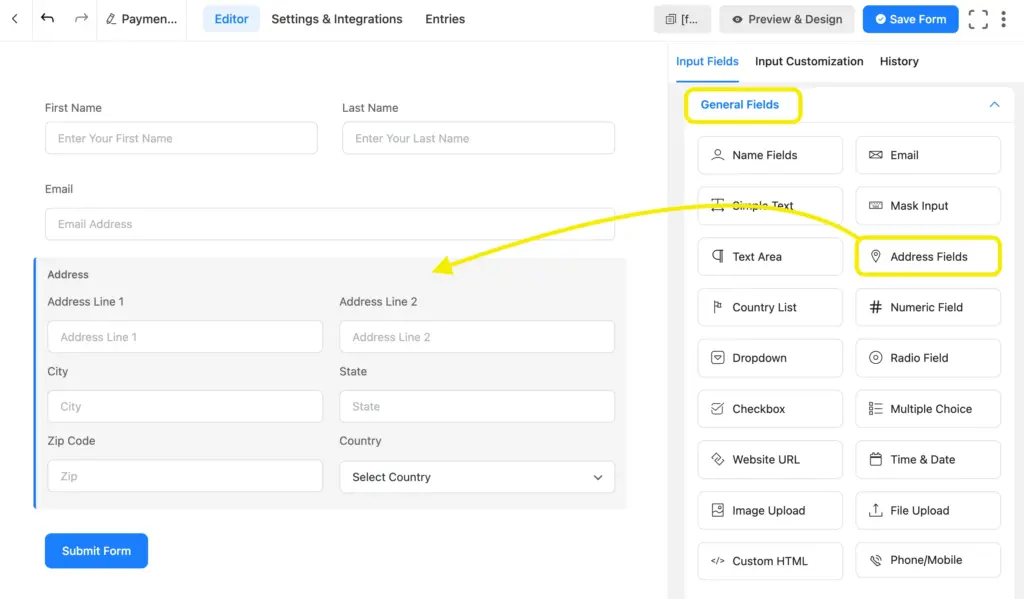
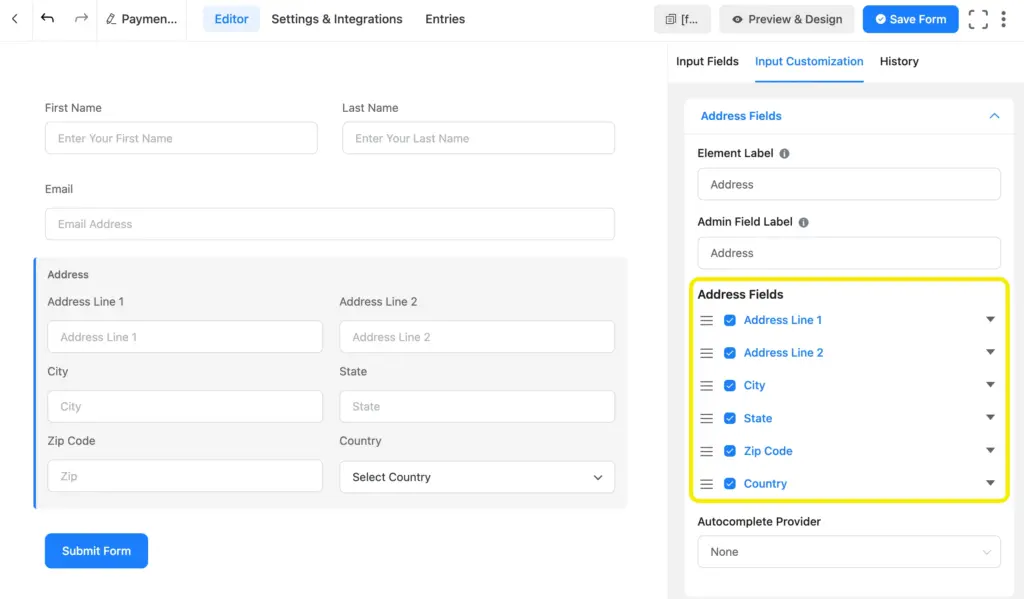
You can customize every part of an address field- label, placeholder, help message, and additional field specific settings.
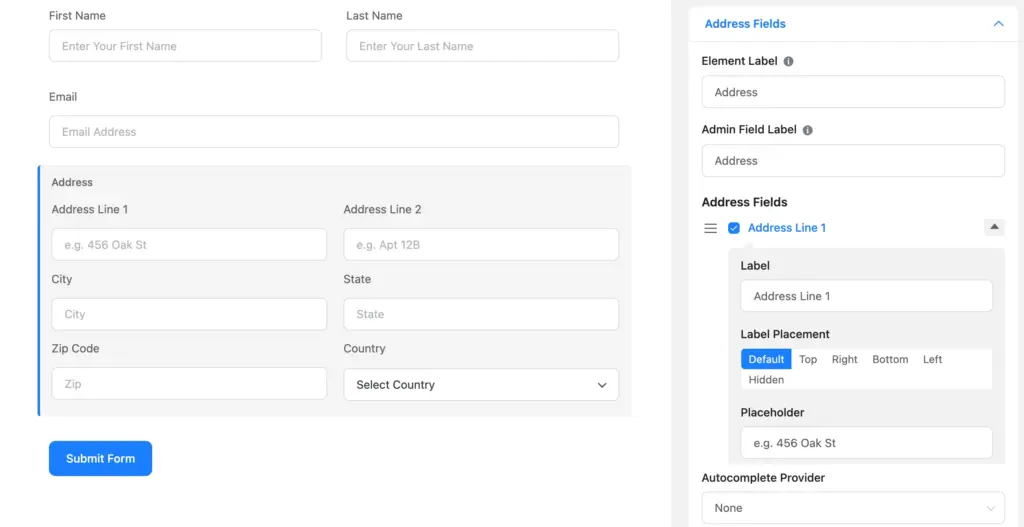
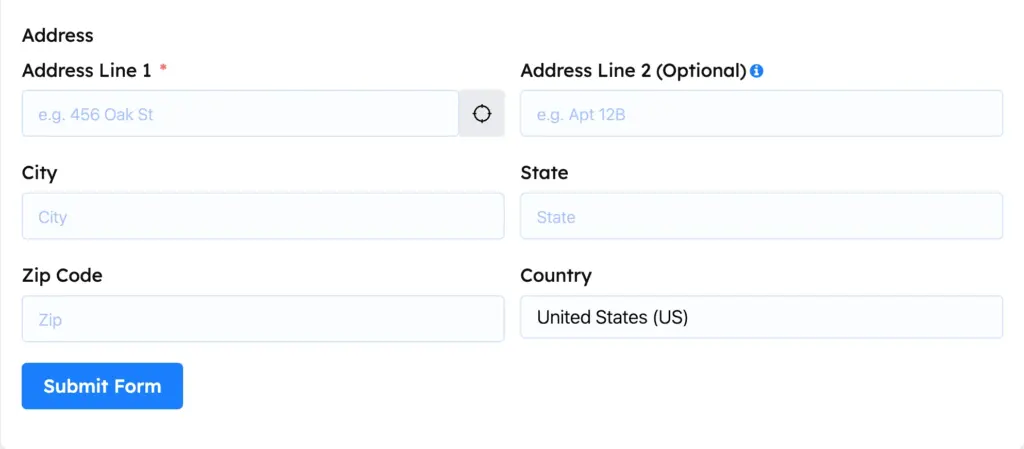
You can customize to provide a clear label and placeholder for Address Line 1. As we discussed before, labeling for Address Line 1 can be straightforward. But a clear placeholder is needed. Also set this field to required everytime.
The editor can be used to reduce confusion with the Address Line 2. Labeling it as optional reduces a lot of friction.
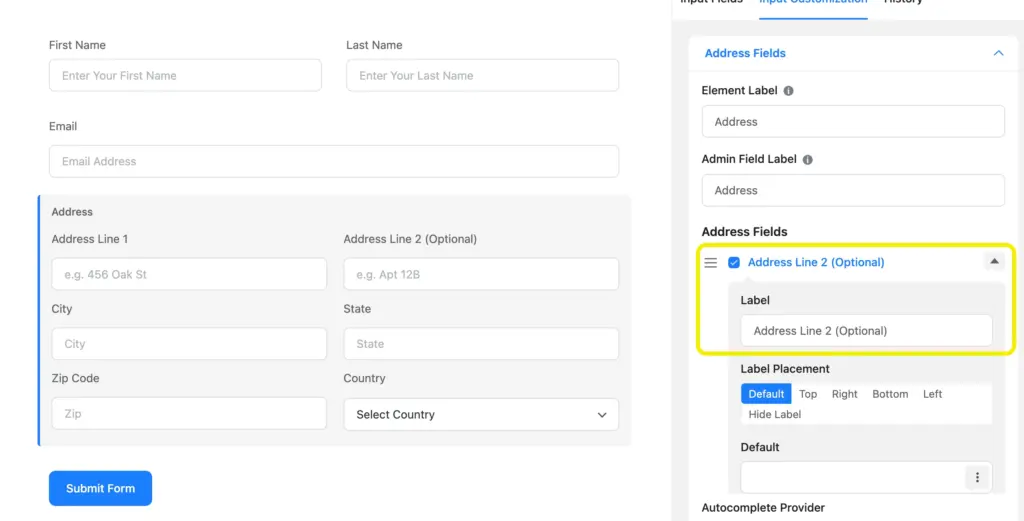
You can also add a guiding placeholder, such as “Apt 12B”, which clarifies the intent of the field. An additional help message can explain what belongs there and reassure users that the field is optional if it doesn’t apply.
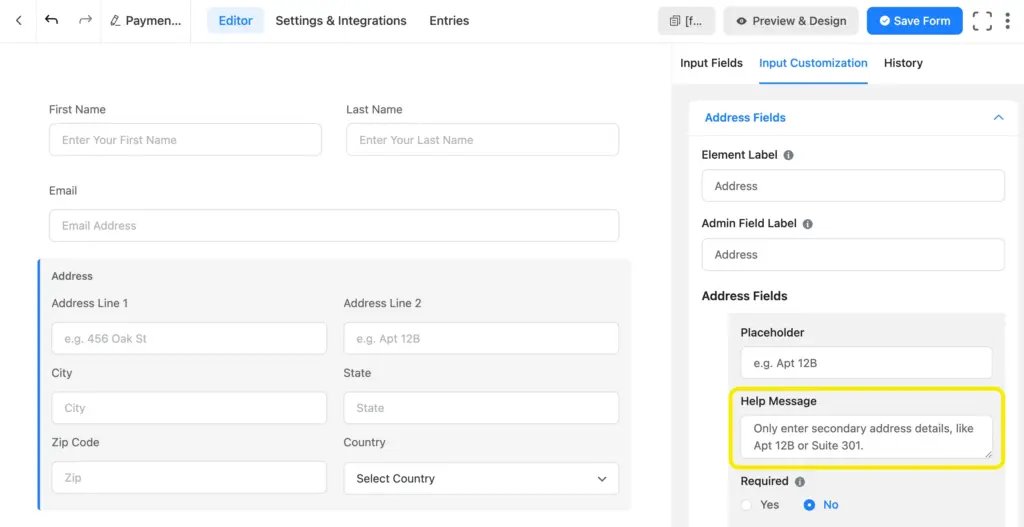
Other fields like City, State, and ZIP Code can be set as optional in many cases, especially for lead or contact forms where full address precision isn’t required.
The Country field, however, can be useful beyond basic location data – it can drive conditional logic, adjust address formats, enable region-specific validation, or trigger different workflows based on where the submission comes from.
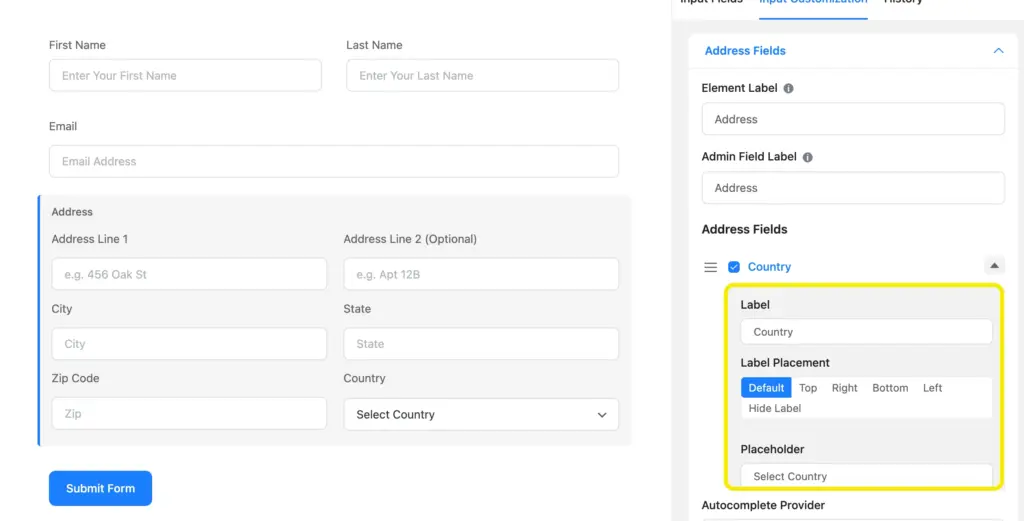
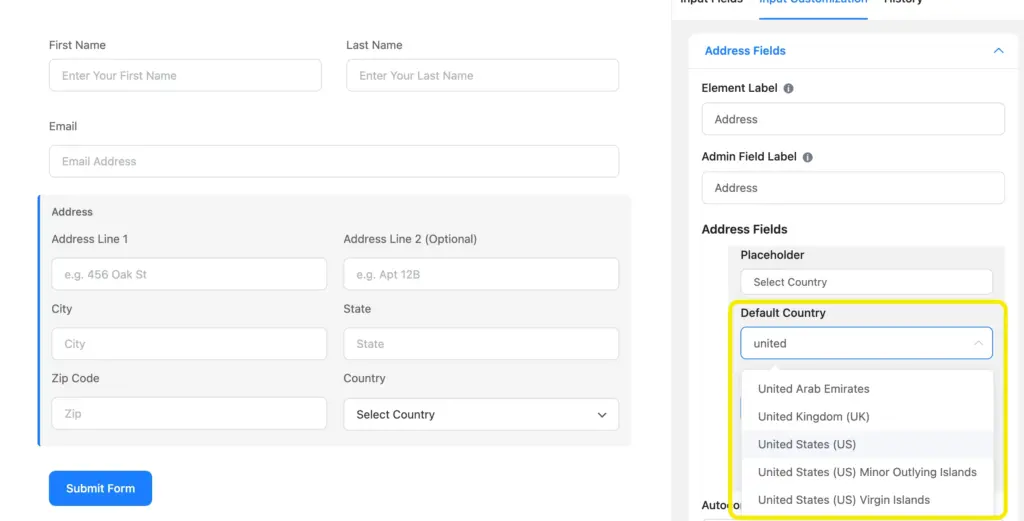
In the country field, you can set a default country if you are already sure of your user base.
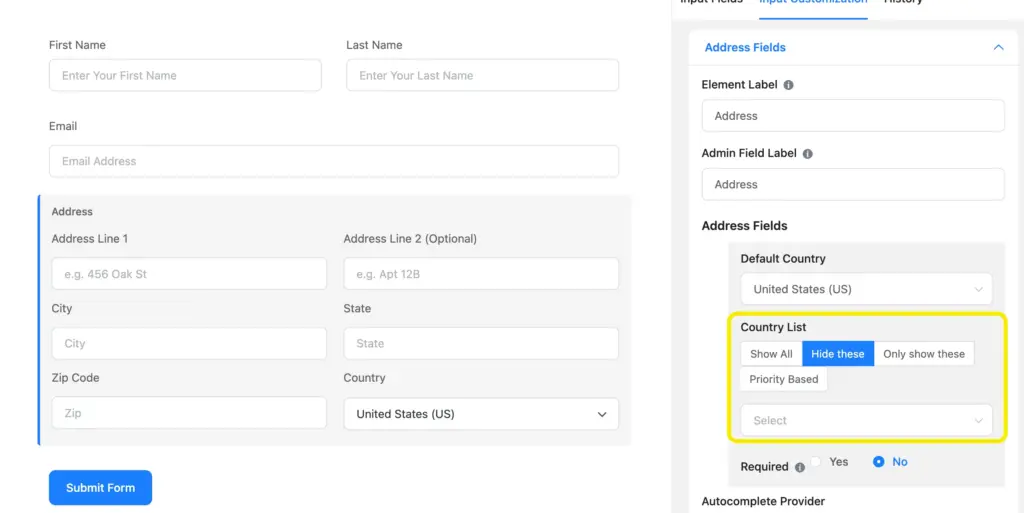
If you are going global, you can show a country list, with a control to show or hide specific countries.
In case you aim to reduce manual work, you can use the autocomplete feature. Set up the Autocomplete Provider to Google Maps or OpenStreetMap Geolocation for this. With this feature, Fluent Forms allows you to embed maps, and provide auto address suggestions within the form.
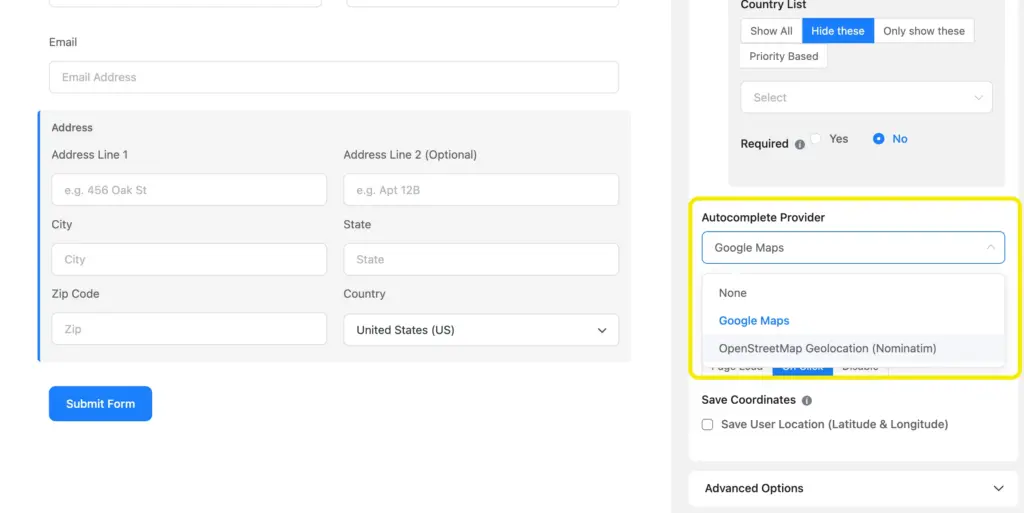
With this you will be able to locate the precise location of the customers or users, which can be very helpful for internal or overseas shipping.
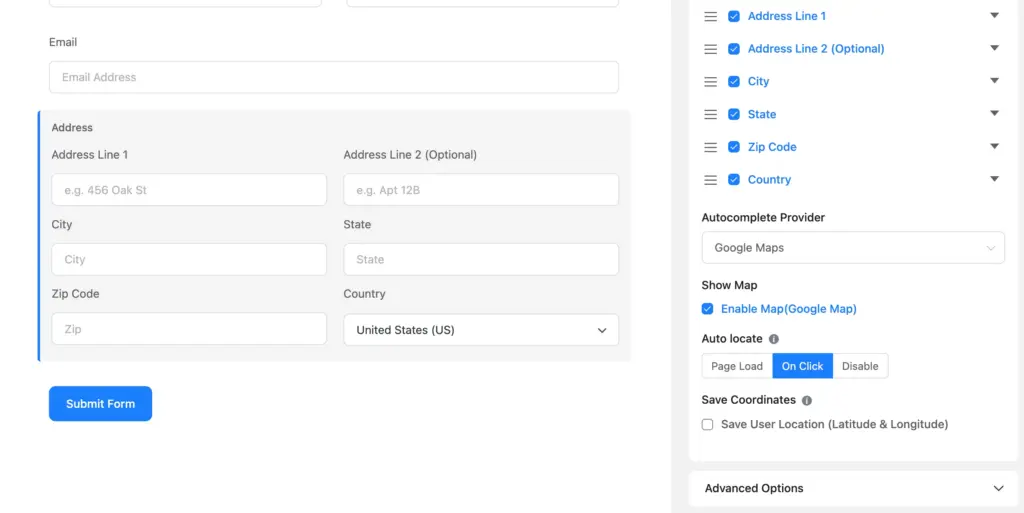
This is how an Ideal form with address fields look like: Address Line 1 required, No vague Address Line 2 (with help message), Default Country, and others set to optional.
Enjoying this article?
We regularly publish actionable content on our blog. Subscribe to get them delivered straight to your inbox.
We won’t spam you. You can unsubscribe whenever you want.
Why address accuracy actually matters
Address accuracy sounds like a logistics problem until you see how it plays out in real businesses.
Take a small eCommerce store shipping physical products. One missing apartment number means a package gets returned. That’s extra shipping cost, extra handling, and an unhappy customer asking why their order hasn’t arrived yet.
Or think about a local service business-say, a home cleaning or appliance repair company. If the address is slightly off or missing unit details, the technician shows up late or at the wrong place. Now you’ve wasted time, fuel, and possibly lost a repeat customer over something that started in a form field.
For B2B companies sending contracts, invoices, or hardware to offices, address accuracy matters even more. A missing suite or floor number can delay internal routing. Documents sit at reception. Deals slow down for reasons no one notices immediately.
Even medical clinics or legal firms feel this. Sending documents to the wrong address isn’t just inconvenient-it can turn into a privacy issue very quickly.
What’s common across all of these is that the problem doesn’t feel big at the form stage. It shows up later, when fixing it costs more time, money, and trust than it should have.
Clean address data prevents most of this. And, the address autocomplete feature in WordPress forms can easily ensure proper addresses. When address fields are clear and people know exactly what to enter, small businesses avoid a lot of quiet, recurring headaches down the line.
Most people overlook address lines in their contact forms, but we covered it because when missed out it can hurt business communication. Want more write-ups like this? Let us know in the comments below!

This is Sumit. He’s a physics major who’s trying to understand both the physical as well as the WordPress worlds. Whenever he’s not busy, plays fifa or spends time with his family.



Leave a Reply