

13 Reasons to Switch From Contact Form 7 to Fluent Forms

At WordCamp Asia 2026, Contact Form 7’s lead developer Takayuki Miyoshi confirmed what many WordPress users had suspected for a while: after version 6.2, CF7 enters a feature freeze. Meaning only bug fixes and security patches will be released periodically. No new features, no major improvements.
If you’re one of the millions of site owners running CF7, that announcement calls for a change of plans. A plugin that stops evolving isn’t just missing new features; it’s about to slowly fall behind as WordPress moves forward.
Contact Form 7 was an era. It served millions of WordPress users for years and opened the way for modern form builders. But its development is ending, and the longer you wait, the more risk builds up on your site.
And when you’re ready, you must switch to a form builder that won’t let you down, which necessarily means:
- Offers all the CF7 features and more for free.
- Been in the market for a long time, proving stability
- Will allow you to easily migrate your existing forms
Fluent Forms (trusted by 700k+ users worldwide, 4.8⭐ on wordpress.org) offers all of these and more.
TL;DR
- Contact Form 7 is entering feature freeze after v6.2, which means bug fixes only, no new development.
- Fluent Forms is actively developed, and its free version already outperforms CF7 on features, UX, and integrations.
- You can migrate your existing CF7 forms to Fluent Forms in one click, no rebuilding.
- Fluent Forms free tier includes 30+ input fields, conditional logic, conversational forms, an AI form builder, and entry management, all unavailable in CF7.
- Pro starts at $79/year with every feature included. No tier-gating, no add-on fees.
How Fluent Forms Free Compares to Contact Form 7
Before the full breakdown, here’s the free-to-free comparison. You can switch today without spending anything.
| Feature | Contact Form 7 | Fluent Forms Free |
|---|---|---|
| Form Builder | Shortcode-based editor | Visual drag-and-drop |
| Input Fields | 10+ fields | 35+ fields |
| Conditional Logic | 3rd-party add-on | Built-in |
| Conversational Forms | Not available | Built-in |
| AI Form Builder | Not available | Built-in |
| Entry Management | Requires add-on | Built-in |
| Multi-Column Layouts | Custom CSS | Built-in |
| Templates | 1 default contact form | 150+ |
| Spam Protection | reCAPTCHA (manual setup) | Multiple Options |
| Payment Gateway | Stripe (basic) | Stripe (with 1.9% transaction fee in free tier) |
| Payment Fields | Only the payment button | 6 fields |
| Downloadable PDF | Not available | Free add-on |
| GDPR Tools | Not available | GDPR Agreement field built-in |
| Future Development | Feature freeze after v6.2 | Active development |
| Price | Free | Free |
That’s just what the free tier offers. Fluent Forms Pro (starting at $79/year) unlocks payment gateways including PayPal, Mollie, Razorpay, Paddle, and Square, plus 60+ integrations, multi-step forms, advanced form styler, and more.
Why Switch from Contact Form 7 to Fluent Forms
If your forms handle leads, inquiries, payments, registrations, or customer communication, staying on a plugin that no longer evolves can create limitations over time.
Fluent Forms gives you a modern replacement with easier form building, stronger built-in features, active development, and a smooth migration path. Below are 11 clear reasons why switching now is a smart move.
1. The CF7 feature freeze is a real risk
Contact Form 7 going into feature-freeze means the plugin will only get bug fixes and security patches from here on. On the surface, that sounds manageable. But there’s a gap between “receiving security patches” and “staying compatible with a CMS that ships major updates every few months.”
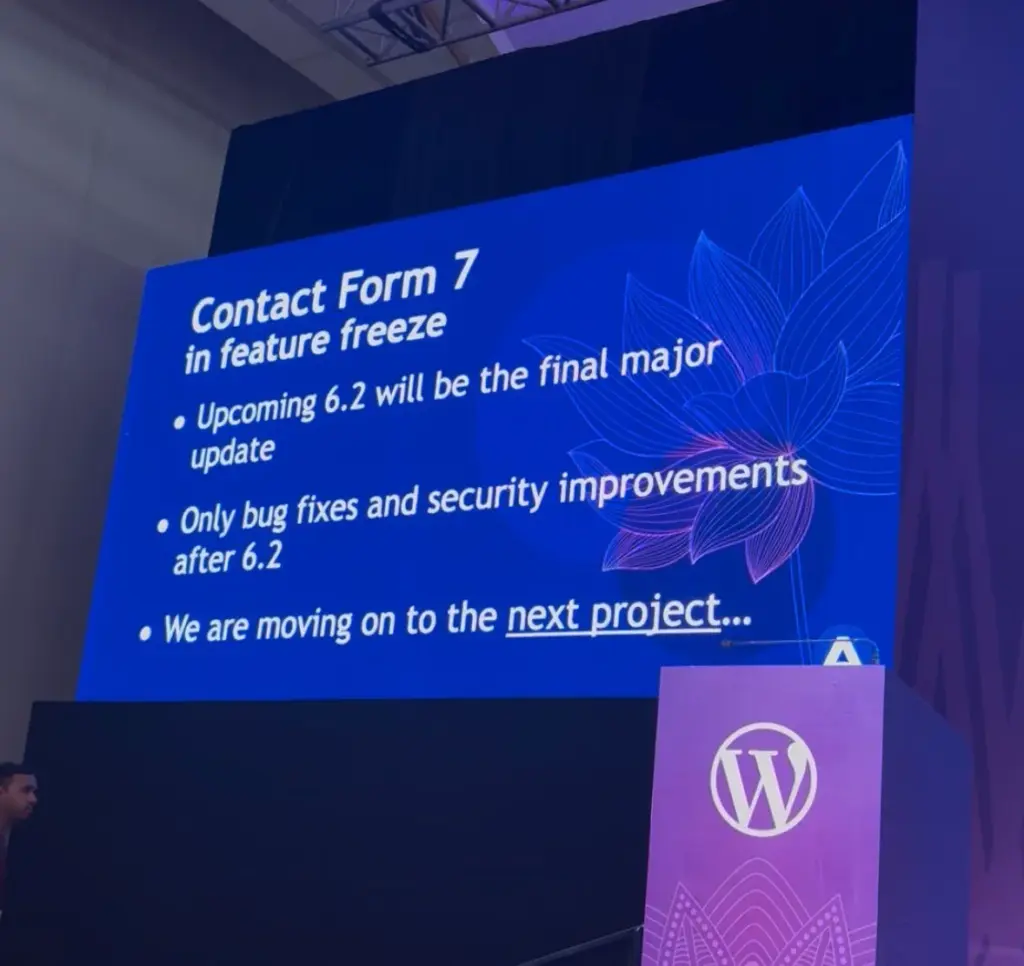
WordPress continues to evolve, with new PHP requirements, block editor changes, and updated security standards. CF7 might not keep pace with any of that after version 6.2. When something breaks due to a WordPress core update, you’re depending on a solo developer to prioritize a fix for a project they’ve said they’re moving on from.
There’s also the add-on problem. A large part of CF7’s functionality depends on third-party add-ons built by external developers. With the core plugin winding down, there’s no guarantee those add-ons will stay maintained either.
You don’t want to wait until something breaks on your live site. Conduct your research now and switch to a trusted alternative before that happens.
2. You can migrate in one click, no rebuilding
The question every CF7 user is asking: Do I have to rebuild all my forms if I switch?
No. Simply migrate your existing CF7 forms using a one-click migration tool. It’ll keep your fields, structure, and most of the settings intact, right inside Fluent Forms. And the whole process is automatic.
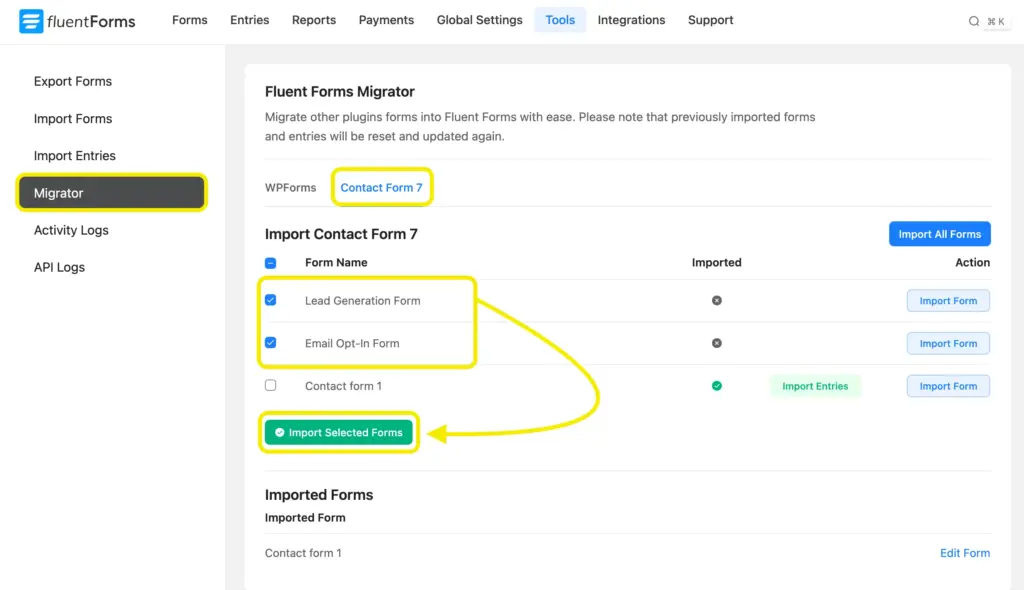
The migration might take a few minutes, depending on how many forms you have. After that, your forms are fully editable in Fluent Forms’ visual drag-and-drop interface, and you can use them right away.
3. Fluent Forms free outperforms CF7
CF7 is free, and so is Fluent Forms’ free version. The difference is what you get with each.
CF7’s free version gives you a shortcode-based editor, 10+ fields, one default form template, and basic email notification. That’s it. Anything beyond that, entry management, conditional logic, and spam protection beyond reCAPTCHA, requires installing 3rd party add-ons or custom code.
Fluent Forms free gives you a drag-and-drop visual builder, 36 input fields (including time & date, address fields, payment fields, and terms & conditions), 150+ ready-made templates, conditional logic, conversational forms, an AI form builder, built-in entry management, a multi-layer spam protection system, and Stripe payment support (a charge applies).
It’s not even close. You get more in the Fluent Forms free tier than most competing plugins charge for at Pro. And if you ever want to grow further, upgrading to Fluent Forms Pro starts at $79/year, with every feature included. We don’t tier-gate like the other form builder plugins.
4. A visual builder that shows your form in real time
CF7’s text-based editor hasn’t changed in years. You write shortcode tags in a text box, click save, switch to a different browser tab, embed a shortcode on a page, and then preview that page to see what your form actually looks like.
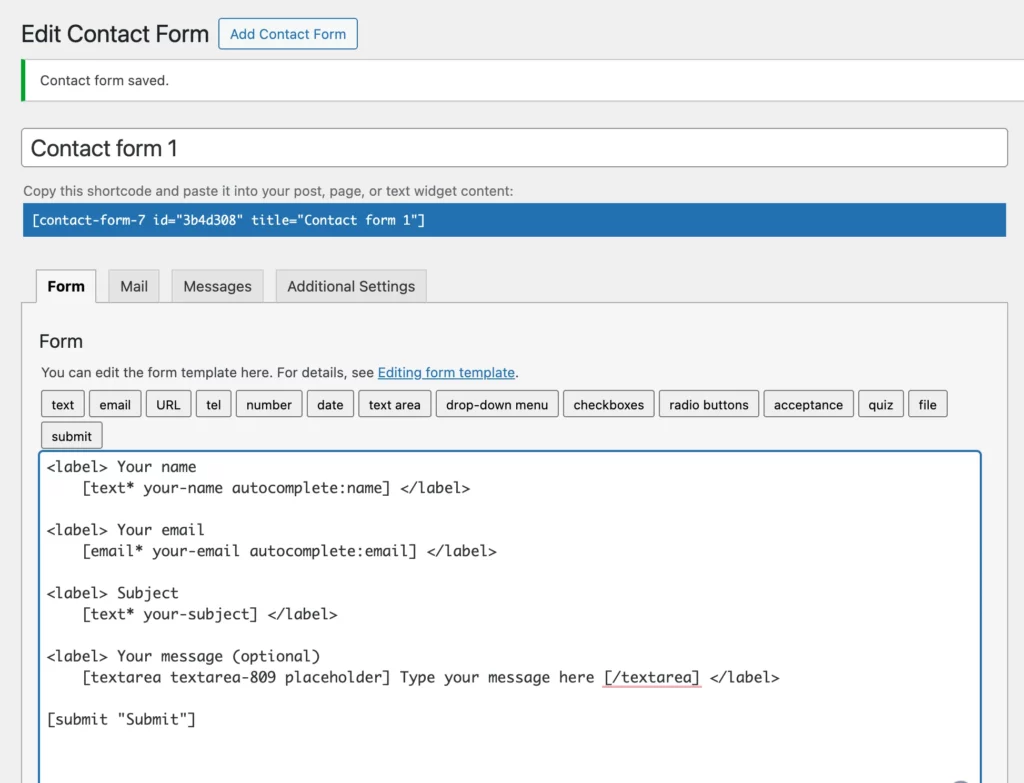
If you catch an error, you go back to CF7, fix the tag, save, switch to the preview tab, and reload. That loop is slow, and now it’s frozen there permanently.
Fluent Forms gives you a live visual builder. You see your form’s structure in the center of the editor as you build it. Drag a field in, and it appears instantly. Click on a field to edit its label, placeholder, or validation rules, and watch the update in real time.
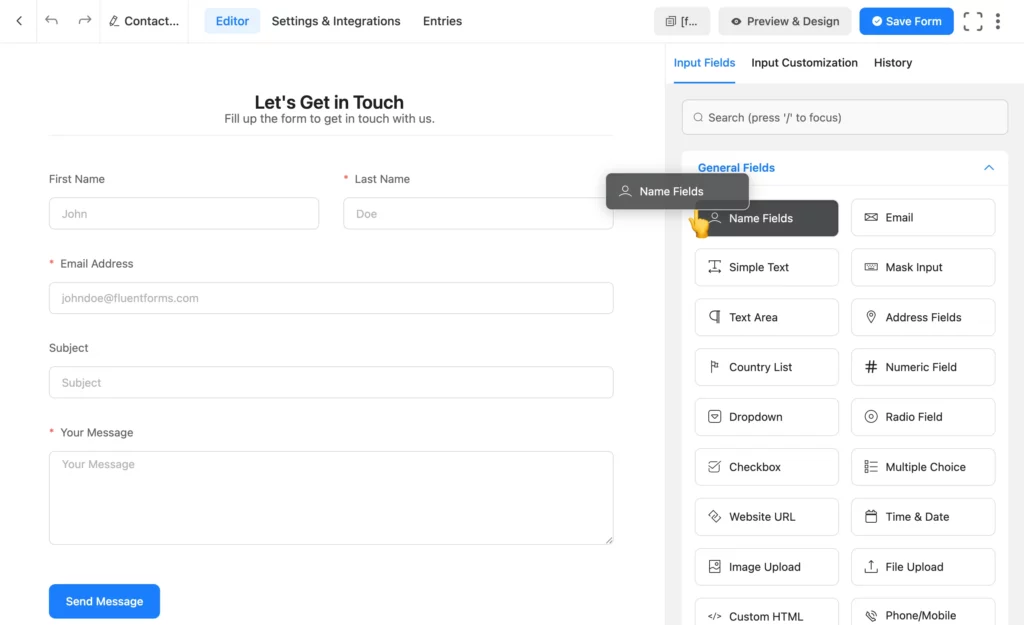
Fluent Forms also offers a separate tab where you can preview (free) and visually style (pro feature) your form before publishing.
The AI Form Builder goes further. Type a plain-language description, “I need a client onboarding form with name, company, project budget, and preferred start date,” and the AI builds the complete form structure for you. You fine-tune from there. This is available in the free version.
5. Your form submissions are saved inside WordPress
This has been CF7’s biggest blind spot for years: it does not store form submissions. CF7 sends an email notification when someone submits a form, and that’s the end of CF7’s involvement. If the email bounces, lands in spam, or wp_mail() fails (which happens often), that submission is gone. You never knew it existed.
Fluent Forms stores every entry in your WordPress dashboard. You can search, filter, mark them read or unread, and export to CSV, Excel, or JSON. And unlike some popular plugins, Fluent Forms offers entry management in its free plan.
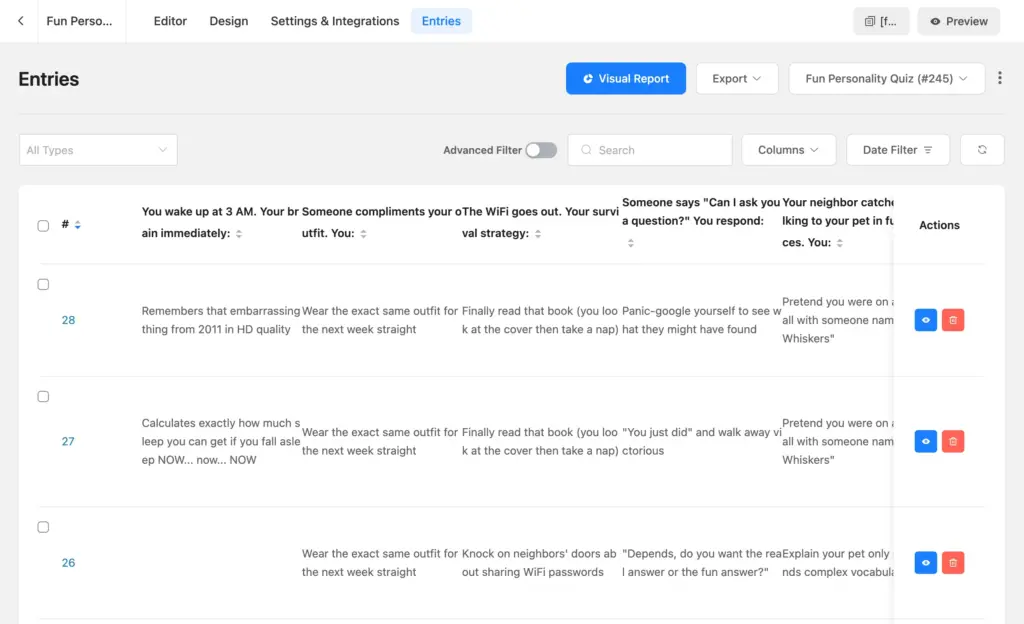
If a potential client submits your contact form at midnight and the notification email filters into spam, the entry is still sitting in your dashboard the next morning. You lose nothing.
The entry management view also gives you analytics (conversion rate based on impressions & clicks) and pie and bar charts showing the distribution of responses across your form fields. You can spot trends in submissions without exporting data to a spreadsheet.
6. Conditional logic is built-in
CF7 offers no conditional logic feature. If you need to show or hide form fields based on user input, you need to install a third-party add-on.
That means another plugin to maintain, another compatibility surface to monitor, and another dependency to worry about when CF7’s add-on ecosystem starts losing developer attention post-feature-freeze.
Fluent Forms’ conditional logic is built into the core plugin, free and pro alike. You can show or hide fields, sections, and even entire sections (using containers) based on user responses.

Rules include equals, not equal, greater than, less than, greater than or equal to, less than or equal to, contains, starts with, ends with, and regex match, so you can build logic as simple or complex as your form requires. You can also combine multiple conditions or group them to handle more complex logic.
The same conditional logic applies to email notifications and confirmation messages. If a user selects “Enterprise” in a plan type dropdown, you can route that submission to a different email address and show them a different confirmation message than a user who selects “Solo.”
Fluent Forms offers field-level conditional logic for free, while setting-level conditional logic is a pro feature.
7. Spam protection that works in layers
CF7’s spam protection consists of reCAPTCHA, Akismet, and Turnstile. There’s no built-in filtering layer, no honeypot, and no alternative if those options fail or create friction.
Fluent Forms uses a layered approach, and each protection method is configurable in a few clicks from the form’s security settings.
- The free version includes a built-in honeypot, token-based spam-protection, empty submission blocking, keyword filtering, plus integration with reCAPTCHA, hCaptcha, Cloudflare Turnstile, Akismet, and Cleantalk.
- Fluent Forms Pro adds IP restriction, country blocking, double opt-in, and role manager.
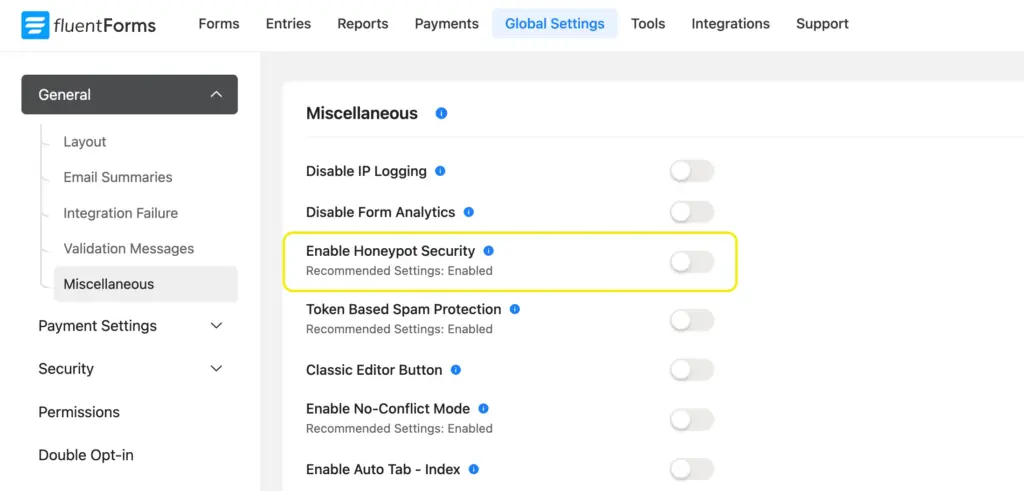
These features help you drop spam rate without adding friction for legitimate visitors. You’re not choosing between security and user experience.
8. Accept payments without separate plugins
CF7 added a basic Stripe button in a recent update. The setup requires you to write a shortcode tag manually, calculate currency amounts in the smallest unit (700 cents = $7 USD), and the Stripe button replaces your form’s submit button. It works, but it’s an inflexible option.
Fluent Forms payment features offer more flexibility. You have separate payment fields: payment items with images and prices, custom payment amounts for donations or tips, item quantity controls, subscription fields, and a payment summary that shows users their total before they submit. And all of these are free, plus Stripe integration (with a 1.9% charge per transaction).
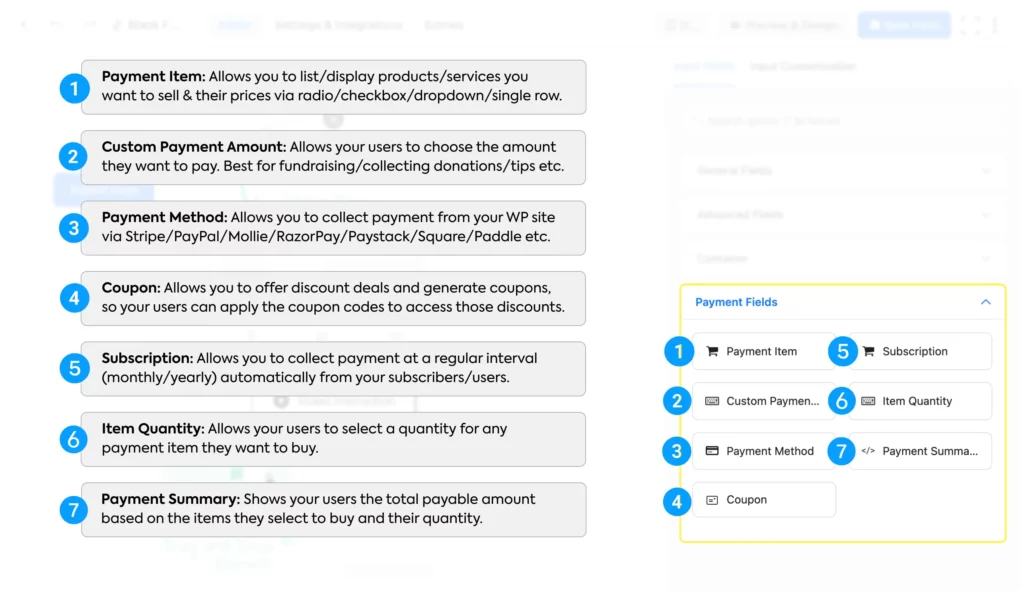
Fluent Forms Pro unlocks advanced payment features like coupons and inventory. It offers integration with 7 more gateways: Authorize.net, Mollie, Razorpay, Paystack, Square, Paddle, and PayPal. The pro version removes the additional Stripe fee, and you get an overview of all payments and trends inside the Fluent Forms reporting dashboard.
9. Better form styling without custom CSS
One of Contact Form 7’s limitations is design control. By default, CF7 forms inherit your theme styling, and that sounds convenient. However, if your theme style clashes with any form element, you have to edit CSS and target classes manually.
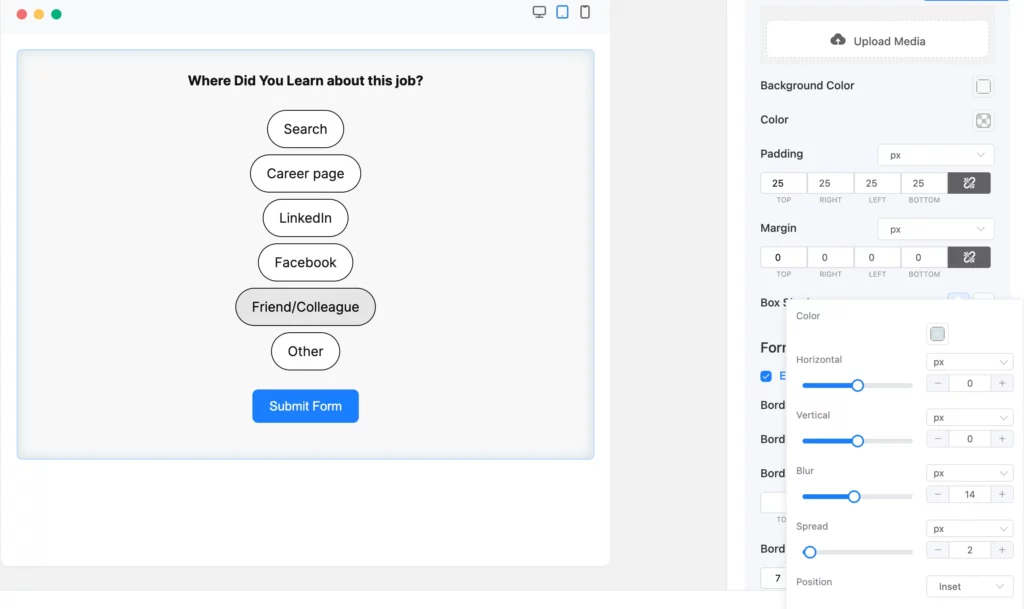
Fluent Forms gives you built-in visual styling controls so you can customize buttons, labels, borders, spacing, typography, colors, shadows, and layouts without touching code. You can make forms match your brand faster, while saving hours of development time.
10. Advanced form types beyond simple contact forms
Contact Form 7 works as a traditional contact form plugin. Once you need more advanced use cases like multi-step forms, conversational forms, quizzes, surveys, calculations, payment forms, or user registration workflows, you usually need extra plugins or custom development.

Fluent Forms can do much more than basic contact forms, so you won’t need to switch tools again as your site grows. You can use it for lead forms, surveys, feedback, payments, registrations, donations, and even more, all in one place. Instead of outgrowing your plugin later, you can keep using the same one as your needs grow.
11. 60+ integrations vs. CF7’s 6
CF7 supports 6 integrations out of the box: Akismet, Turnstile, reCAPTCHA (security), Brevo, Constant Contact (email marketing), and Stripe (payment). That’s the full list.
Fluent Forms connects to 60+ platforms across CRM, email marketing, payment processing, project management, analytics, community, and automation tools. Integrations include Mailchimp, HubSpot, Salesforce, ActiveCampaign, Zoho CRM, Airtable, Google Sheets, Slack, Telegram, Twilio, Zapier, and Webhook support for anything not on the list.

On the WPManageNinja ecosystem side, Fluent Forms connects natively to FluentCRM, Fluent Support, FluentBooking, FluentBoards, FluentCommunity, FluentSMTP, Ninja Tables, and WP Social Ninja. These are built by the same team, so there are zero configuration conflicts. Data flows directly between products without middleware or API limits.
12. Real support from a dedicated team
CF7 is maintained by a solo developer who just announced they’re moving on. The WordPress.org support forum reflects this: according to public data from WordPress.org, CF7 resolved roughly 33% of its support threads over a recent two-month period.
Fluent Forms has a dedicated support team. Free users have access to WordPress.org support threads, support tickets, an active community forum, tutorial documentation, YouTube walkthroughs, and a growing library of step-by-step guides.
13. A plugin that keeps getting better
CF7’s final feature update is version 6.2. After that, nothing new. Meanwhile, Fluent Forms ships regular updates with real functionality.
Recent additions include:
- v6.1.15 (January 2026): Default form style option that auto-applies to all new forms, dynamic autocomplete field type, prefix/suffix options for textarea and URL fields, mobile keyboard type options for number and mask inputs.
- v6.1.5 (November 2025): Gutenberg Block Form Style Customization, Net Promoter Score in Conversational Forms, Accordion/Tab collapsible areas, Authorize.net payment gateway.
- v6.1.20 (March 2026): Fixed Stripe coupon discount rounding on multi-quantity line items, step form save-and-resume fix.
The AI form builder launched as a free feature. Conversational forms, Fluent Forms’ equivalent to Typeform’s one-question-at-a-time format, are free. The PDF generator is a free add-on available on WordPress.org.
When you switch to Fluent Forms, you’re not just moving to a better form builder today. You’re getting one that will still be improving a year from now.
Are You Ready to Make the Switch
You know your CF7 forms inside out. You don’t have to rebuild any of them. The one-click migration handles that in minutes. You’re simply choosing a builder that continues to improve, saves time, reduces risk, and gives you room to grow without patching together extra add-ons.
Fluent Forms is faster, easier to use, better supported, and actually stores your submissions. It gives you everything CF7 offers and more, with new features and improvements coming consistently.
Build Smarter Forms for Free


Sarika writes for Fluent Forms and loves to offer insights into small businesses. She’s curious and enjoys discussing ideas, interests, and perspectives. In her free time, she’s either marvelling at architectural beauties or trying different cuisines.




Leave a Reply