

Fluent Forms 6.2.12: MCP for AI Agents, Better Navigation, and More
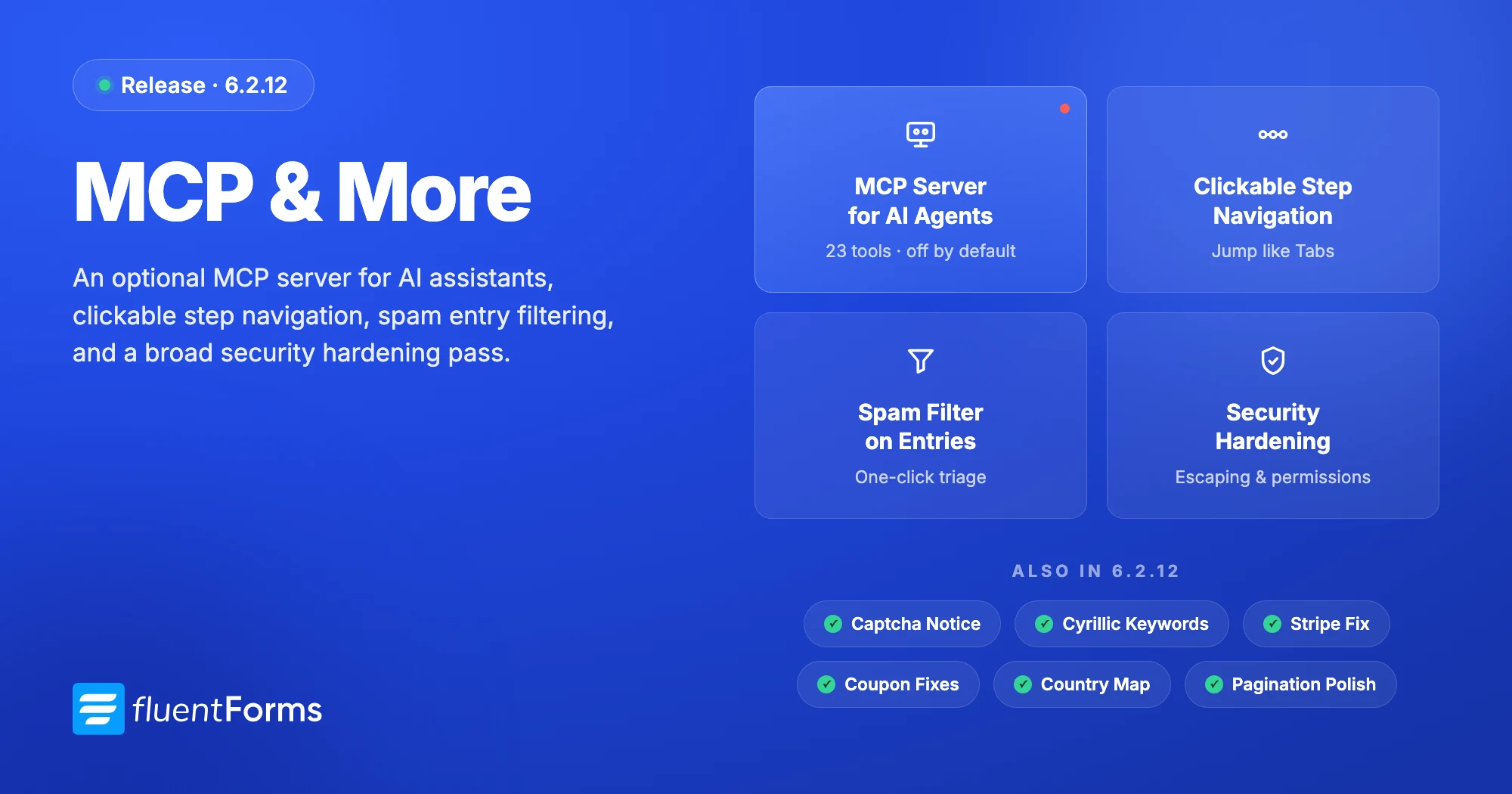
Fluent Forms 6.2.12 introduces an optional MCP server in the free plugin. It lets supported AI assistants work with your forms, entries, and reports without direct database access or sharing your WordPress admin password.
The feature is turned off by default and requires the free FluentHub or WordPress MCP Adapter plugin. Setup takes about five minutes. Once connected, you can ask questions such as, “How many entries arrived last week, and which ones are still unread?”
This release also adds clickable navigation to multi-step forms, a Spam filter for entries, clearer captcha warnings, and several security and reliability improvements across Fluent Forms Free and Pro.
Connect Fluent Forms to AI assistants (Free)
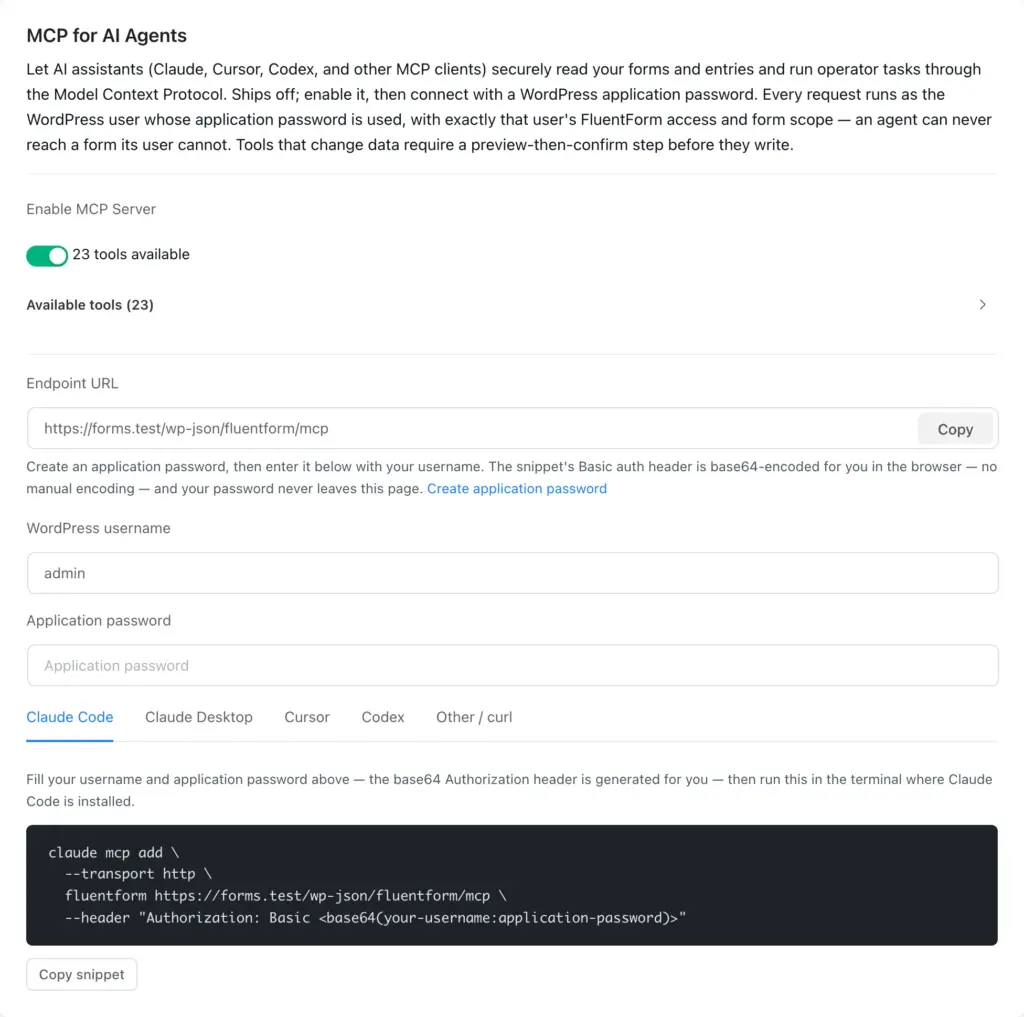
What is MCP?
MCP, short for Model Context Protocol, is an open standard that lets AI assistants connect to other software. Through MCP, an assistant can see which actions Fluent Forms supports and use them when you ask. WordPress now has an official adapter for this connection.
In practice, your AI assistant can answer questions using information from your forms, entries, and reports.
One requirement: FluentHub. The official WordPress MCP Adapter is included with FluentHub, the free companion plugin for Fluent products. Fluent Forms provides the available actions, while FluentHub makes them accessible through MCP. If FluentHub is missing or inactive, the settings card will show what to do next.
What you can do with it
Fluent Forms exposes 20 tools in the free plugin. With Fluent Forms Pro active, three advanced reporting tools join them, for 23 in total.
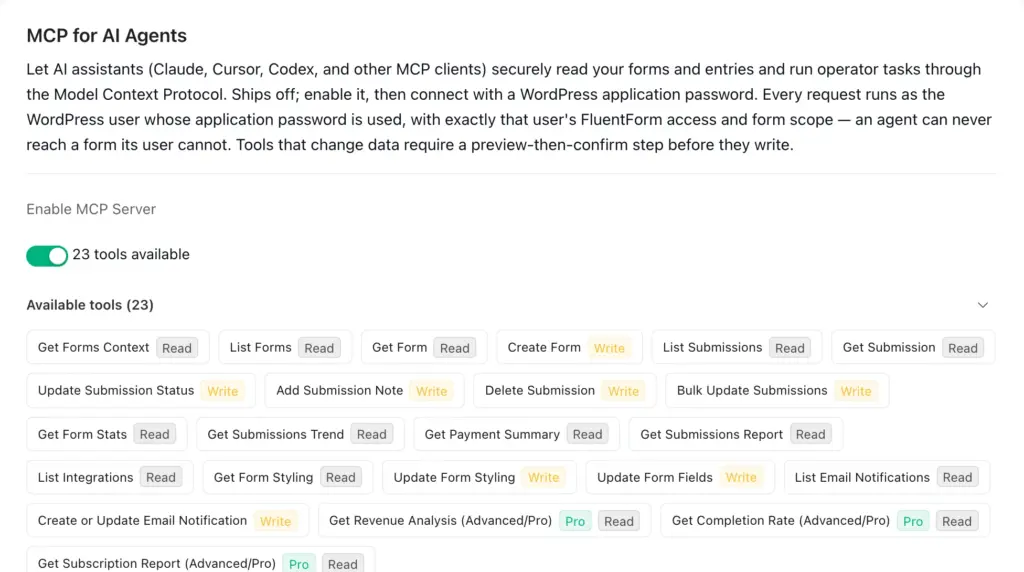
| Area | Tools | Target |
|---|---|---|
| Discovery | Get Forms Context, List Forms, Get Form | Read |
| Building | Create Form, Update Form Fields | Write |
| Entries | List Submissions, Get Submission | Read |
| Entry operations | Update Submission Status, Add Submission Note, Delete Submission, Bulk Update Submissions | Write |
| Reporting (Free) | Get Form Stats, Get Submissions Trend, Get Payment Summary, Get Submissions Report | Read |
| Styling | Get Form Styling, Update Form Styling | Read / Write |
| Notifications & integrations | List Email Notifications, Create or Update Email Notification, List Integrations | Read / Write |
| Advanced Reporting (Pro) | Get Revenue Analysis, Get Completion Rate, Get Subscription Report | Read |
The feature split follows Fluent Forms itself: basic reporting is available in Free, while advanced reporting requires Pro. Form styling remains available in Free.
What using it looks like
You don’t write JSON. You ask a question.
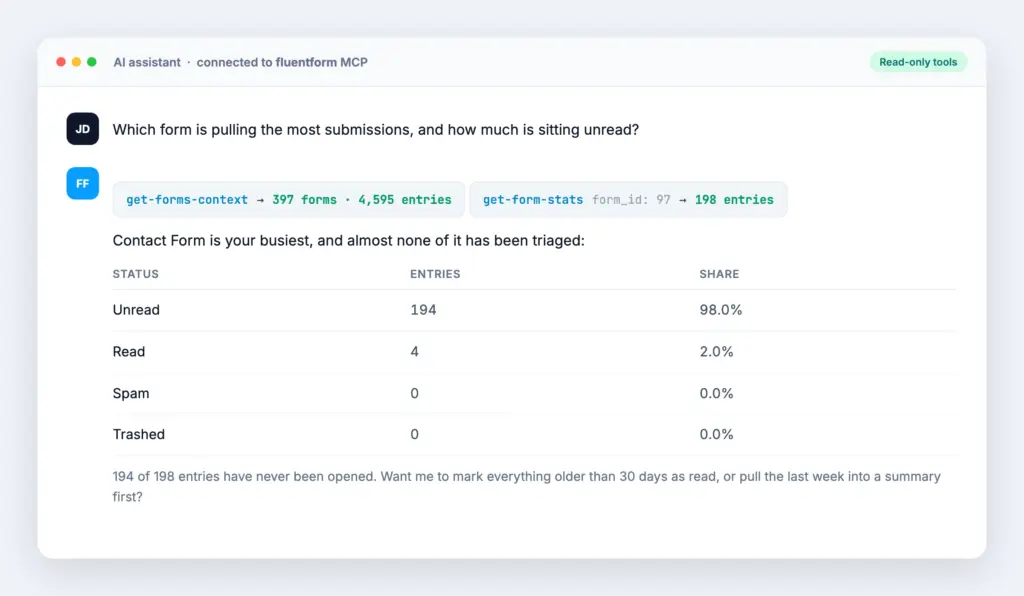
Some prompts that work on day one:
- “Which form got the most submissions last month, and when do they arrive, what’s the peak hour?”
- “Show me the last 10 entries on the Contact Form and summarise the common themes.”
- “Add a note to entry #4021 saying the refund was approved.”
- “Build me a three-step event registration form: details, session choice, notes.”
- “What’s my revenue by payment method this quarter?” (Pro)
Instead of exporting a CSV and pasting it into a chat, you can ask the question directly.
You confirm every change
Actions that change data include an extra confirmation step.
Every action that changes data follows two steps. First, the assistant creates a preview without saving anything. The change runs only after a second request confirms that preview.
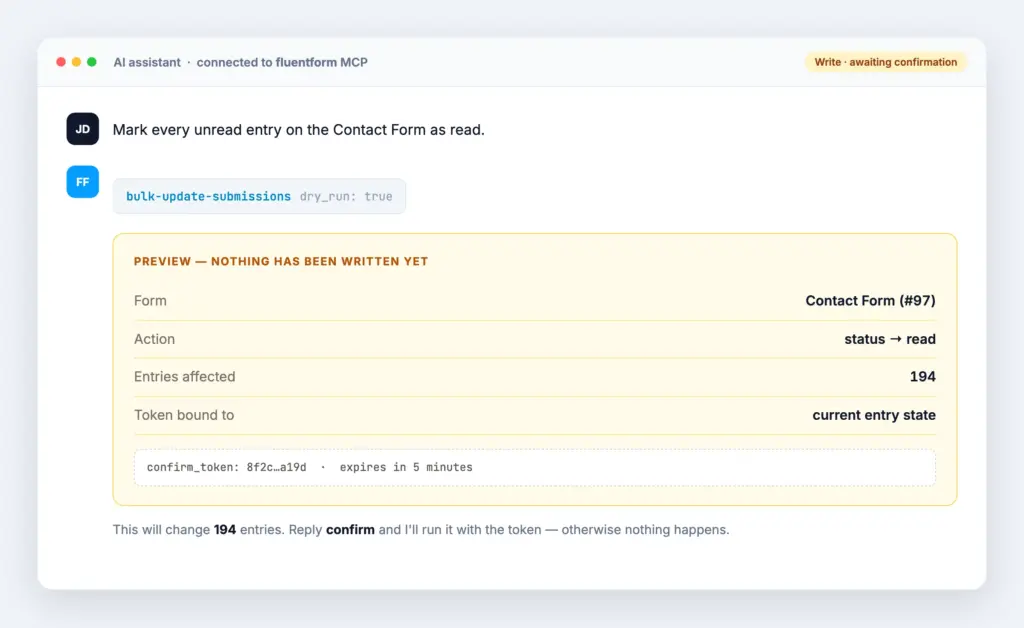
Two details worth knowing:
- Previews stay tied to the current form or entry. If anything changes before confirmation, Fluent Forms requires a new preview.
- Previews expire after five minutes. Older previews cannot be used to make changes.
Repeated requests are also handled safely, so a temporary connection problem does not apply the same change twice.
How access and security work
- It is off by default. The MCP connection is unavailable until you enable it in settings.
- It uses an existing WordPress user. You connect with a WordPress application password. Every request follows that user’s Fluent Forms permissions and form access.
- Form access still applies. A manager assigned to specific forms can access only those forms through MCP.
- Submission content is treated as untrusted. Form submissions can contain text from anyone. Fluent Forms marks that content as untrusted and keeps all changes behind the preview and confirmation process.
- You can turn it off at any time. Disable the setting or delete the application password.
This is an admin feature for you and your team. It is not a customer-facing chatbot and is not available to site visitors.
Setting it up
Setup takes about five minutes inside WordPress:
- Install FluentHub. It includes the WordPress MCP Adapter required for the connection. The settings card checks its status and shows the appropriate next step. Get FluentHub on GitHub. If you have the WordPress MCP Adapter installed then that will work as well.
- Turn it on. Go to Fluent Forms → Global Settings → MCP for AI Agents and flip Enable MCP Server. The card immediately shows your endpoint (
/wp-json/fluentform/mcp) and the tool count. - Create an application password. Use the direct link in the settings card. Copy the password when WordPress creates it because it will not be shown again.
- Connect your client. The card generates a ready-to-paste snippet for Claude Code, Claude Desktop, Cursor, Codex, and plain curl. The settings card prepares the connection details in your browser.
Test the connection with a simple request such as “List my forms.”
Clickable step navigation (Free + Pro)
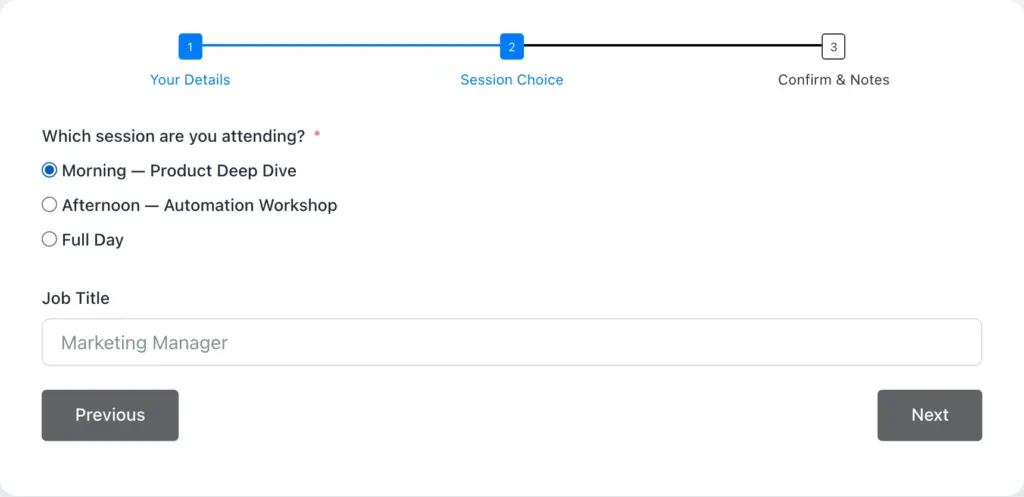
Multi-step forms have always shown a progress indicator. Previously, respondents had to click Previous several times to correct an answer on an earlier step.
In 6.2.12 the Steps progress indicator behaves like the Tabs indicator: click any step you’ve already completed and you jump straight to it. Steps that have not been reached remain locked, so the normal validation order still applies.
Nothing needs to be configured. Existing multi-step forms get the improvement automatically.
A Spam filter on the entries list (Free)
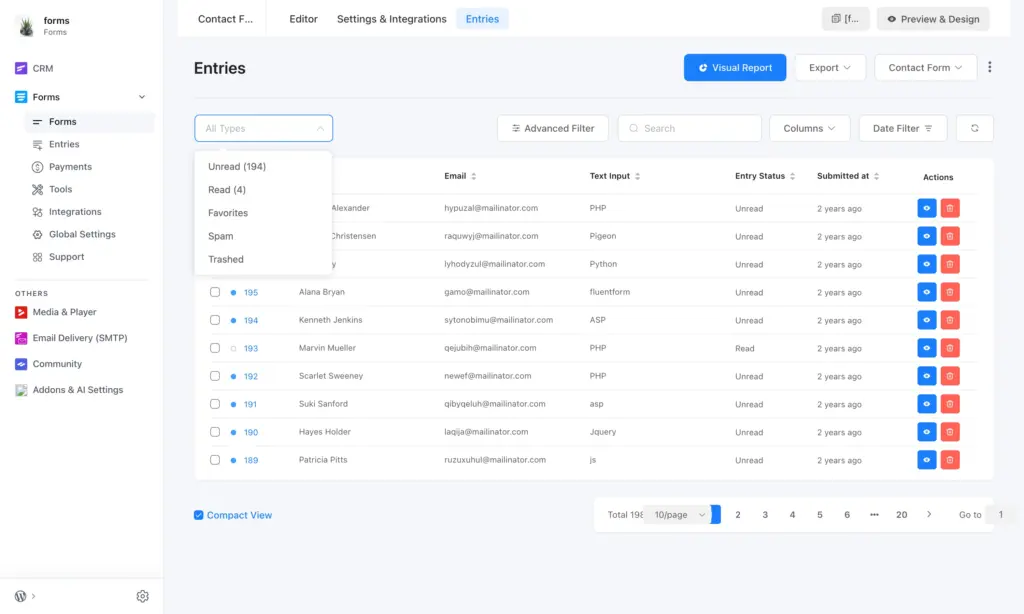
Captcha, Akismet, and keyword restrictions could already flag spam, but the entries list did not provide a direct way to review those submissions or restore a false positive.
Spam is now available in the entry status filter alongside Unread, Read, Favorites, and Trashed.
While we were in there: the bulk action bar no longer appears when nothing is selected, and pagination alignment was fixed across the Forms, Entries and Payments lists.
A warning for missing captcha keys (Free)

Global captcha auto-load could be enabled even when the selected captcha service had no valid keys. That left the configuration incomplete without a clear warning.
Fluent Forms now shows a notice on admin screens with a direct link to add the missing keys.
Security and reliability improvements (Free + Pro)
We recently completed a detailed security review, conducted by an external security expert alongside our in-house team. Based on the findings, we’ve hardened several edge cases across both the free and Pro versions. This release includes the resulting security and reliability improvements:
- Cookie smartcodes now handle saved values more safely. If you use cookie-based smartcodes, we recommend updating soon. Props to Patchstack and Wordfence for reporting.
- Keyword-Based Restriction now blocks non-Latin alphabets. Previously, keyword matching could miss terms written in Cyrillic and other scripts. Matching now works across alphabets.
- Value handling and permission checks were improved across entries, reports, integrations, and payments. Fluent Forms Pro also includes improvements for file uploads.
- Payment bulk actions now require the Manage Payments permission, and revenue and payment-type reports require View Payments. Capability checks now match what the UI implies.
- Outgoing integration requests are limited to their expected services. Slack integration requests only go to Slack hosts; on Pro, integration and remote file requests are restricted to their expected hosts. This prevents an incorrect integration URL from sending a request to an unrelated host.
Fixes worth calling out
Free
- Stripe checkout no longer stops when processing payment metadata.
- Smartcode URLs in the email editor no longer receive an unwanted
http://prefix. - Captcha fields can now be removed and added back to a form correctly.
Pro
- Coupon codes rejected for everyone on sites behind a CDN or proxy. Coupon validation now works correctly on sites behind Cloudflare or a similar proxy.
- Coupon usage limits not counting stacked codes. Stacked coupons now count properly against their limits, so a “100 uses” coupon actually stops at 100.
- Payment confirmations not matched to the order that started them. Confirmations now reconcile against the originating order.
- The Reports country map not highlighting countries on translated sites. Country matching no longer depends on the admin display language.
How to update
Pro users: go to Plugins → Updates and update both Fluent Forms and Fluent Forms Pro. Keep both plugins on version 6.2.12.
Free users: update from Plugins, or download the latest from WordPress.org.
New to Fluent Forms? Install Fluent Forms free and try the MCP server on a staging site first.
Full changelog
6.2.12, Free (August 10, 2026)
- Adds an optional MCP server that lets AI assistants work with your forms, entries, and reports, turned off by default
- Adds a Spam option to the entry status filter on the entries list
- Adds a notice when global captcha auto load is enabled but the keys are missing
- Improves the Steps progress indicator so you can click it to move between steps, like Tabs
- Improves how cookie smartcode values are handled and displayed
- Fixes a fatal error during Stripe checkout when pushing metadata
- Fixes Keyword-Based Restriction not blocking keywords in other alphabets, such as Cyrillic
- Fixes
http://being added to smartcode URLs in the email editor - Fixes captcha fields not being added back to the form
- Fixes the bulk action bar showing when no entries are selected
- Fixes pagination alignment on the forms, entries, and payments lists
- Hardens output escaping and authorization across entries, reports, integrations, and payments
- Restricts payment bulk actions to the Manage Payments permission and revenue and payment type reports to the View Payments permission
- Restricts Slack integration requests to Slack hosts
6.2.12, Pro (August 10, 2026)
- Improves the Steps progress indicator so you can click it to move between steps, like Tabs
- Fixes the Reports country map not highlighting countries on translated sites
- Fixes coupon codes being rejected for everyone on sites behind a CDN or proxy
- Fixes coupon usage limits not counting stacked codes
- Fixes payment confirmations not being matched to the order that started them
- Hardens output escaping and authorization across entries, payments, reports, integrations, and file uploads
- Restricts integration and remote file requests to their expected hosts
In case you missed it
We will keep adding useful MCP actions, including more advanced reporting options. If there is a Fluent Forms task you would like an assistant to handle, tell us. Your feedback helps shape what we build next.
Happy form building. 💙

Hello, this is Jewel, CEO & Head of Ideas at WPManageNinja. I am obsessed with WordPress since 2009. My aim is to be a user-centric developer first, and a serial entrepreneur second. You will find me discussing various tech issues and trying to come up with scalable solutions on different forums when I am not busy coding.


Leave a Reply