

Fluent Forms 6.2.3: Step Tab Navigation, PayPal Checkout v2, Image Crop, Ranking Field, and More
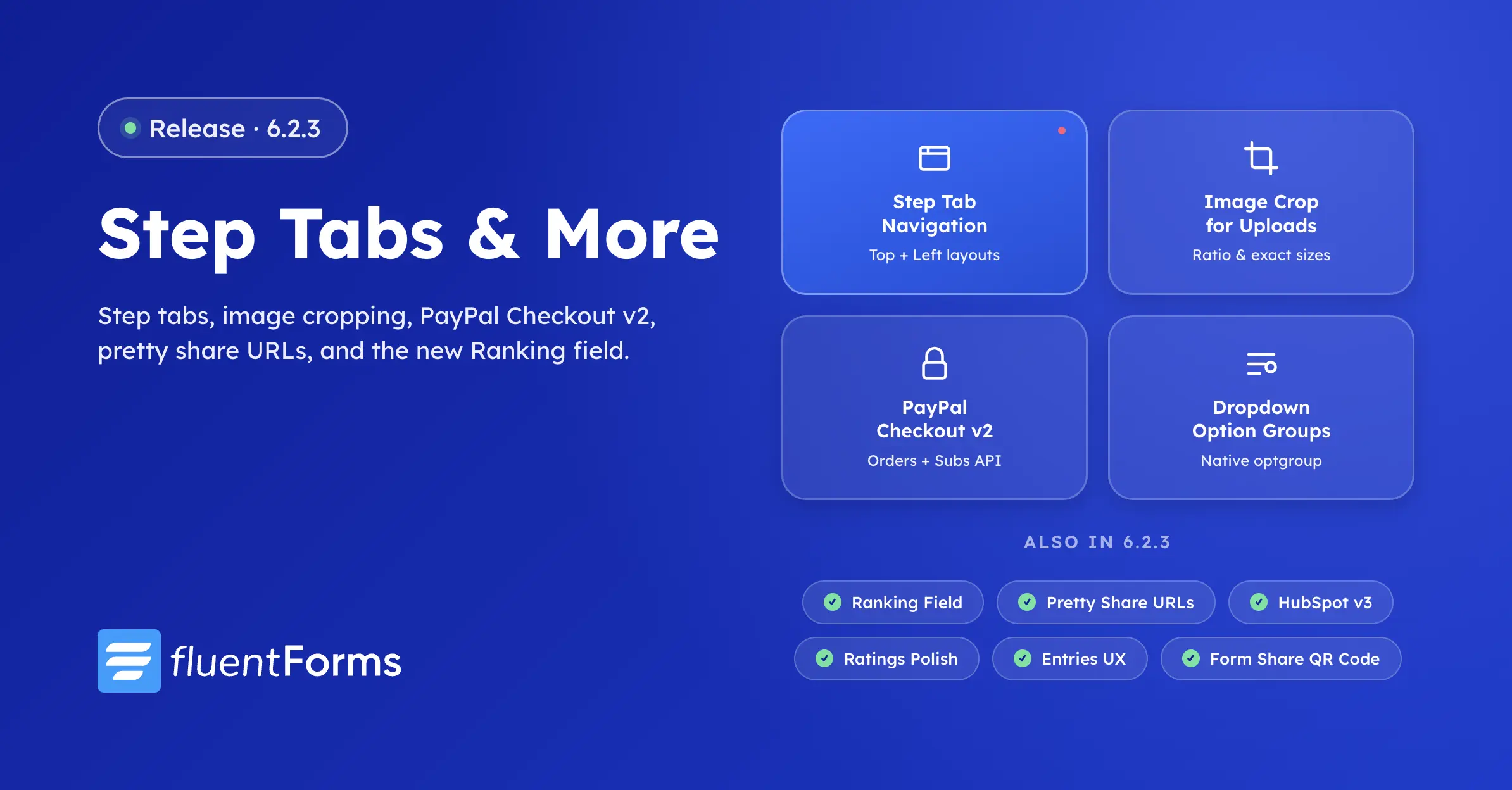
Spring releases land fast at Fluent Forms HQ, and 6.2.3 is one of our biggest maintenance-meets-feature drops of the year. We’ve shipped a new step navigation experience for multi-step forms, full PayPal Checkout API support, on-the-fly image cropping for upload fields, pretty share URLs for landing pages, dropdown option grouping you can enable with a single toggle, and a brand-new Ranking field for ordered-preference questions. Alongside the headliners, this release closes 50+ bug fixes and a security hardening pass on the admin bundle.
If you missed Fluent Forms 6.2.0 earlier this cycle, that release laid the groundwork for the new conversational and sharing features you’ll find polished further in 6.2.3.
Step Form Tab Navigation (Pro)
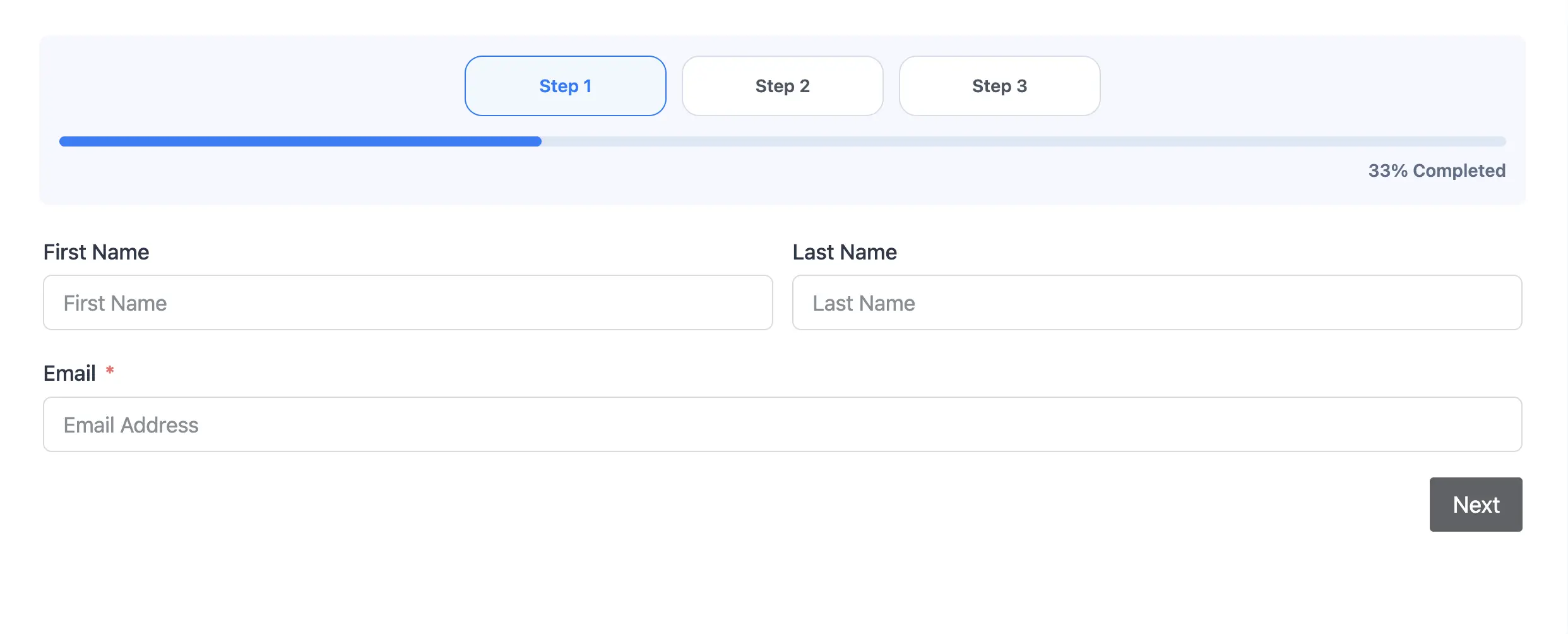
Multi-step forms get a much-needed navigation upgrade. The new Tabs step indicator replaces the old linear progress bar with named, clickable steps that respondents can use to jump around your form — perfect for long applications, multi-section surveys, and registration flows where users want to review earlier answers before submitting.
You’ll find two layouts: Top places the tabs across the top of the form, and Left arranges them in a vertical sidebar that suits desktop-heavy forms with longer step titles. There’s also a new compact progress bar option for cases where you want minimal chrome without losing the sense of progress.
- Clickable step navigation with safe escaping of custom step titles
- Backward-compatible with the legacy
steps_with_navrenderer - Works with conditional logic — hidden steps stay out of the tab strip
- Keyboard accessible, with focus states designed for assistive tech
PayPal Checkout API Support (Pro)
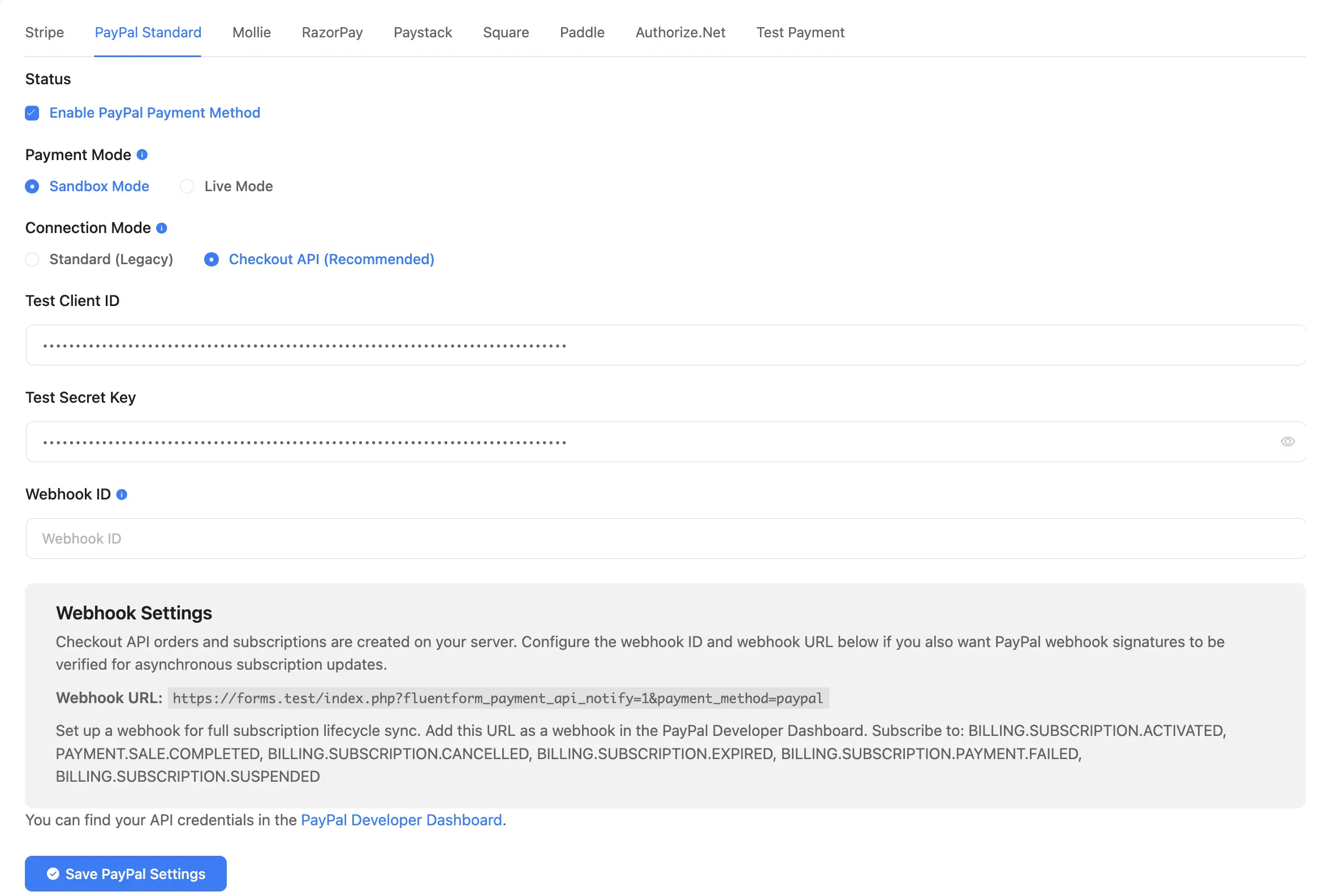
PayPal has been quietly deprecating its older REST endpoints, so we’ve migrated the entire PayPal payment path to the modern PayPal Checkout API. This release wires up the new Orders API v2 for one-time payments and the Subscriptions API v2 for recurring plans, with webhook signature verification for incoming events so you can trust what PayPal sends back.
Existing PayPal forms will continue to work without configuration changes. New forms automatically use the v2 endpoints, and webhooks are now cryptographically verified end-to-end. If you accept PayPal payments through Fluent Forms Pro, this update keeps you on a fully supported API path well into 2026.
Image Crop Flow for Image Uploads (Pro)

If you’ve ever asked respondents to upload a profile photo, a product image, or a banner asset only to receive a wildly off-aspect picture, you’ll appreciate this one. The image upload field now ships with a built-in cropping modal that lets respondents adjust the crop box right after they pick an image — before it ever reaches your entries.
- Ratio mode — enforce 1:1, 4:3, 16:9, or any custom aspect ratio
- Exact dimensions mode — require a specific pixel width and height
- Works in standard forms and conversational forms
- Server-side validation enforces the crop on the backend, not just the browser
The crop dimensions are validated on the server when the submission lands, so an attacker can’t bypass the modal and upload an oversized or off-ratio file by tampering with the request.
Pretty URLs for Share Pages (Pro)
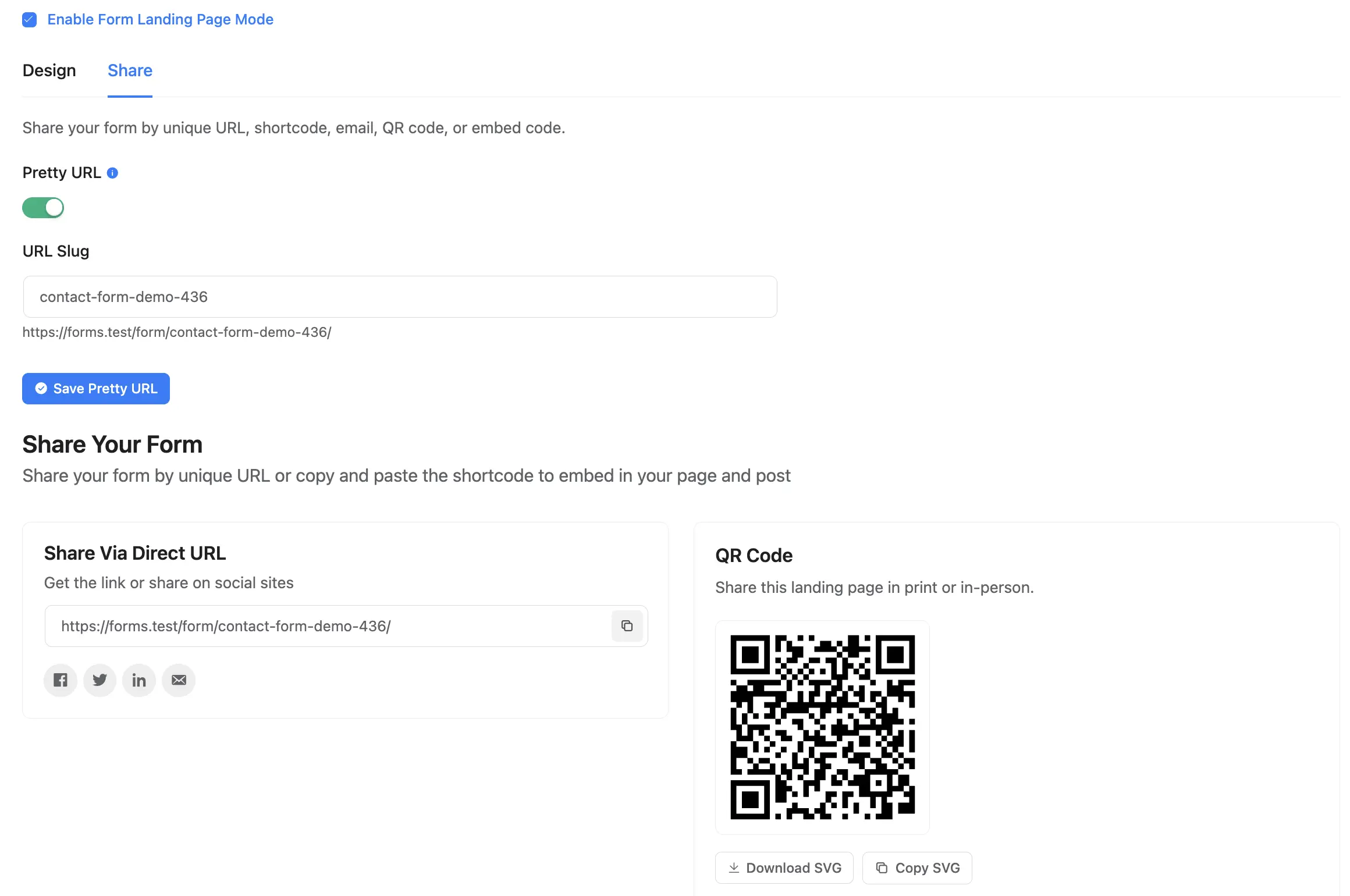
Landing page and conversational form share links used to look like ?fluent-form=42&token=abc. From 6.2.3, you can give every shared form a pretty URL — a clean, slug-based address that’s easier to email, embed in QR codes, or print on marketing collateral.
You’ll find the new option under each form’s Share settings. The base slug is configurable per site (default /form), and private share tokens are still handled safely behind the scenes so public URLs never leak authorization material.
The share flow itself got polished too. Conversational form share settings now expose email and embed copy buttons so you can hand off the right snippet for the right channel in a click, and the Landing Page share panel was tidied up alongside it.
Dropdown Option Grouping (Free)
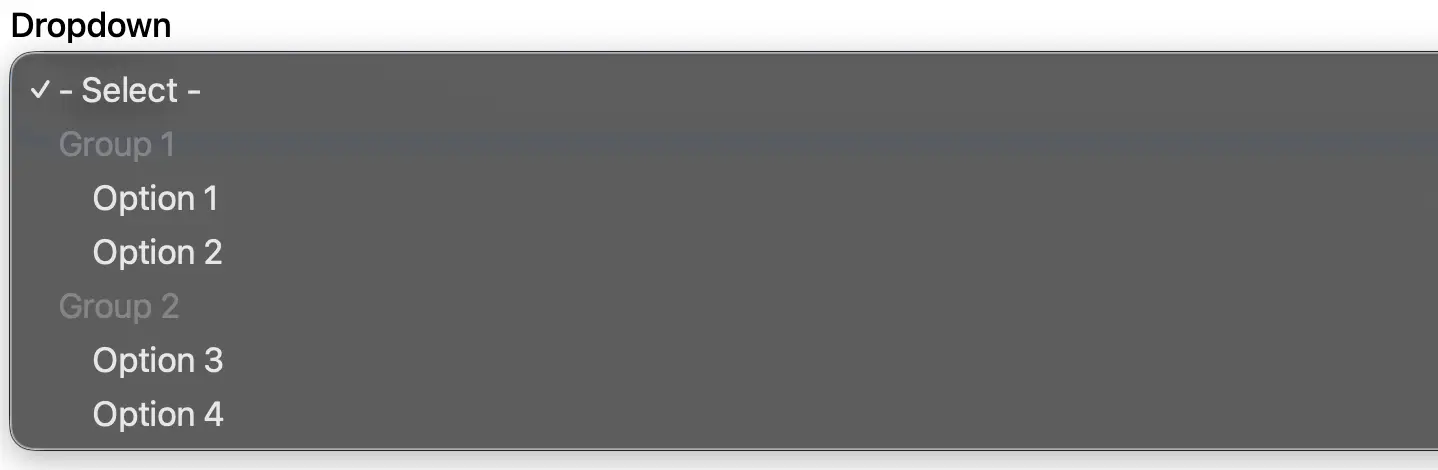
Long dropdowns are a usability headache. With 6.2.3, both the Dropdown and Multi-Select fields support native option grouping. Enable the toggle and your editor switches to a grouped layout where you can label each cluster of options — perfect for country lists (group by continent), product catalogs (group by category), or any taxonomy-driven choice list.
Groups render with the native HTML <optgroup> element on the frontend, so they work without extra JavaScript, stay accessible to screen readers, and translate cleanly through WPML. Conversational forms understand groups too — they render as clearly separated option clusters in the chat-style interface.
Ranking Field (Pro)
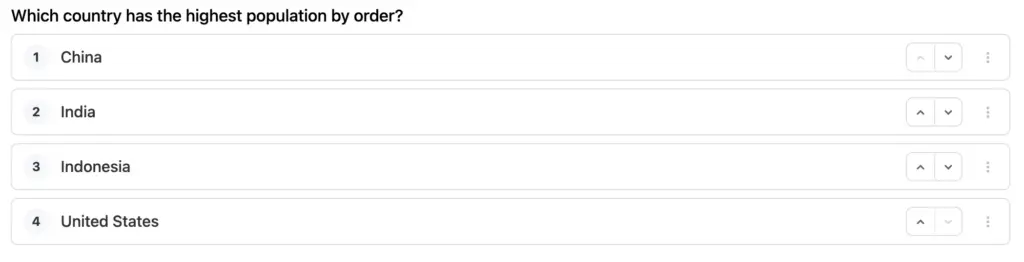
Surveys, product research, and feedback forms often need more than a multi-select — they need an ordered answer. 6.2.3 introduces the new Ranking field, which lets respondents drag options into the order they prefer, with clear numbered positions on the left so the result is unambiguous.
- Drag-and-drop reordering in list or grid layout
- Optional image support for visual ranking questions
- Quiz scoring — assign points to ranked positions and use the field inside Quiz forms
- Built-in Report module support — average rank and position distribution charts out of the box
- Results stored as an ordered array, queryable through entries, exports, and integrations
- Renders cleanly in standard forms and conversational forms alike
Ranking values flow through to email notifications, CSV/XLSX exports, and integrations in their submitted order — so a “rank your top three features” question maps directly onto a 1, 2, 3 column in your spreadsheet without post-processing.
HubSpot Integration on CRM v3 (Pro)
HubSpot retired the v1 contacts and lists endpoints we’d been using, so this release ships a full migration to the HubSpot CRM v3 and Lists v3 APIs. Existing HubSpot feeds continue to work without reconfiguration — we’ve added a legacy list-ID mapping layer so older feeds keep targeting the right lists under the new schema.
Error reporting is significantly better too. When a HubSpot request fails — missing properties, invalid enum values, scope errors — you’ll now see the actual API response in the form log instead of a generic “failed” message.
Ratings Field Polish (Pro)
The Ratings field gets a long-requested round of upgrades. You can now choose from a set of custom icon presets (stars, hearts, thumbs, flames, and more), upload your own SVG icon, and control the active and inactive colors independently. The same polish carries through to conversational forms.
Entries Page Keyboard & Table UX (Free + Pro)
If you spend hours in the entries list, you’ll feel the difference immediately. The entries table now supports proper keyboard navigation — arrow keys move focus between rows, Enter opens the highlighted entry, and Space toggles its selection. Icon-only action buttons have accessible labels, and pinned columns no longer break the row focus state.
The form switcher above the table is now searchable, which makes a real difference once you cross a few dozen forms. And you can choose which columns to pin so the most important data stays visible while you scroll horizontally through the rest.
The Advanced Entries Filter got an overhaul too: cleaner labels, grouped operators, tidier value inputs, and two new operators — not-in and not-equal — so you can write the exclusion queries that used to need workarounds. There’s also a new keyboard shortcut for saving form settings for anyone who lives in the form editor.
Key Improvements & Bug Fixes
This release closes more than fifty reported bugs and polishes items across both free and pro. A few of the most impactful:
Conditional logic with missing referenced fields
The not-equal operator now evaluates correctly when the field being referenced has been removed or hidden — previously this could produce inconsistent visibility behavior in long-lived forms that had been edited over time.
Custom field conditional logic not appearing
Conditional logic configured on custom field types is now visible in the form editor settings panel, restoring parity with built-in fields.
Textarea field crash on array input
A submission containing an unexpected array value for a Textarea field could trigger a fatal error during processing. Submissions now coerce safely instead of crashing.
Safari and iOS radio/checkbox styling
Custom radio and checkbox styles weren’t rendering correctly on Safari and iOS — the underlying browser default would bleed through. Frontend styles now apply consistently across all WebKit browsers.
Form import preserving custom CSS/JS
Importing a form template no longer corrupts characters like > in custom CSS or JavaScript. We’ve added dedicated sanitizers for those meta keys so the imported form behaves identically to the source.
Submission sort order
The entries list now sorts by submission date rather than insertion order, so manual entry edits no longer reshuffle the table.
Find feature inside popups and page-builder templates
The “Find Forms” tool now detects shortcodes embedded inside Popup templates and page-builder layouts that don’t ship form output through the standard the_content filter.
Authorize.Net edge cases
Held-for-review transaction responses are no longer treated as hard failures, guest checkouts work correctly without a logged-in user, and the billing payload now passes API validation when a phone field is present.
Exports and internationalization
XLSX exports now include the submission creation date, CSV and XLSX filenames preserve non-Latin form titles (Japanese, Arabic, Cyrillic), and several previously hard-coded admin strings are now translatable.
Additional smaller fixes
- Brevo boolean attributes,
- Pipedrive marketing_status,
- Google Sheets with special characters in worksheet names,
- ACF grouped fields in post feed mapping,
- taxonomy field display in entries,
- AmoCRM.ru OAuth,
- repeater container response tables,
- HubSpot checkboxes and long custom field labels,
- multi-word Google Fonts in conversational forms,
- Save Progress email respecting SMTP reply-to,
- italic text in conversational custom HTML,
- and many more — are listed in the full changelog.
Security Hardening
We’ve also fixed a save-and-resume privacy issue in Fluent Forms Pro where draft submissions could be visible across logged-in users on shared accounts. Drafts are now strictly scoped to the user who created them.
Full Changelog
Free (6.2.3)
- Added option group support for Dropdown and Multi-select fields
- Added pinned column support in the entries table
- Added new icon presets, SVG icon support, and active/inactive color options for the Ratings field
- Added search to the form switcher in entries
- Improved keyboard navigation in the entries table
- Improved accessibility for fixed columns and action buttons in entries
- Updates DOMPurify to tighten the security
- Fixed conditional logic settings not showing for custom fields in the editor
- Fixed conditional logic not-equal check when the target field has no value
- Fixed Name field layout when a sub-field has no label
- Fixed text and list formatting differences between the editor and preview
- Fixed AI form builder losing field hints for non-English prompts
- Fixed missing submission date in Excel exports
- Fixed garbled export filenames for forms with non-Latin titles
- Fixed form import breaking confirmation and notification settings
- Fixed the Find feature missing forms inside page builder popups
- Fixed entries not sorting by actual submission date
- Fixed form import corrupting custom CSS and JavaScript code
- Fixed visual artifacts in the collapsed form settings sidebar
- Fixed Global Settings sidebar collapse toggle not working on desktop
- Fixed the Excel export option incorrectly labeled as xlsv
- Fixed entry Next and Previous navigation breaking on sites that use a custom database table prefix
- Fixed fatal error when a Textarea field receives an array value during submission processing
- Fixed multi-word Google Fonts not loading in conversational forms
- Fixed textdomain_just_in_time notice on WordPress 6.7 and later, including WP Staging staging environments
- Fixed several strings that could not be translated on non-English admin sites
- Fixed the Entries page label showing garbled text on German-language sites
- Fixed confirmation redirect URL losing query-string values with encoded characters
Pro (6.2.3)
- Added Tabs style for multi-step forms with Top and Left layouts, clickable step navigation, and a compact progress bar option
- Added a new Ranking field for ranking options by drag and drop in list or grid layout with quiz and report support
- Added PayPal Orders API v2 and Subscriptions API support
- Added image cropping for file upload fields with ratio and exact-dimension options
- Added pretty URL support for Landing Page and Conversational Form share pages
- Added keyboard shortcut support for saving form settings
- Improved Conversational Form share options with email and embed copy buttons
- Improved Landing Page share settings
- Improved the Advanced Entries Filter UX with cleaner labels, grouped operators, and tidier value inputs
- Improved the Advanced Entries Filter to support not-in and not-equal operators
- Upgrades HubSpot integration to CRM v3 and Lists v3 APIs
- Fixed custom radio and checkbox styles not rendering correctly on Safari and iOS
- Fixed payment status filter on translated admin sites
- Fixed ACF grouped fields not showing in post feed mapping
- Fixes Google Sheets integration failing when a worksheet name contains special characters
- Fixed repeater field including non-input fields in its response table
- Fixed HubSpot checkbox values being sent with an extra semicolon
- Fixed long HubSpot custom field labels being cut off in the settings dropdown
- Fixed taxonomy field showing IDs instead of names in entries and notifications
- Fixed AmoCRM OAuth redirect for amocrm.ru users
- Fixed subscription description showing recurring text when billing is set to once with a signup fee
- Fixed Landing Page media-left layout cutting off form fields
- Fixed Save Progress email not respecting SMTP plugin reply-to settings
- Fixed Authorize.Net treating held-for-review payments as failures
- Fixed Authorize.Net payment failing due to phone number validation
- Fixed HubSpot field mapping incorrectly converting text values to dates
- Fixed Dynamic field startsWith and endsWith filter options being swapped
- Fixed Advanced entries filter returning no results for numeric, date, and text searches
- Fixed italic text not rendering in custom HTML fields in conversational forms
- Fixed multi-word Google Fonts not loading in conversational forms
- Fixed save-and-resume drafts being visible across logged-in users on shared accounts
- Fixed Pipedrive Persons feed duplicating the Marketing Status field
- Fixes Pipedrive failing the API call when Marketing Status is set to No Consent
- Fixed Pipedrive integration error when campaigns are active
- Fixed Pipedrive Lead field mappings sending wrong data types for date and numeric custom fields
- Fixed Brevo integration not sending boolean field values correctly
- Fixed Brevo integration not mapping multiple-choice and category attribute types from Checkbox and Multi-select form fields
- Fixed the Offline payment method label not translatable in notifications
Update Today
Existing Pro users: Fluent Forms 6.2.3 is rolling out now. Update both the free and pro plugins from your WordPress dashboard to pick up everything in this release.
Free users considering Pro: PayPal Checkout v2, the image cropping flow, pretty share URLs, the new Ranking field, and the HubSpot v3 migration all land in Fluent Forms Pro this release. See the full Pro feature list and pricing.
New to Fluent Forms? Fluent Forms is the fastest, lightest contact form and lead-capture builder for WordPress. Download the free plugin and try the new dropdown grouping and improved Ratings field today.
Your feedback shapes what we build next. Reply on our community forum or drop us a line on social — the roadmap for 6.3.x is being shaped right now.
Happy form building!
In Case You Missed Recent Updates
Fluent Forms 6.2.2 — Conversational Polish & Payment Fixes
- Conversational form save-and-resume reliability improvements
- Stripe subscription edge-case handling and webhook hardening
Fluent Forms 6.2.1 — Stability Release
- Critical fixes to entry exports, integrations, and form rendering
Fluent Forms 6.2.0 — Major Feature Release
- New form templates, refreshed admin UI, and expanded integration library

Hello, this is Jewel, CEO & Head of Ideas at WPManageNinja. I am obsessed with WordPress since 2009. My aim is to be a user-centric developer first, and a serial entrepreneur second. You will find me discussing various tech issues and trying to come up with scalable solutions on different forums when I am not busy coding.




Leave a Reply