

Signed updates for Fluent Forms Pro
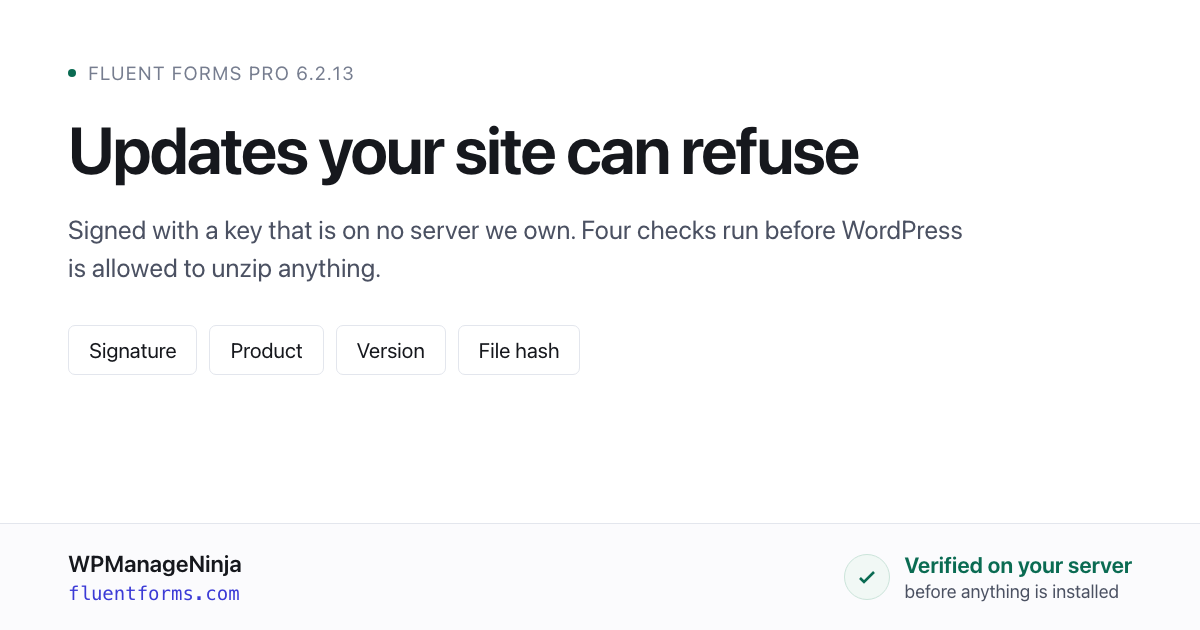
From 6.2.13, Fluent Forms Pro refuses to install an update that was not signed by us. The check runs on your server, against a key compiled into the plugin, before WordPress is allowed to unzip anything.
The signing key is not on our licensing server, not on our build machine, and not on our CDN. It is typed in by hand when a release is cut and gone from memory when it is done. So an attacker who takes any of our infrastructure still cannot produce an update your site will accept.
This post is the long version: how commercial plugin updates actually work, what ours did before, what they do now, and where the new system deliberately stops short.
How a commercial plugin update actually works
Nearly every paid WordPress plugin — one sold outside the WordPress.org directory — updates through the same five steps. This was ours too, until this release.
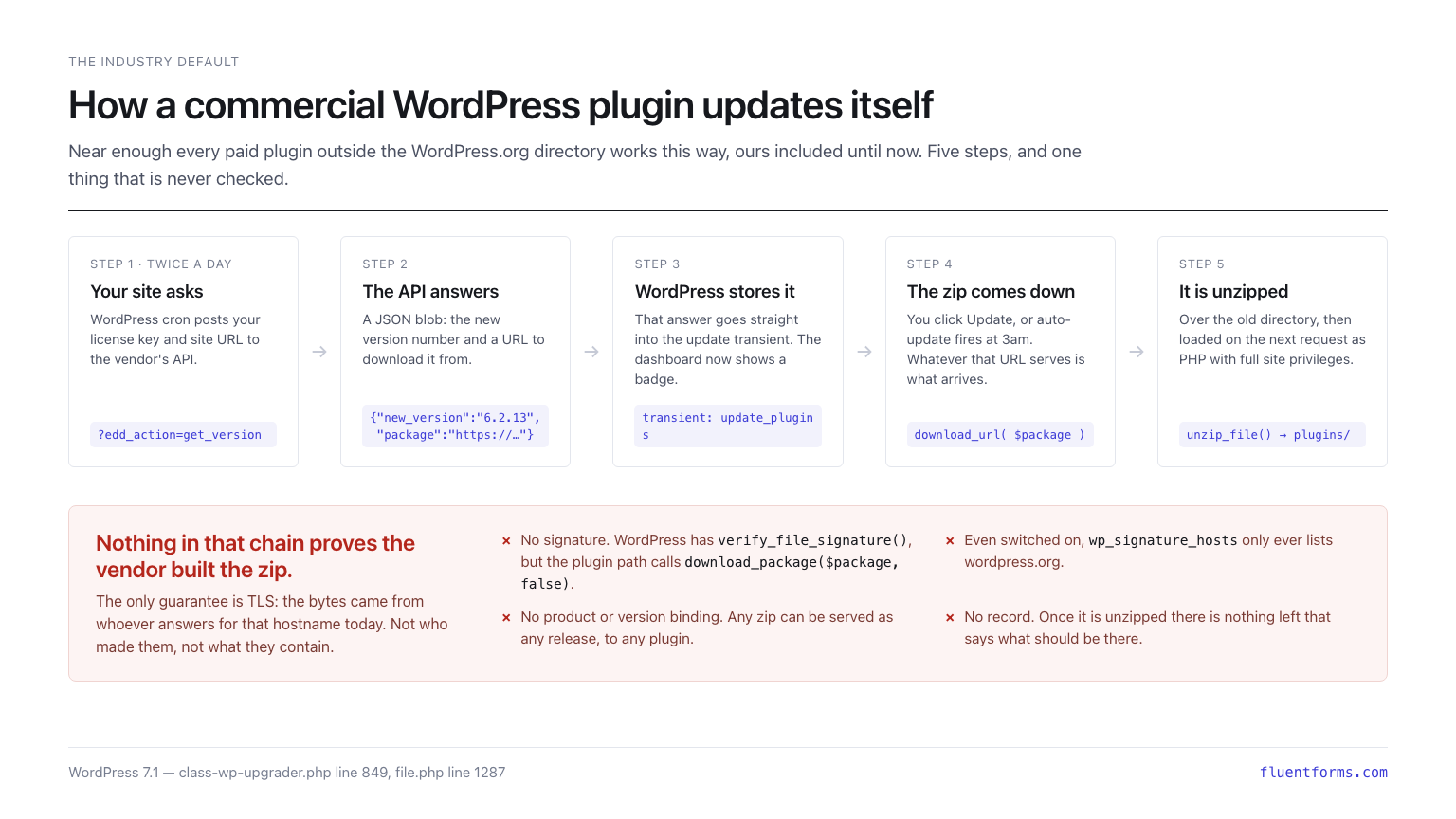
- Twice a day, WordPress cron asks the vendor’s API what the latest version is, sending the license key and site URL.
- The API answers with a small JSON object: a version number and a URL to download it from.
- WordPress writes that answer straight into its
update_pluginstransient. The dashboard shows a badge. - Someone clicks Update, or auto-update fires overnight. Whatever that URL serves is what arrives.
- It is unzipped over the existing directory and loaded on the next request as PHP, with the same privileges as the rest of your site.
Read that list looking for the step where anything proves the vendor built the zip. There isn’t one.
The only guarantee in the chain is TLS, and TLS answers a narrower question than people assume: these bytes came from whoever answers for that hostname right now. Not who made them. Not what is in them.
WordPress does ship signature-checking code — verify_file_signature(), added in 5.2 — but the plugin update path never turns it on. In WordPress 7.1 — the current release as this is written — WP_Upgrader::run() calls download_package( $package, false ), and that false is the signature check. It is on line 849 of wp-admin/includes/class-wp-upgrader.php, and it has been false for every version we checked back to 6.7. Even if it were true, the wp_signature_hosts filter (wp-admin/includes/file.php, line 1287) defaults to wordpress.org, downloads.wordpress.org and s.w.org, so a package from a vendor’s own domain would be skipped anyway.
The one integrity check that does run is a Content-MD5 header comparison, if the server happens to send one — and a server that can change the bytes can change that header too.
Three places to poison an update
A supply chain attack on this model does not need your password or a vulnerability in the plugin. It needs one machine between the vendor’s build and your plugins directory.
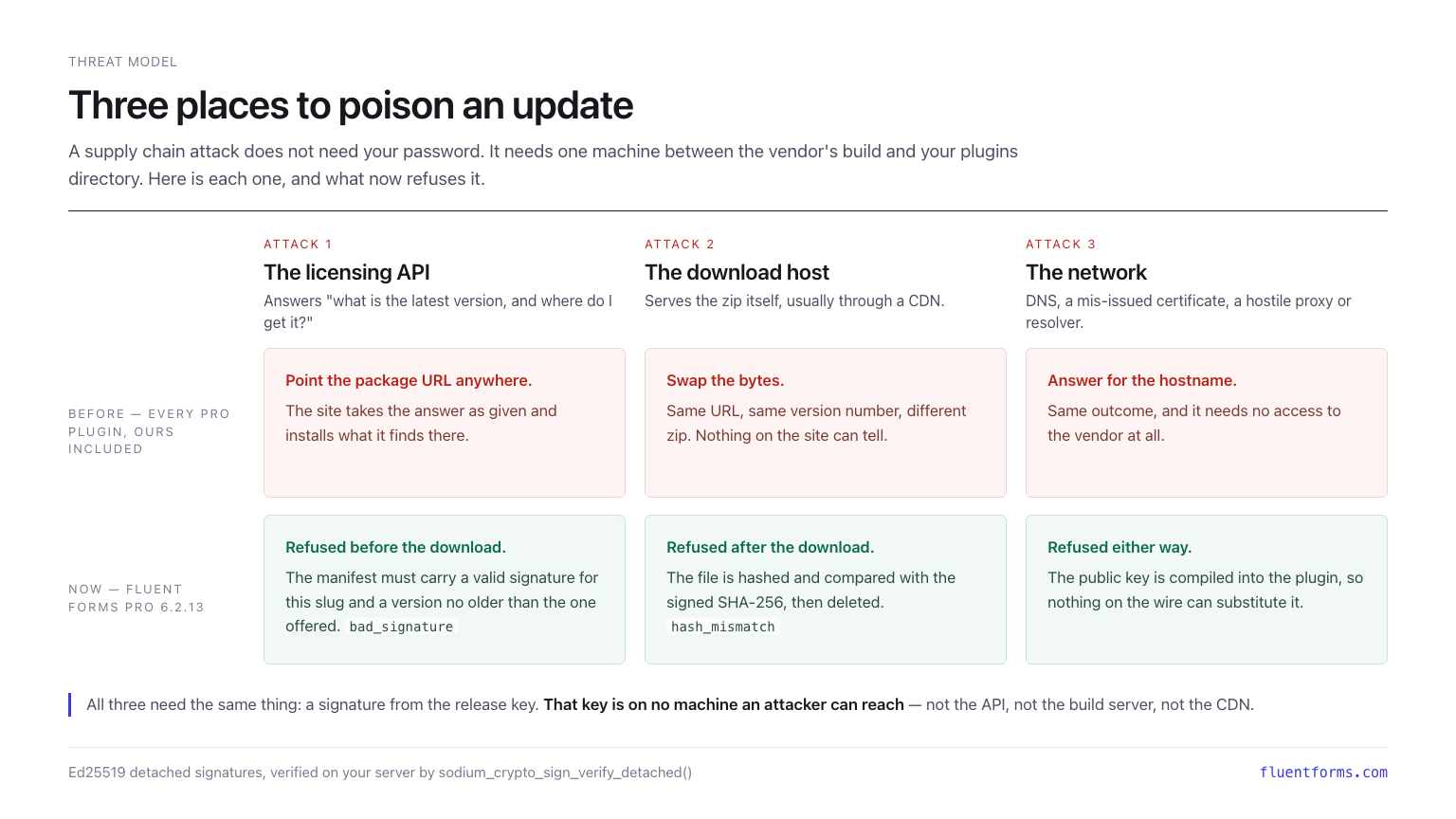
The licensing API. It decides what the package URL is. Change the answer, and every site that checks for updates fetches from wherever you say.
The download host. Same URL, same version number, different zip. Nothing on the receiving site can tell the difference.
The network. DNS, a mis-issued certificate, a hostile resolver or proxy. Same outcome, and it needs no access to the vendor at all.
In all three, the site owner did everything right — kept auto-updates on, ran a current version — and gets owned anyway. That is what makes update channels attractive: they are trusted, automated, and they run as PHP.
Forms make the prize larger than usual. A form plugin sees names, email addresses, uploaded files, payment details in transit, and every integration credential the site has connected to it. Code injected there does not need to go looking.
What our previous releases did
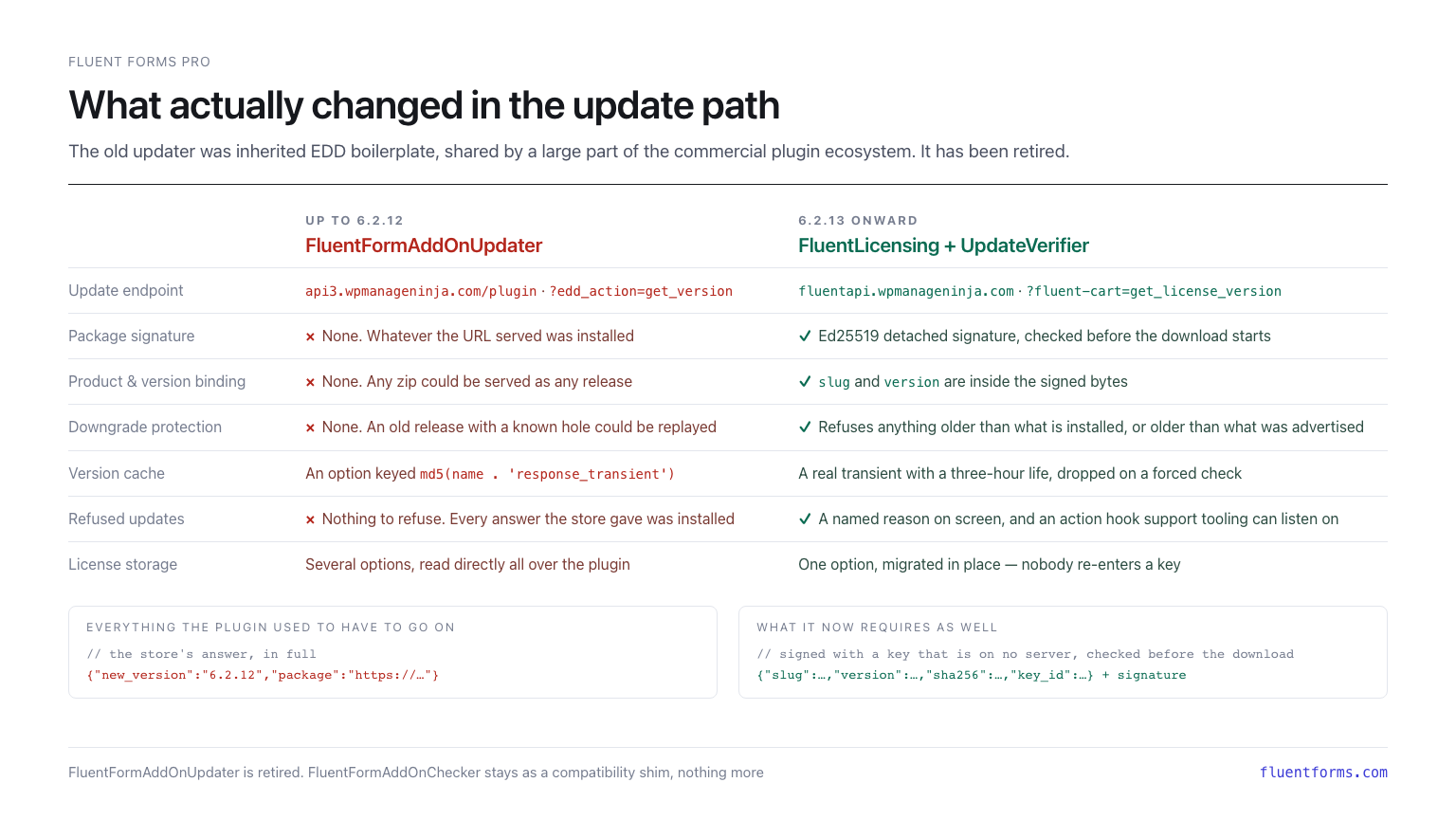
Fluent Forms Pro up to and including 6.2.12 used FluentFormAddOnUpdater, derived from the Easy Digital Downloads Software Licensing sample client — the same code, with local edits, that a large part of the commercial plugin ecosystem still ships. It talked to api3.wpmanageninja.com/plugin with ?edd_action=get_version, and it had none of the protections above.
What it received back from the store was this, and nothing else:
{"new_version":"6.2.12","package":"https://…"}A version number and a URL. No field in that response could be checked against anything; there was no record of what the release was supposed to contain, and so no way for the plugin to form an opinion about the zip it was about to unzip. That is not a bug in the old updater — it is the whole design, and it is what the ecosystem has been shipping for a decade.
FluentFormAddOnUpdater is gone as of 6.2.13, replaced by the licensing and update layer that FluentCommunity Pro and Ninja Tables Pro already run on. FluentFormAddOnChecker stays behind as a compatibility shim so that older free versions, and anything calling fluentFormProActivateLicense(), keep working.
Migrating it had a hard constraint: nobody re-enters a license key. A site licensed before the update stays licensed after it, with no customer action. The new layer reads what the old one wrote, seeds itself once, and keeps answering the legacy entry points. Network-wide licensing on multisite is preserved. If a single customer had to paste their key again, the migration would have been wrong.
Four checks, three of them before anything downloads
The verifier hooks upgrader_pre_download, which runs for the Update button, for auto-updates, for cron and for WP-CLI alike — an unguarded path is the one that gets used.
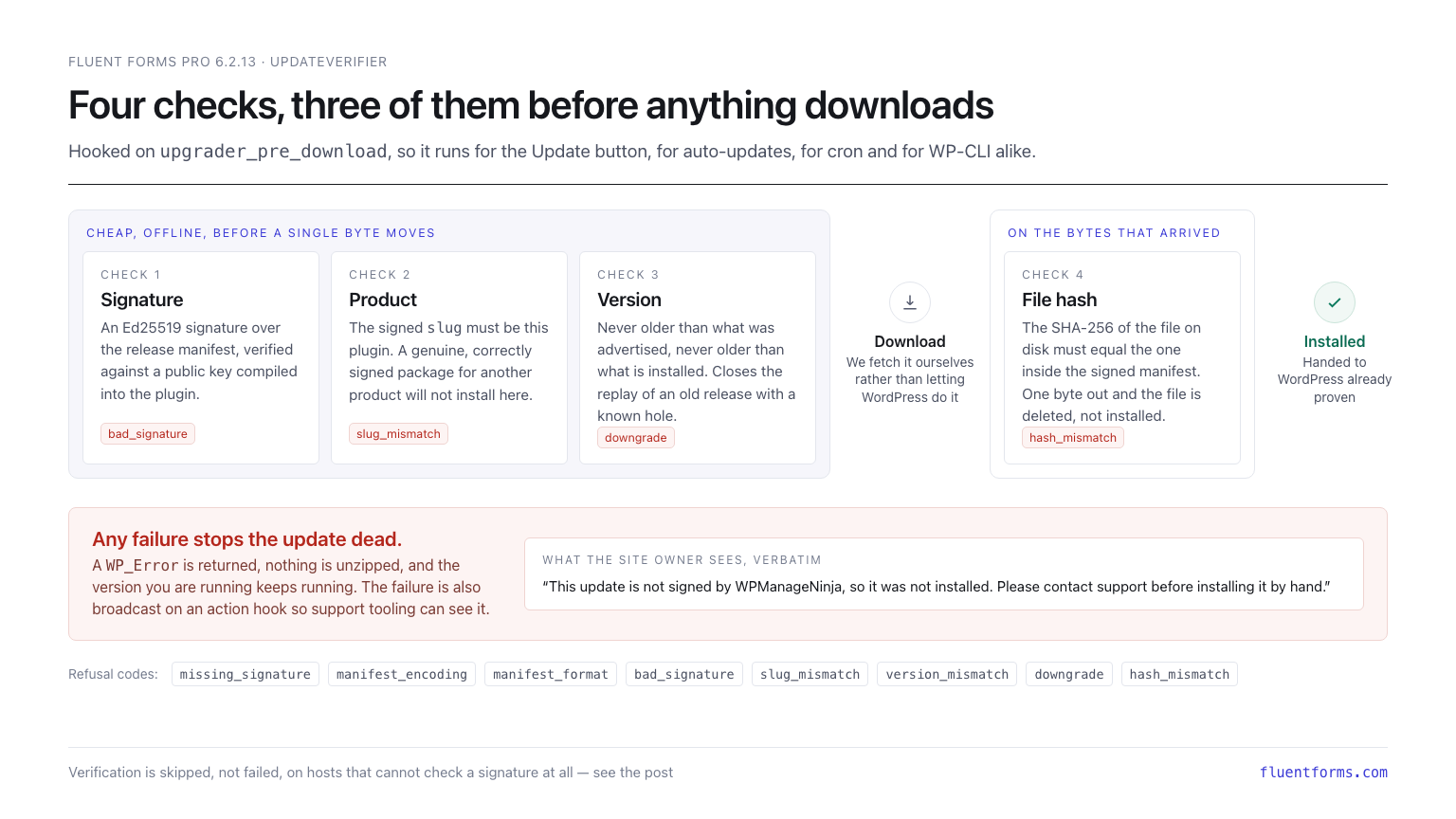
1. Signature. The update response carries a small manifest and a detached Ed25519 signature over it. The signature is verified against a public key compiled into the plugin, over the manifest bytes exactly as they arrived — never decoded and re-encoded first, because any change in key order or whitespace produces different bytes and a signature that will not verify.
2. Product. The signed slug must be this plugin. This closes a subtle one: a genuine, correctly signed package for a different product of ours, replayed as a Fluent Forms update.
3. Version. The signed release must not be older than the version being advertised, and not older than the version installed. That closes the downgrade replay — a compromised API offering “9.9.0 available” so everyone clicks, then serving a genuinely signed 5.1.0 with a known hole.
4. File hash. Only now does the download happen, and we do it ourselves rather than letting WordPress do it. The file on disk is hashed and compared against the SHA-256 inside the signed manifest. One byte out and the file is deleted, not installed.
If any check fails, a WP_Error is returned, nothing is unzipped, and the version you are running keeps running. The failure is also broadcast on an action hook, so support tooling can see why an update was refused instead of guessing.
The signed bytes are deliberately small and boring:
{"slug":"fluentformpro","version":"6.2.13","sha256":"<the release zip's SHA-256>","key_id":"wpmn-pub-key"}Four fields, in that order, with no timestamp. That omission is load-bearing: it makes the output reproducible from the zip alone, forever. Signing the same zip again reprints the same manifest and signature byte for byte, which is what lets the value stored in the licensing system be diffed against a fresh run.
One piece of real-world messiness is handled explicitly. A site working from a cached update check will sometimes fetch bytes its cached manifest predates — routine every time a release lands, not evidence of tampering. So on a hash mismatch the plugin asks the API once, uncached, and re-checks the file already in hand. No second download, and the bytes still have to be signed for this plugin, at a version no older than the installed one.
The key is not on any server
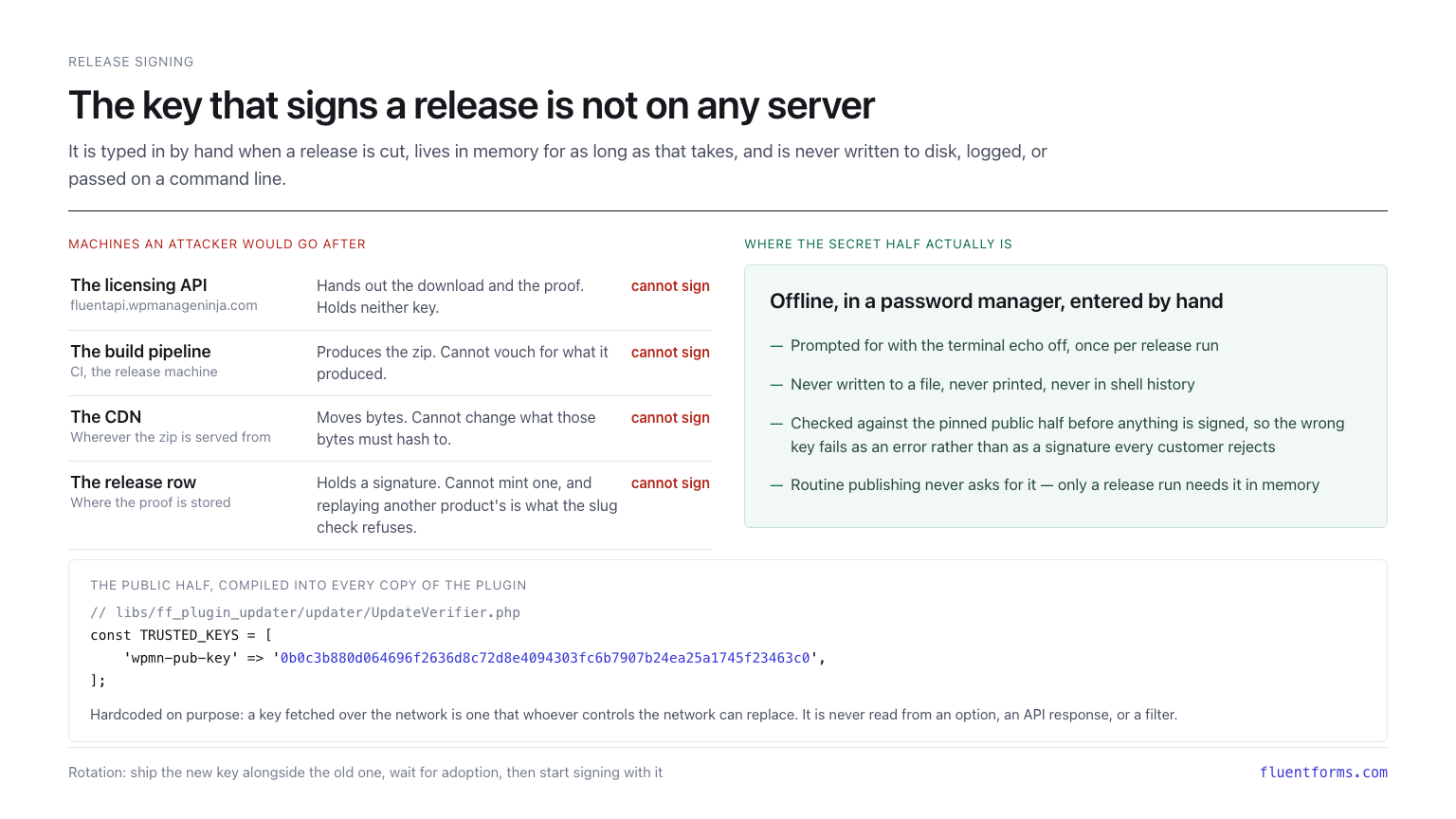
The secret half of the release key lives in a password manager. It is typed in by hand when a release is cut, prompted for with the terminal echo off, held in memory for as long as signing takes, and never written to disk, printed, logged, or passed on a command line.
Before anything is signed, the entered secret is checked against the pinned public half, so a wrong key fails as an error rather than as a signature that every customer’s update rejects.
The public half is hardcoded in the plugin, in libs/ff_plugin_updater/updater/UpdateVerifier.php:
const TRUSTED_KEYS = [
    'wpmn-pub-key' => '0b0c3b880d064696f2636d8c72d8e4094303fc6b7907b24ea25a1745f23463c0',
];
Hardcoded on purpose. A key fetched over the network is a key that whoever controls the network can replace, which would defeat the entire scheme. It is never read from an option, an API response, or a filter. Rotation works by shipping a new key alongside the old one, waiting for adoption, then signing with the new one and dropping the old entry a release later.
It is the same key that signs FluentCommunity Pro and Ninja Tables Pro. One key, one place it lives, one thing to protect.
So: our licensing API can hand out downloads but cannot vouch for them. Our build machine can produce a zip but cannot sign it. Our CDN can move bytes but cannot change what those bytes must hash to. Compromising any of them — or all of them — does not produce an update your site will accept.
Where it deliberately fails open
This is the part we would rather explain than have discovered.
Verification is skipped entirely, and updates behave exactly as they did before signing existed, in three cases:
- No usable key is compiled in. A placeholder or malformed key leaves the gate dormant rather than blocking every update on the site.
- The server cannot check an Ed25519 signature at all. Normally it can — WordPress bundles
sodium_compat— but core only loads that polyfill whensodium_crypto_box()is missing. A host with the sodium extension andsodium_crypto_sign_verify_detachedindisable_functionsends up with neither the extension function nor the polyfill. - The package is a local path rather than an
http(s)URL — an admin uploading a zip by hand. Note that plainhttpURLs are not waved through: anything remote is verified.
The reasoning is the same in each case: refusing would leave the site unable to install anything ever again, security fixes included. That is strictly worse than the unsigned updates this replaces. None of these are reachable from the network — the second depends on PHP configuration, and anyone who can change that already has server access and has no need of the update channel.
There is also a site-owner escape hatch, FLUENTFORMPRO_SKIP_UPDATE_VERIFY, for the rare case where something on a host makes verification impossible and support needs a way through.
How a release is cut
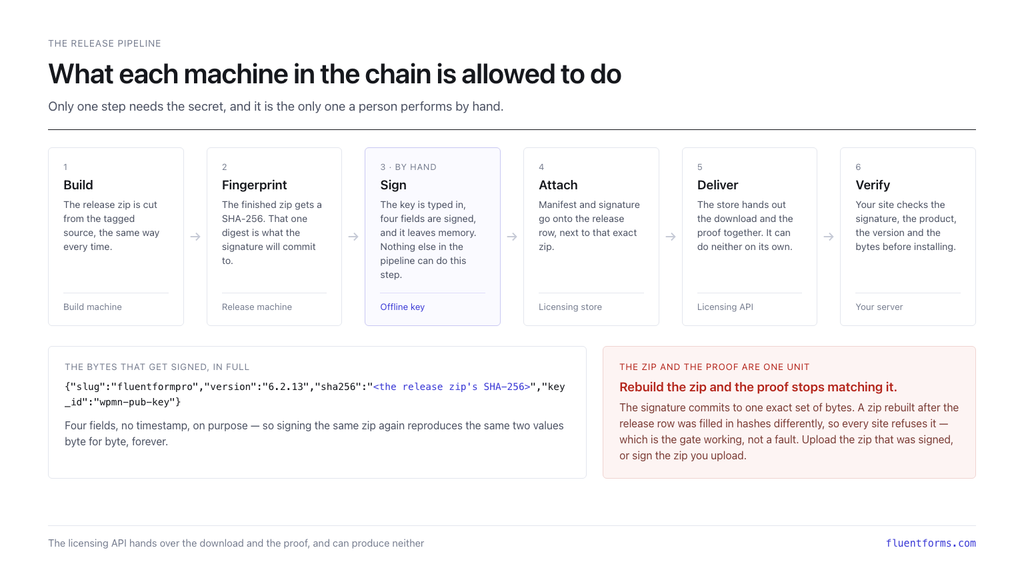
The zip is built from tagged source. It is hashed. The release is signed by hand, offline. The manifest and signature go onto the release row in the store, next to that exact zip. From then on the licensing API hands out the download and the proof together — and can produce neither on its own.
The zip and its proof are one unit. A zip rebuilt after the release row was filled in hashes differently, so every site refuses it. That is the gate working rather than a fault, and the fix is to upload the zip that was signed, or sign the zip you upload.
Full changelog of 6.2.13
- Fixed: Accepts uploaded and imported files regardless of extension casing, like .JPG or .jpg
- Clears the bulk-actions bar on the entries screen after an action finishes
- Adds a setting for the message shown when “Other” is chosen but left blank
- Ties each Authorize.Net charge to its own order and blocks charge reuse
- Limits entry replay to safe integration feeds, blocking user-account update replays
- Requires an HTTPS API URL for ActiveCampaign, with a clear error instead of silent sync loss
- Fixes over-limit coupons from being accepted
- Fixes Google Maps saving coordinates to the wrong address field when several are present
- Adds the fluentform/draft_nonce_verify filter to help Save & Resume on fully cached sites
- Fixes shared form links sometimes showing a “page not found” error
What’s next
Fluent Forms Pro joins FluentCommunity Pro and Ninja Tables Pro on this release pipeline, and the rest of the range is following.
Updating a plugin should not require trusting every server between you and us. For Fluent Forms Pro, it no longer does.

Hello, this is Jewel, CEO & Head of Ideas at WPManageNinja. I am obsessed with WordPress since 2009. My aim is to be a user-centric developer first, and a serial entrepreneur second. You will find me discussing various tech issues and trying to come up with scalable solutions on different forums when I am not busy coding.


Leave a Reply