

Fluent Forms vs User Registration & Membership: Comparison That Help You Choose
If you are seeking a reliable form builder plugin for your WordPress site, chances are Fluent Forms and User Registration & Membership have taken the first impression in your shortlist.
Both plugins have already earned enormous popularity in their huge user base, and are adding value to the WordPress industry, too.
So, let’s dive into the in-depth comparison so that your choice can be defined as the right one.
TL;DR
- Both Fluent Forms and User Registration & Membership offer basic fields in the free versions, and additional features in their Pro versions.
- Fluent Forms offers diverse pricing, which starts from $79, and URM keeps $99 as the lowest price package
- URM prioritizes registration-centric fields and features, while Fluent Forms ensures diversity through the fields and features fit for quiz, survey, orders, registration, payment, etc
- Fluent Forms outperforms URM in a few scopes, such as 34+ free fields, 100+ form templates, 7 payment options, and 60+ integrations
Fluent Forms vs User Registration & Membership comparison: the highlights
Every form building plugin has some common features while being distinct based on their features introduced for the particular interests of the users. Fluent Forms and User Registration & Membership(URM) also possess similarities and dissimilarities in aspects like fields, features, accessibilities, integrations, knowledge base, user interface, user experience, pricing, etc.
This comparison ought to be between the user’s point of view towards the plugins, not only what they offer and what they miss. The same plugin can be extensively useful to one user when being very basic to another.
Here you will find some points that can help you determine whether any of the plugins can offer you what you are specifically searching for.
Fields and features
Both Fuent Forms and User Registration & Membership(URM) have a wide range of fields and features.
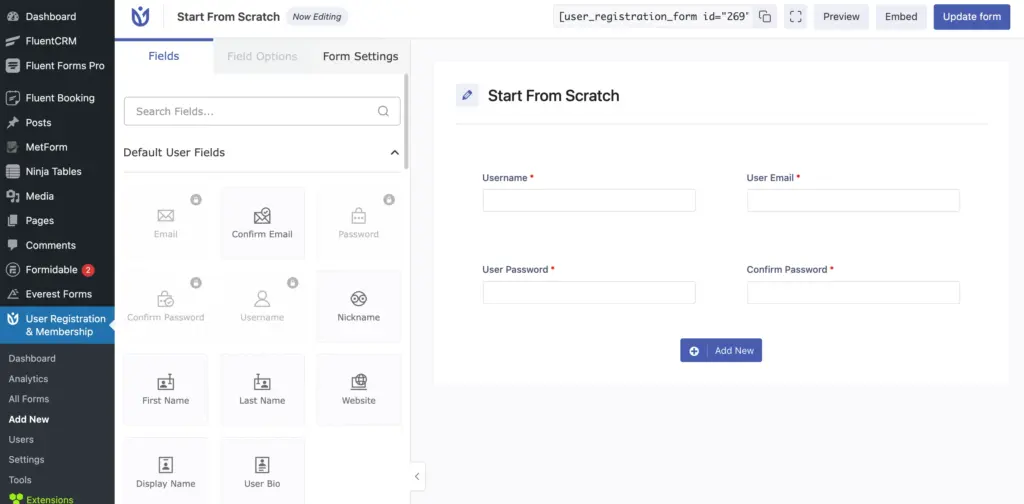
As URM focuses mostly on registration, you will find relevant fields for this task, including confirm email, username, password, secondary email, custom captcha, and invitation code, among others.
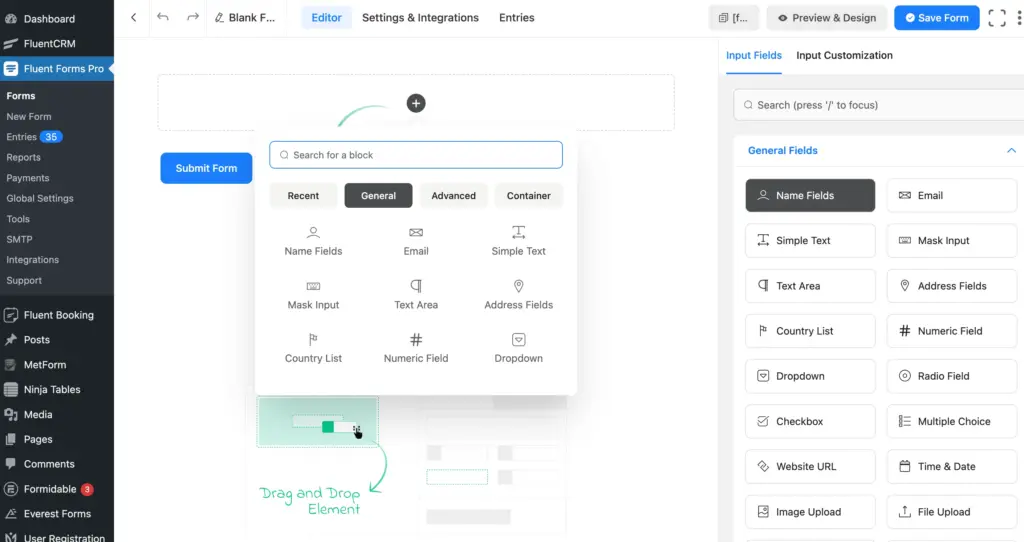
On the other hand, Fluent Forms seems to be a master of all trades in terms of form creation. As it caters to a diverse group of users, it will provide input fields and features related to sign-up and registration, order and payment, user-generated content, lead generation, and similar purposes.
From simple text to rich text input, country list to address autocomplete, one to six-column container, quiz score to calculation– Fluent Forms provides you with a variety of choices that you can relate to any type of form, not limited to registration or membership.
Free vs Pro
Getting a long list of advanced fields in the free version might be a bit higher expectation, but a few important fields should be available so that a business website can build some primary forms, and use this for a business purpose.
In Fluent Forms, along with the AI Form builder, you will get a good number of free form templates. You will get conditional logic in the free version, which broadens the scope of creating better forms without any limitations. While you are getting 19 integrations free with the Fluent Forms basic, the payment has been free with Fluent Forms. The spam-protection and notification are very helpful for long-term use.
To access the quiz and survey, numeric calculation, advanced form styler, address autocomplete, coupon, inventory, etc, you have to subscribe to the pro plan.
In short, if your business is growing and needs the advanced functionalities for diversified and extensive uses, you are more likely to require the pro pack of Fluent Forms.
In User Registration and Membership Free Version, you will find some important features such as User Registration Analytics Widget, Customizable Email Notifications, Import/Export forms, etc. However, to access some other vital features like Form Reset Button, Unique Field Validation, Signature field, etc, you will need to subscribe to the Pro version.
Templates and documentation
The form templates of Fluent Forms have two primary purposes: one is that users can just use a template to publish with or without a bit of customization directly. The other is to get inspiration – even users who don’t want to directly use copy and paste can create a similar, purpose-relevant form in a minute, as Fluent Forms is designed to create forms faster with the smoothest drag-and-drop functionality.
Similarly, URM also provides a satisfactory number of form templates, typically broad and have multiple options in the relevant fields. Anyway, the number of free templates is still less. The templates also reflect the main theme of URM, which is registration.
In terms of documentation, Fluent Forms has always been foolproof because of continuous bug-fixing and frequent updates. Besides, Fluent Forms also has a dedicated Documentation Creation team, powered by the Technical Support Team and backed by its Marketing and Dev teams. So, the Fluent Forms documentation, which is numerically 400+, is a combination of user experience, market demands, separately built for both coders and other users with zero coding knowledge.
URM also has 160+ documentation with a variety of categories, including email settings, account management, troubleshooting, etc.
Popularity, pricing, and updates
Fluent Forms has reached 6,00,000+ active installations, User Registration & Membership has 60,000+ active installations; where both plugins have satisfactory ratings of 4.8 stars out of 5 Stars.
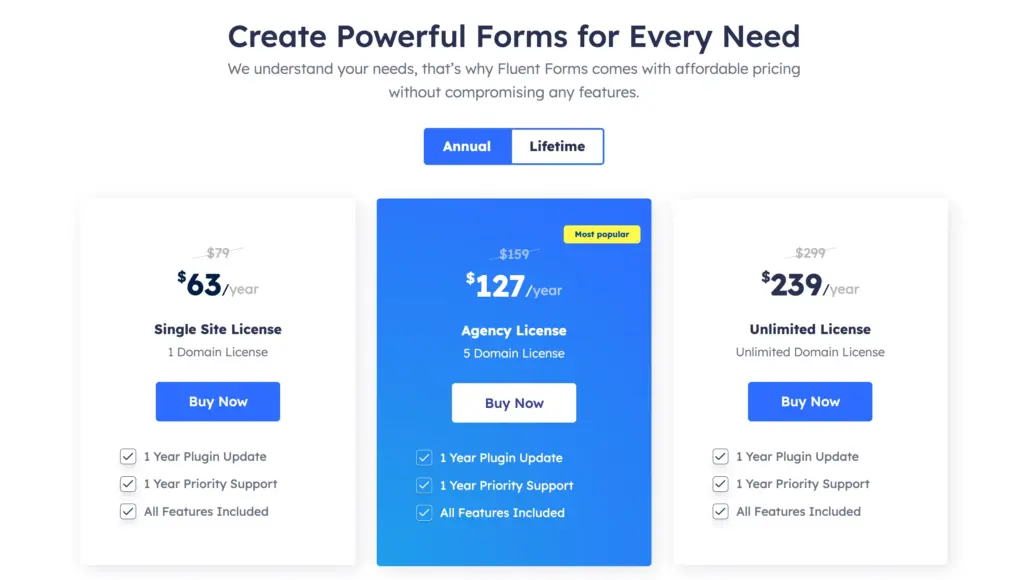
Fluent Forms has diverse pricing starting from $79, where every plan includes all features.
The pricing of User Registration & Membership starts from $99, where the access to the features may vary.

If you notice the Fluent Forms Changelog, you will find how regular Fluent Forms updates are, and how quality features and foolproof bug fixes every update has. URM also has updates at a good frequency, which are mostly focused on enhancements and fixes.
Code and no-code user experiences
Fluent Forms is unquestionably a no-code plugin that helps broaden the scope using custom CSS, JS, etc. Furthermore, it has plenty of form templates so that smart forms can be adapted easily. The AI form builder also requires no form-building experience. Additionally, if you dig deep and go for better conditional logic fields, you will find it much easier.
URM provides more of the registration-based fields facilitated with zero-coding UX. Again, in most of the fields, when Fluent Forms keeps the code-free design simple, which you can intensify with your own coding instructions, URM makes the code-free design a bit complicated and hands over the simplification task to you.
Customization and integrations
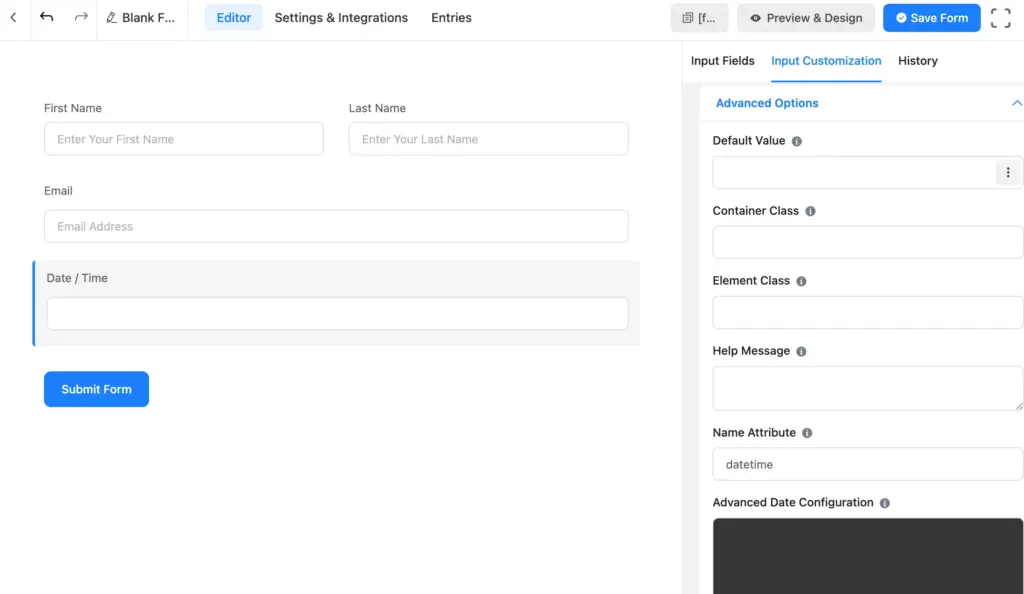
Advanced field customization can help users get the best output from a particular field. Let’s take the Time & Date field as an example. In Fluent Forms, you can add or change the Element Label, Label Placement, Admin Field Label, Placeholder, Date Format, and also advanced date configuration is a plus.
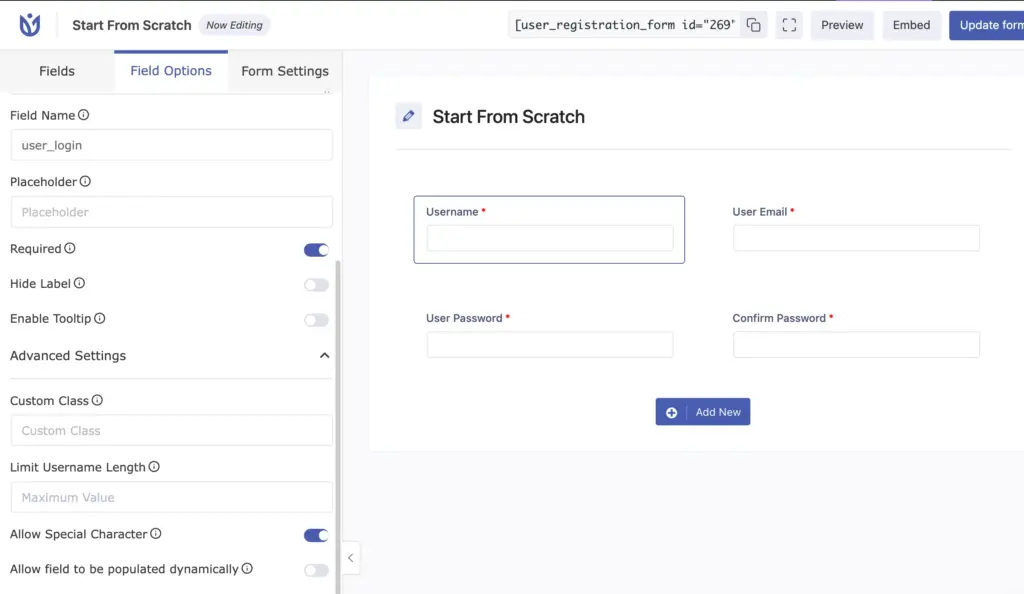
URM keeps the customization a little different. Anyways, it offers Hide Label, Tooltip, and Custom Class, which appear to be quite advanced.
When it comes to the matter of integrations of Fluent Forms, you’d better count the categories. Fluent Forms has integrations for Support, Data Management, Project Management, Email Marketing, CRM, Automation, and so on. In that case, User Registration and Membership has a limited number of integrations: Salesforce, Google Sheets, LearnDash, Zapier, and WooCommerce Integration.
Exclusives and missed scopes
Both Fluent Forms and URM have some exclusive features which is not available in the other. Like in Fluent Forms, you will get an AI form builder and conditional logic for free. URM, too, has some exclusivity, such as specific categories of fields for WooCommerce Billing and Shipping.
Fluent Forms offers the simplest payment procedures as a vivid form plugin. A free payment option with Stripe integration, while also having PayPal, Razorpay, Paystack, Paddle, Mollie, Authorize.net and Square accessible.
An autosave would make the faster form building experience much smoother, eliminating users’ concern about saving the changes(which is already something the development team has started considering).
An overview to choose the proper one
While Fluent Forms comes with a better approach to the variety of uses, URM prioritizes a few specific fields. Fluent Forms is a contact form builder, registration form builder, payment form builder, quiz and survey form builder. On the contrary, if you look into User Registration & Membership, you’ll find that it basically focuses on user registration and WooCommerce billing/shipping/payment.
It’s entirely the users’ demands that eventually decide which goals a plugin will adapt and which ones will be ignored. Fluent Forms also started with a view to accommodating the needs of a contact form plugin, but after a longer journey, users’ needs turned it into an all-in-one form plugin.
The target of Fluent Forms is to meet the best possible needs of a business for which it has been built. A contact form is half done until it possesses proper CRM integration, payment methods, multipurpose form building, such as quiz, survey, inventory, product order, and even in some cases, reservation too.
The other concern is who the users are and how familiar they are with coding and UX. Do the users find the fields before ransacking the whole interface? Are they instructed with proper documentation to make the best out of their plugin? How are the pre-built forms that make a non-coder user just select and publish? And, to what extent does it allow developers to adapt their own code? – These are the questions answering which help you help decide perfectly.
We always suggest using both plugins’ free versions for testing purposes. Fluent Forms free version offers as many scopes as possible, and also provides a money-back guarantee to the pro users. Users get 24/7 technical support, which ensures your ecosystem never falls.
Here is a summarized comparison of some basic differences between Fluent Forms and URM:
| Features | Fluent Forms | URM |
| Active Installations | 600k+ | 60k+ |
| Starting Price | $79 | $99 |
| Undo/Redo | Yes (Free) | No |
| AI Form Builder | Yes(Free) | No |
| Conditional Logic | Yes(Free) | Pro Add-on |
| Built-in Confirm Email and Confirm Password field | No | Yes |
| File Upload | Pro | In Pro Add-on |
| Stripe | In Free Version | In Pro Add-on |
| Built-in Woocommerce Billing and Shipping Fields | No | Yes |
| Mailchimp Integration | In Free Version | In Pro Version |
| Signature | In Pro Add-on | In Free Version |
[Please note that the table is just an instance that shows a few of the many differences between the two powerful plugins. You are more likely to go through the entire comparison to get an overview.]
Enjoying this article?
We regularly publish actionable content on our blog. Subscribe to get them delivered straight to your inbox.
We won’t spam you. You can unsubscribe whenever you want.
The decision-making discussion
Both Fluent Forms and URM have a bunch of complaint-free features applicable to their primary user base. Limitations are also common in both plugins because both are evolving to meet the needs of the users. Then a question comes that which one is right for you?
The answer is pretty clear: look into the features, see if the features can fulfill the needs of your business, and inspect the user experience, as it should suit your web experience. Try the free version if necessary, maybe you’ll find the hidden gems!
Two amazing facts about Fluent Forms and URM are: Fluent Forms is fit for any business because it is made of the concentration on delivering everything of something and something of everything. And, it has broad integrations and customization options so that users can use this for multiple purposes of their multiple businesses, too. And the lovely scope of User Registration and Membership is that they have nailed the registration process; it feels like every registration field and feature is available here without caring about being multifunctional.
Build Smarter Forms for Free


Hi, this is Aparup. I am a Literature postgraduate, mixing my creative thoughts with my experience in the tech industry to surpass AI. Professionally, I am a content marketer seeking solutions to users’ problems regarding WordPress.



Leave a Reply