
How Fluent Forms Becomes More Powerful with WPManageNinja Integrations
Fluent Forms is more than just a WordPress form builder plugin. It’s the backbone of a connected WordPress ecosystem. When combined with other products like FluentCRM, FluentBooking, and Fluent Support, it transforms simple submissions into fully automated business workflows. Here’s how a small business can scale using the Fluent ecosystem.
TL;DR
- FluentCRM: Automate lead capture, tagging, segmentation, and email workflows.
- FluentSupport: Turn form submissions into tickets, manage customer queries efficiently.
- FluentCommunity: Auto-enroll members into spaces or courses, send welcome emails, collect payments.
- FluentBooking: Embed booking events in forms, schedule appointments seamlessly.
- FluentBoards: Track tasks, projects, and team progress directly from form submissions.
- WP Social Ninja: Collect and display social proof from users automatically.
- Ninja Tables: Organize and display data from form submissions in responsive tables.
- FluentSMTP: Ensure reliable WordPress email delivery for transactional and marketing emails.
An overview of the integrations available in Fluent Forms
With integrations with various tools, Fluent Forms can pass data instantly and reliably to almost any part of your business stack. This could mean adding leads to your CRM, creating bookings, generating support tickets, or even sending emails. This means your forms don’t just “collect information”-they actually move information to where it needs to go.
By leveraging integrations, small businesses can:
- Automate repetitive tasks
- Improve workflow efficiency
- Enhance user experience
- Scale operations without adding complexity
Instead of manually exporting entries, adding people to lists, updating spreadsheets, or assigning tasks, Fluent Forms does the heavy lifting the moment a user hits submit. It currently supports over 60+ integrations grouped into several categories: Project Management, Automation, Communication, Security, CRM, Payment, Email Marketing, etc.
Yes, Fluent Forms works with dozens of external tools. But the real magic happens inside the WPManageNinja ecosystem – the suite of products built by the same team behind Fluent Forms.
These integrations aren’t just “compatible.” They’re native, deeper, faster, and designed to work together out of the box, with zero conflicts and minimal setup.
In this blog, we’ll focus only on the WPManageNinja plugins that unlock automation-friendly workflows inside your WordPress dashboard:
- FluentCRM – The integration instantly sends form submissions into your CRM as contacts, applies tags, updates lists, triggers automations, and launches email sequences the moment someone hits “Submit.”
- FluentSupport – Converts form submissions into support tickets, assigns them to agents, attaches files, and starts workflows.
- FluentBooking – Lets users choose dates/times directly from your form and auto-creates bookings, events, meetings, and confirmations synced with your calendar.
- FluentCommunity – Creates user profiles, updates membership roles, and enrolls people into private communities or courses right from a form submission.
- FluentBoards – Turns form entries into tasks, cards, or tickets, so your team can track submissions visually in board-style workflows.
- FluentSMTP – Ensures all form notifications and automated emails are routed through your authenticated mail setup for reliable delivery.
- Ninja Tables – Sends form entries directly into dynamic tables where you can filter, sort, edit, and display the data on your site instantly.
- WP Social Ninja – Collects and displays custom user reviews in your social proof system.
Build Smarter Forms for Free
Fluent Forms + FluentCRM: Capture leads automatically
FluentCRM is the email marketing automation engine inside your WordPress dashboard. It handles everything from email campaigns to advanced segmentation, without relying on external SaaS subscriptions. Think of it as the control center for all your customer communication.
FluentCRM packs a full suite of email automation features that most small businesses usually pay monthly for:
- Advanced segmentation (tags, lists, custom fields)
- Visual automation builder for multi-step workflows
- Email campaigns and sequences
- Contact activity tracking (opens, clicks, and campaign history)
- E-commerce and LMS integrations
- Reporting and contact-specific activity logs
And the best part? You own the data. No API limits. No vendor lock-in. No “please upgrade to send more emails.”
What the FluentCRM integration actually does
When someone submits a form, the integration doesn’t just “save an entry.” It instantly transforms raw form data into a structured, automated email marketing workflow.
Here’s what fires automatically:
- Creates or updates the contact in FluentCRM
- Applies tags based on form responses
- Adds contacts to specific lists or segments
- Populates custom fields with mapped values
- Triggers the appropriate automation workflow
- Starts automated email sequences
- Tracks activity (opens, clicks, and campaign engagement)
- Runs conditional steps inside the workflow based on responses or behavior
Real use case
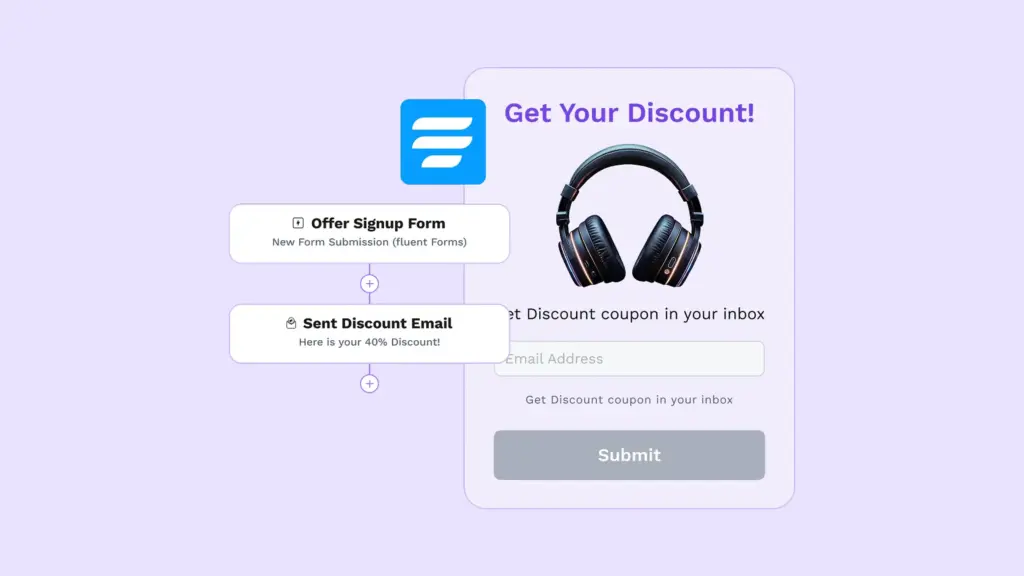
A visitor lands on your website and signs up for a free guide through a Fluent Forms opt-in form. The moment they hit “Submit,” FluentCRM takes over automatically. The contact is created instantly with all the mapped fields, and the right tags are applied based on what they selected in the form.
From there, an automation workflow begins. FluentCRM sends the initial download email, schedules follow-up messages, and tracks how the user interacts with each email. If they open multiple emails or click on key links (like your pricing page), the workflow adjusts – applying new tags or moving the contact into a more targeted sequence.
By the time your team looks at the contact profile, they already know:
- what resource the lead downloaded
- which emails they opened
- what links they clicked
- what tags or segments they belong to
In short: your team doesn’t need to guess who’s interested or manually qualify anyone. The system does it for you.
Here’s why this integration is a game-changer for growing businesses:
- Leads are captured and organized automatically with no manual work.
- Follow-ups happen consistently, keeping prospects engaged.
- Tags and lists make segmentation effortless and accurate.
- Automated workflows scale as your business grows.
- Your team always knows which leads are sales-ready.
Fluent Forms + FluentSupport: Turn form submissions into support tickets automatically
FluentSupport is a WordPress-native helpdesk built for teams that want full control over customer support without relying on external platforms. It centralizes customer conversations, ticket management, and agent workflows inside your WordPress dashboard, keeping support fast, organized, and scalable.
Instead of forcing customers into rigid ticket portals, Fluent Support works seamlessly with custom-built forms, so support starts exactly where your users already are.
What the FluentSupport Integration Actually Does
Every form submission can be converted directly into a support ticket. The integration ensures that requests are logged, prioritized, and routed automatically, streamlining the support process.
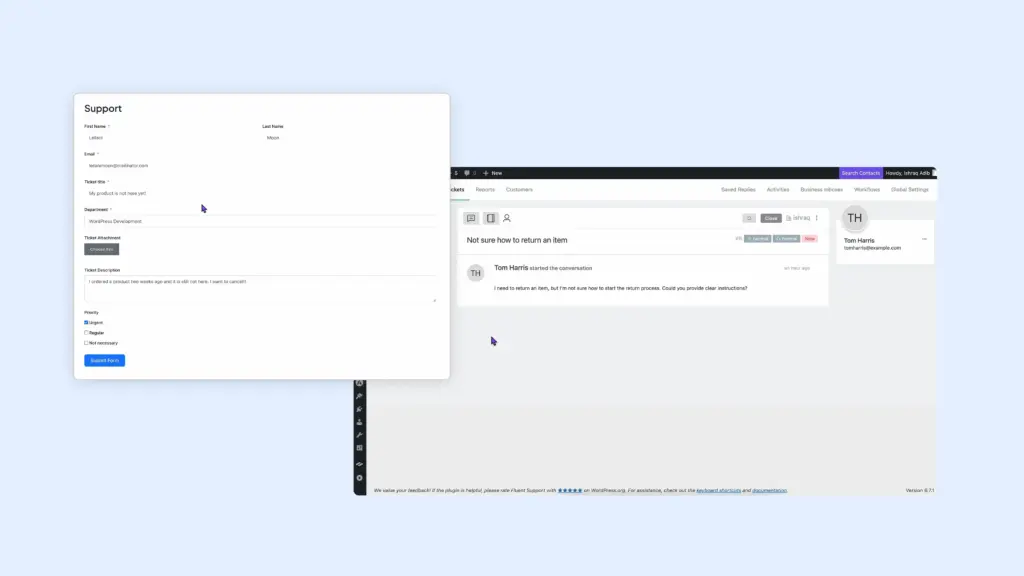
Here’s what happens instantly:
- Convert form submissions into support tickets instantly
- Design custom support forms instead of using fixed ticket layouts
- Place support forms anywhere on your website
- Map form fields to ticket fields, priorities, or departments
- Capture attachments, user details, and context in one step
- Keep all support activity inside WordPress
Real use case
A customer submits a product query through your contact form. FluentSupport immediately creates a ticket and routes it to the correct agent. If the customer included attachments, they appear in the ticket automatically. The agent sees all details in one place and can respond quickly.
Meanwhile, the system can notify the customer that their request has been received and is being handled. Every interaction and status change is logged for complete transparency and accountability.
Here’s why this integration helps businesses deliver better support:
- Support tickets are created without manual intervention
- Forms can be tailored to different support scenarios
- Requests can be submitted from anywhere on the site
- Agents receive complete context from the first message
- Support workflows scale without switching tools
Fluent Forms + FluentBooking: Schedule appointments effortlessly
FluentBooking is a scheduling and appointment management system built for businesses that rely on meetings, calls, demos, or consultations. It replaces back-and-forth emails and external booking tools with a streamlined, self-hosted booking experience.
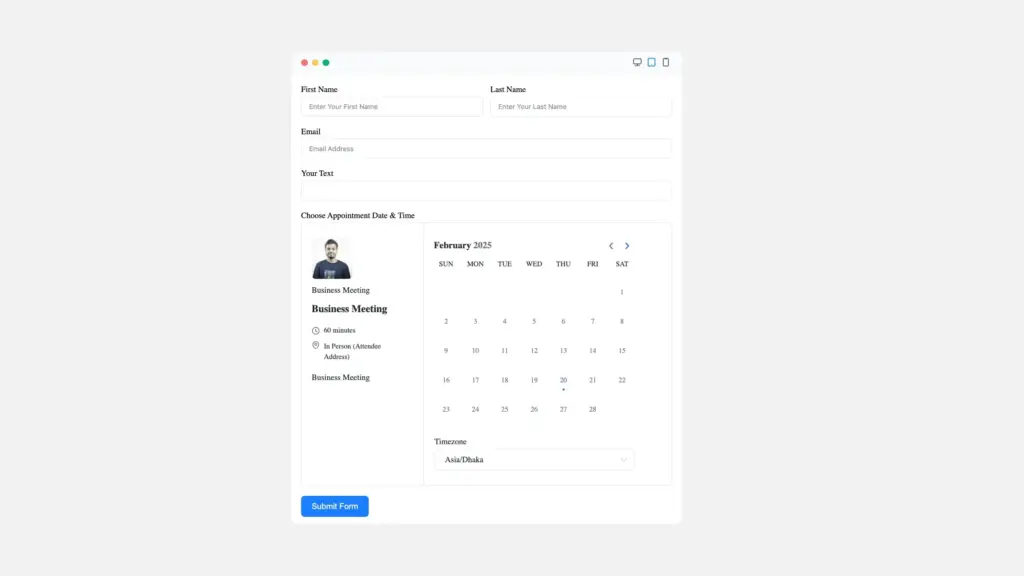
Instead of sending users to a separate booking page, FluentBooking can live directly inside your forms.
What the FluentBooking integration actually does
Form submissions can be converted directly into confirmed bookings. The integration handles availability, customer details, and notifications automatically, so appointments are never double-booked or overlooked.
Here’s what happens automatically:
- Creates a booking with date, time, and customer details
- Checks availability and prevents scheduling conflicts
- Sends confirmation emails or SMS to the customer
- Updates the calendar in real time
- Triggers reminders or follow-ups according to your setup
- Allows team members or staff to see assigned bookings instantly
Real use case
A client fills out a consultation request form on your site. FluentBooking instantly checks your calendar, confirms an available slot, and creates a booking. The customer receives a confirmation email with the appointment details.
Staff members see the new booking immediately in their dashboard. Later, automated reminders are sent to the client, reducing no-shows and ensuring a smooth scheduling experience.
Here’s how this integration makes booking simple and reliable:
- Bookings are created instantly without manual entry
- Calendar conflicts are prevented automatically
- Customers receive confirmations and reminders without follow-up calls
- Staff can manage schedules easily from a central dashboard
- Businesses can handle growing appointment volumes effortlessly
Fluent Forms + FluentCommunity: Onboard community members instantly
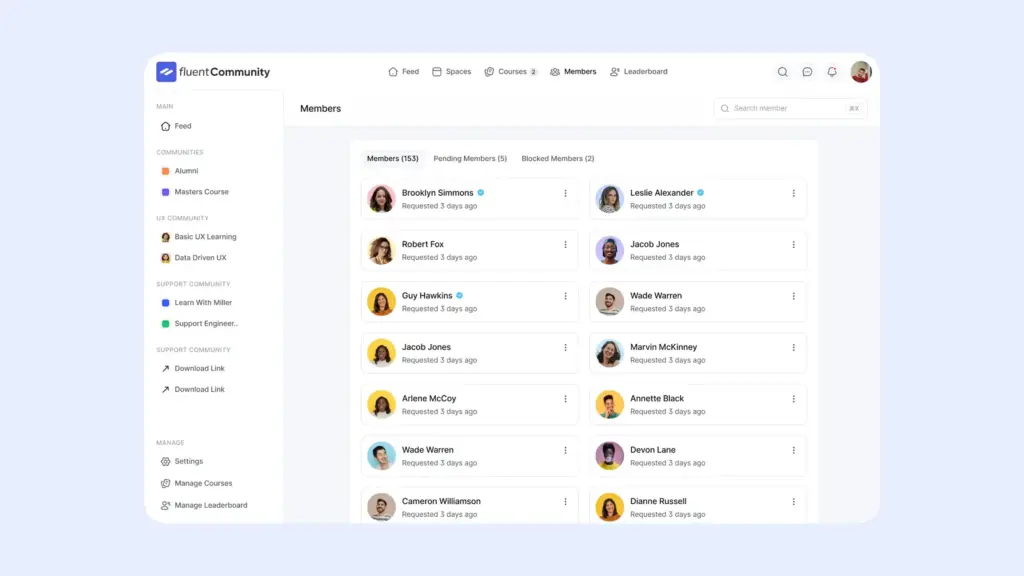
FluentCommunity is your WordPress community platform – discussion spaces, member profiles, private groups, and all the engagement features you usually expect from external forums, but fully hosted on your WordPress site. No monthly SaaS bill and you control everything.
What the FluentCommunity integration actually does
This integration bridges your forms with your community space so people can sign up for your ecosystem smoothly.
It allows you to:
- Enroll users into specific Spaces or Courses
- Create new WordPress users from form submissions
- Map member details like name and email automatically
- Control access to public or private spaces
- Log users in automatically after submission
- Trigger welcome emails for new members
- Collect payments for paid access when combined with payment forms
Real use case
Imagine you’re running a membership site with beginner and advanced groups. When someone fills out your “Join the Community” form, FluentCommunity automatically creates their community account, places them into the right group based on their skill level, and pre-fills their profile details. They land straight inside the right space.
Here’s why this integration makes community growth effortless:
- New members are added without admin involvement
- Group placements become accurate and rule-based
- User onboarding feels seamless and professional
- Profiles are always clean and correctly populated
- Community engagement grows without operational chaos
Fluent Forms + FluentBoards: Turn form entries into tasks, tickets, and workflows
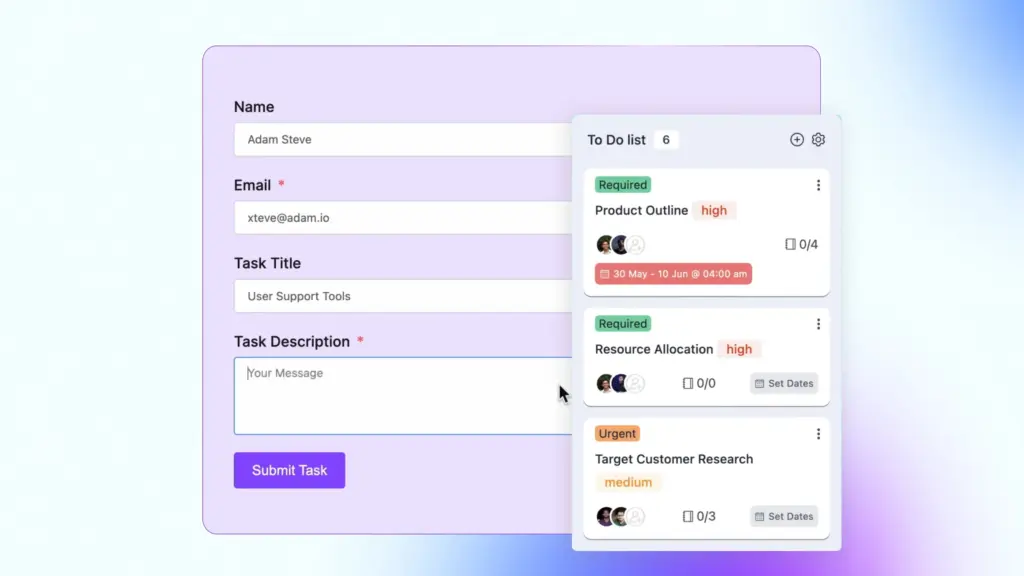
FluentBoards is your task and project management system. It is a clean Kanban-style dashboard for organizing work without Trello, Asana, or any cloud-based subscription nibbling your budget. Everything stays inside your site, fast and under your control.
What this integration actually automates
Instead of form submissions piling up in your inbox, this integration converts them into actionable work items inside FluentBoards. No copying, no forwarding, no “I’ll add this later” excuses.
It can automatically:
- Create new tasks the moment someone submits a form
- Assign tasks to specific team members
- Set priority, due dates, or labels based on form responses
- Drop tasks directly into the right board or column
- Update existing tasks when users submit follow-up information
- Notify teams instantly so nothing gets stuck waiting
Real use case
Say you’re collecting feature requests or client briefs. When someone submits the form, FluentBoards instantly generates a new task with all the details mapped into the description, priority, and tags. Your team sees it appear in the right column, ready to be worked on. The workflow becomes visual, trackable, and impossible to ignore.
Why this integration keeps teams organized without extra tools
- Tasks appear automatically where they belong
- Team responsibilities stay clear and visible
- Project pipelines run smoothly with fewer bottlenecks
- No duplicate entries or lost submissions
- Keeps all your operations inside WordPress, subscription-free
Fluent Forms + Ninja Tables: Turn form submissions into structured, searchable data
Ninja Tables is built for one job: making sense of data inside WordPress. Whether it’s product listings, pricing comparisons, directories, or internal records, it turns raw information into fast-loading, sortable, and filterable tables without code.
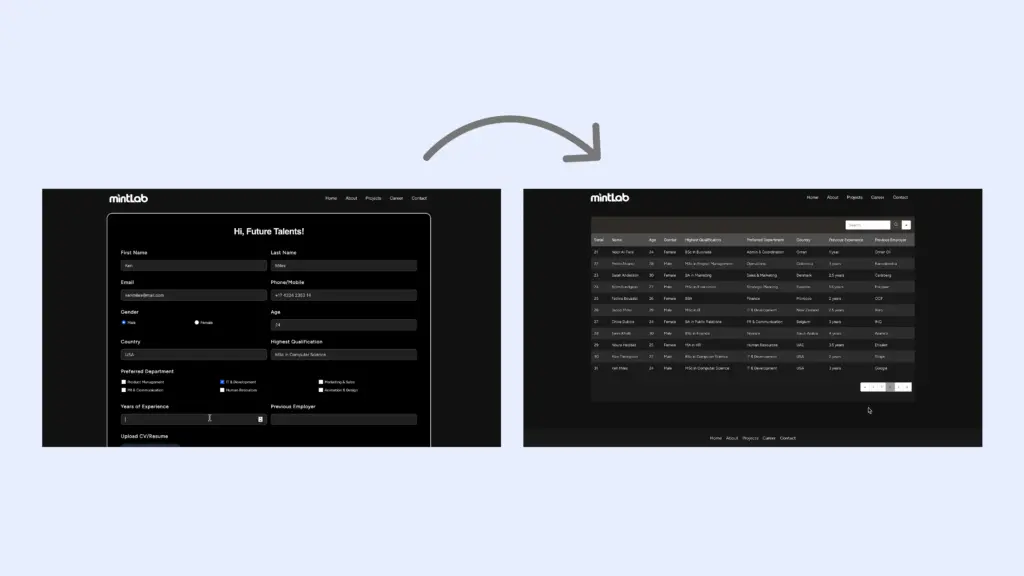
Instead of data living invisibly inside form entries, Ninja Tables brings it front and center in a format users can actually interact with.
What this integration makes possible
This integration connects form submissions directly to tables, so data doesn’t stay hidden inside entries. Every new submission can instantly become a visible, organized row inside a Ninja Table.
This integration can:
- Insert new form entries as table rows
- Map specific form fields to table columns
- Update existing rows when users resubmit or edit data
- Keep tables in sync as new submissions arrive
- Display live data without manual imports or exports
Real use case
You run a job board and collect listings through a submission form. As soon as a company submits a new job, it appears instantly inside a Ninja Table on your website. Visitors can sort by role, filter by location, and search by keyword without you touching a spreadsheet or re-uploading data.
Why this integration brings order to growing data
- Submissions turn into usable data instantly
- Tables stay updated without manual maintenance
- Visitors can sort and filter information easily
- Data remains consistent and structured
- Scales smoothly as submissions increase
Fluent Forms + FluentSMTP: Make sure your form emails actually reach the inbox
FluentSMTP solves one of WordPress’s most silent but damaging problems: email delivery. By default, WordPress sends emails using PHP mail, which hosting providers routinely block or flag as spam. That’s why form notifications, confirmations, and alerts often disappear without anyone noticing.
FluentSMTP fixes this by routing WordPress emails through trusted SMTP providers like Gmail, Outlook, Amazon SES, SendGrid, Mailgun, Brevo, and others. It’s lightweight, secure, free, and built to work reliably at scale.
What this integration takes care of
This integration ensures that every email triggered by a Fluent Forms submission is delivered through a proper SMTP channel, not left at the mercy of unreliable server mail.
It allows you to:
- Send form notification emails via verified SMTP providers
- Deliver user confirmation emails reliably
- Route different emails through different SMTP connections
- Automatically fall back to a secondary SMTP if one fails
- Monitor delivery status with detailed email logs
- Get notified instantly if an email fails to send
Real use case
A business runs multiple forms: contact forms, booking requests, and account registrations. Each submission triggers emails to admins and users. Without SMTP, some emails never arrive, leading to missed leads and confused customers.
With FluentSMTP connected, every email generated by Fluent Forms is sent through a trusted SMTP provider. If the primary service has an issue, a secondary connection takes over automatically. The business can also check email logs to confirm delivery instead of guessing whether messages were sent.
No lost leads. No silent failures. No support tickets asking, “Did you get my message?”
Why this integration protects revenue and trust
- Form notifications are delivered consistently
- User confirmation emails stop landing in spam
- Backup SMTP prevents single points of failure
- Email issues are visible and easy to troubleshoot
- Critical form communication stays reliable as volume grows
Enjoying this article?
We regularly publish actionable content on our blog. Subscribe to get them delivered straight to your inbox.
We won’t spam you. You can unsubscribe whenever you want.
Wrap up
Fluent Forms becomes far more than a form builder when it’s connected to the WPManageNinja ecosystem. Each submission can trigger real business actions, for example: capturing leads, sending emails, creating tasks, opening support tickets, scheduling bookings, or displaying structured data.
For growing businesses, this means scaling operations without adding tools or complexity. Data flows cleanly between products, manual work disappears, and teams stay focused.

An Econ major turned into a Digital Marketer by choice. Hello! This is Ashraf and I am here to enlighten you on various WordPress topics and help you make informed decisions.


Leave a Reply