
Top 6 Forminator Alternatives You Need to Consider

Forminator has a reputation that is honestly well earned. It is one of the few WordPress form builders that gives you a lot of power upfront. Quizzes, polls, calculations, conditional logic, Stripe payments, Google Sheets, Slack, analytics. All available in the free version. If we talk purely feature to feature, Forminator’s free tier stands shoulder to shoulder with Fluent Forms, which is rare in the WordPress world.
But here is the interesting part. Even though Forminator offers strong value, more users are actively looking for alternatives. Not because Forminator is weak but because different use cases demand different structures.
Some want better long term pricing. Some want faster performance. Some want more automation. And some simply want cleaner workflows that scale without depending on a full WPMU DEV subscription.
That is why I took the responsibility of testing and comparing the real alternatives. Not a random list but a focused recommendation for people who actually use Forminator and want to know what works better for them.
Here are the six alternatives that make the most sense.
TL;DR
- Forminator gives one of the strongest free packages in WordPress, especially for interactive forms.
- But alternatives offer different strengths based on what you need.
- Fluent Forms stands out with speed, deeper integrations, and long term pricing advantages.
- Gravity Forms feels reliable, structured, and dependable for enterprise level workflows.
- Ninja Forms is ideal if you prefer modular pricing and beginner friendly UX.
- Everest Forms focuses on simplicity with a flexible layout system.
- WS Form is developer oriented and offers deep customization for advanced workflows.
- Contact Form 7 remains the classic choice for people who are comfortable writing HTML by hand.
- Forminator is great, but these alternatives give you more control, more performance, or more value depending on your workflow.
Why people liked Forminator
Before jumping into alternatives, you need to understand why Forminator has such a loyal fanbase.
Forminator’s free version is surprisingly generous. You get Stripe payments. You get PayPal. You get quizzes, polls, calculations, conditional logic, multi-page forms, and integrations with Google Sheets and Slack. There are no hard restrictions, no forced upgrades, and no complicated onboarding. For a lot of small businesses, that is genuinely enough.
The builder itself is visually clean. You drag fields, rearrange them, and preview as you build. The form modules are easy to understand. Even novices can publish a form in minutes without touching CSS or HTML.
Forminator also built a reputation by offering engagement tools that other plugins only include in Pro tiers. Quizzes, polls, and calculations are usually premium features in other ecosystems. Here, they are free.
If your workflow revolves around interactive forms, Forminator naturally becomes appealing.
Why people search for Forminator alternatives
Even with all that, people eventually start searching for alternatives. After reading user reviews and working with the tool myself, these issues come up repeatedly.
1. WPMU DEV subscription dependency
To unlock Pro features, you cannot buy Forminator alone. You need a full WPMU DEV membership. That sounds great on paper but many users do not need all the extra tools. They only need a form plugin. A mandatory bundle increases long-term cost.
2. Performance concerns
Interactive modules like quizzes and polls are excellent but can feel heavier on resource usage. Some users experience slow load times on shared hosting.
3. Limited automation depth compared to modern form builders
Forminator integrates with a handful of platforms. But when you compare it against plugins that offer seamless CRM and automation connections, you notice the gap.
4. No lifetime pricing option
This is becoming a big decision-making point. Many modern WordPress form builders offer lifetime deals which save hundreds of dollars. Forminator does not.
5. Some users prefer more flexible styling control
The builder is easy but layout styling can feel rigid compared to plugins that let you fine tune spacing, layouts, and structure.
None of these are dealbreakers. But when you stack them together, you can understand why users start exploring alternatives.
How I lined up these Forminator alternatives
When people switch from Forminator, they usually do so for a very specific reason.
So while narrowing down alternatives, I used the following metrics:
- Easy user interface
- Abundance of usable features
- Efficient drag and drop
- Strong third party integrations
- Clean workflow for beginners
- Performance on WordPress
- Cost effectiveness
- Availability of lifetime deals
- Data ownership
These help you evaluate the alternatives based on what matters most to you.
Now let us get into the real comparisons.
1. Fluent Forms
Fluent Forms and Forminator serve the same audience: users who want a visual builder, powerful features, and a form plugin that grows with them. But once you break down the metrics, their approaches become more distinct.

Forminator is generous in its free tier. It gives you quizzes, polls, calculations, conditional logic, and Stripe payments without charging a cent. Fluent Forms meets that level and then expands the workflow further in places where Forminator starts feeling boxed in.
Ease of use
Forminator does a great job of making beginners comfortable. The drag and drop builder is smooth, the interface is predictable, and everything feels friendly.
Fluent Forms, however, introduces speed into that comfort. It has fewer popups, more inline editing, and a builder that responds instantly to adjustments. When you create several forms a week or need quick iteration, these micro-improvements reduce friction. Fluent Forms feels more “real-time” while Forminator feels more “step-by-step.”
Feature depth
Forminator stands strong with quizzes, polls, calculations, conditional logic, and Stripe payments in the free package. This makes it incredibly competitive.
Fluent Forms answers this with flexibility.
Not more features, but more control inside the features:
- multi-step forms
- conversational forms for free
- Stripe payment (Free)
- advanced conditional logic
- repeat fields
- visual data tables
- global form styler
- dynamic form behaviors
Forminator spreads wide with engagement tools.
Fluent Forms dives deep into form architecture and customization.
Integrations
Forminator integrates well with Slack, Trello, Google Sheets, and email tools. Fluent Forms goes deeper with integrations like:
- FluentCRM
- FluentSupport
- Slack
- Mailchimp
- Telegram
- Airtable
- Google Sheets
- Webhooks
…many available in the free version & pro version.
Performance
Fluent Forms is lighter, with a more optimized database structure and selective asset loading. On busy sites or in multi-step logic-heavy forms, this difference becomes noticeable.
Forminator is stable, but slightly bulkier as it aims to offer more modules inside one plugin.
Pricing
Fluent Forms has a free version available, plus there are affordable annual and lifetime plans, starting at $79 per year.
Long term, Fluent Forms becomes more cost-effective.
Who should pick it
Choose Fluent Forms if control, speed, conversational forms, and strong native integrations matter to your workflow. It stands shoulder to shoulder with Forminator’s free power but scales with more flexibility and performance as your forms become more complex.
Build Smarter Forms for Free

2. Gravity Forms
Gravity Forms has been a pillar of the WordPress form ecosystem for more than a decade. It is stable, predictable, and engineered for workflows that need reliability above everything else.
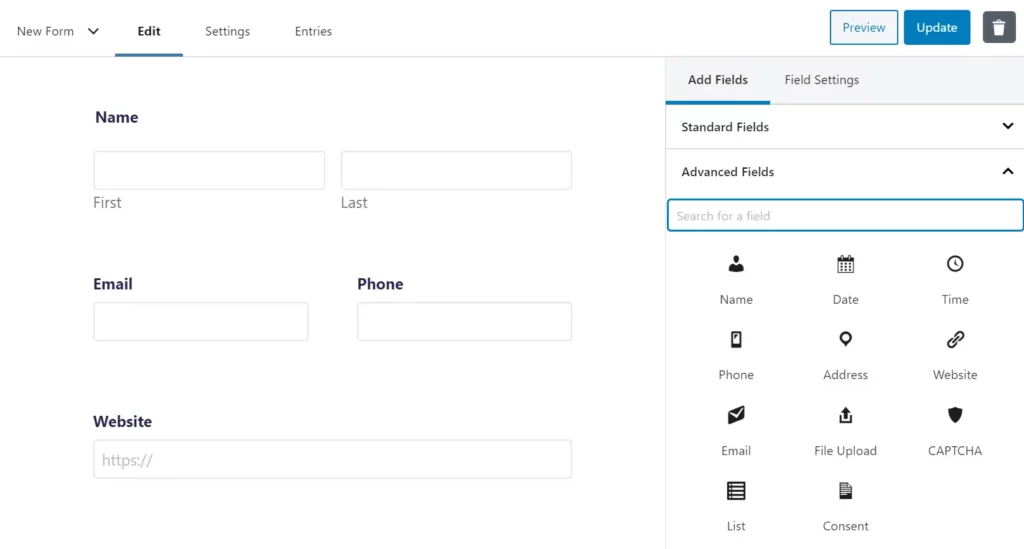
When you compare it directly with Forminator across real decision-making metrics, the differences become clearer.
Ease of use
Forminator aims for immediate comfort. The drag and drop builder feels approachable from the moment you open it. The interface stays clean, the settings stay minimal, and most configurations appear only when needed. Beginners adapt quickly and can publish solid forms within minutes.
Gravity Forms is also visual and intuitive, but it has a more structured rhythm. The builder expects you to move through settings methodically. Nothing feels complicated, but the experience is more procedural. Teams, agencies, and users managing complex forms tend to appreciate that structure. Solo creators often find Forminator quicker to settle into.
Feature depth
Forminator tries to deliver broad functionality right away. Quizzes, polls, calculations, Stripe payments, conditional logic, and multi-step forms all come without cost. It makes sense for creators who want “everything ready to go” without climbing pricing ladders.
Gravity Forms focuses on depth. Not more features, but more control inside the features.
Examples include:
• advanced conditional routing
• multi-page flows for long forms
• nested forms
• conditional notifications
• granular entry permissions
• sophisticated approval workflows
So Forminator gives you generous features that cover most everyday needs.
Gravity Forms gives you the kind of precision required in business-critical or regulated environments.
Integrations
Both plugins integrate well, but the ecosystems differ in scale and intent.
Forminator includes essential integrations for free. Google Sheets, Slack, Trello, Mailchimp, HubSpot, and others work without upgrades. This is ideal for small teams and growing sites.
Gravity Forms has a significantly larger integration library. From CRMs and payment gateways to PDF engines and automation platforms, almost every major tool has an official add-on. Most of these add-ons require higher-tier licenses, so the value depends on how extensive your stack is.
If your workflow depends on multiple enterprise services, Gravity Forms fits better.
If you need only the essentials, Forminator is easier and cheaper to maintain.
Performance
Gravity Forms is engineered for stability. It loads assets selectively and processes conditional logic efficiently. On larger sites, especially those running many integrations or large workflows, Gravity Forms maintains consistency.
Forminator performs well but is slightly heavier because of its all-in-one architecture. When combined with multiple advanced fields or calculations, Gravity Forms tends to remain smoother under load, especially in backend entry management and form rendering.
Pricing
Gravity Forms is premium only, starting from $59 per year. No free version.
Who should pick it
Choose Gravity Forms if your forms are tied to operational workflows, approval processes, routing, or enterprise tools. It fits teams that value structure, stability, and add-on depth more than upfront convenience. Forminator still offers incredible value, but Gravity Forms becomes the natural match when precision and extensibility are non-negotiable.
3. Ninja Forms
Ninja Forms and Forminator attract similar audiences but follow fundamentally different philosophies in pricing, scaling, and feature distribution. The comparison becomes meaningful once you evaluate them through usability, flexibility, and long-term cost.
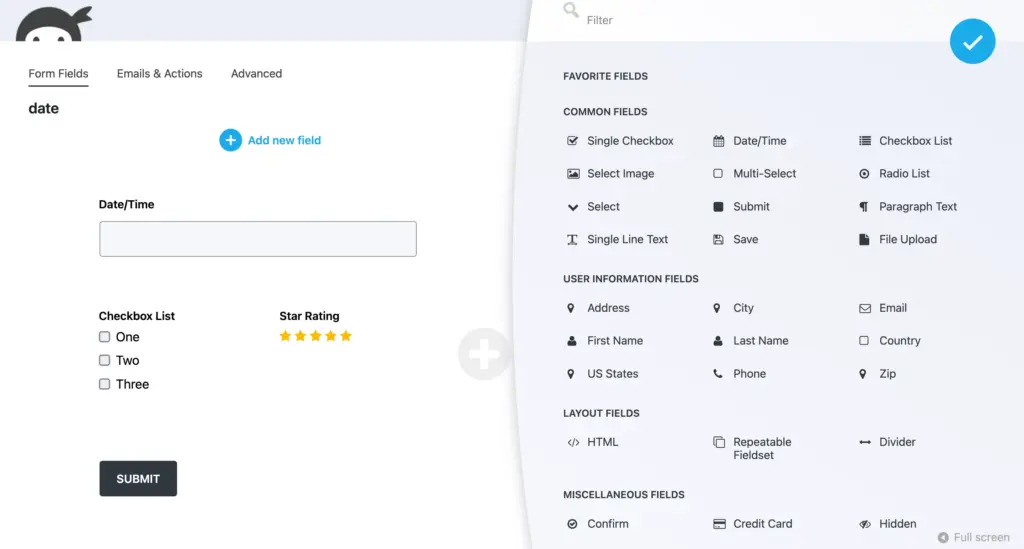
Ease of use
Both plugins use drag and drop.
Forminator feels smoother, cleaner, and more modern. It guides beginners with a simple layout and minimal configuration screens.
Ninja Forms has a clean interface as well, but many adjustments open inside separate panels or configuration windows. The workflow is not difficult, just slightly more segmented. Agencies with varied client needs usually appreciate this structure.
Feature depth
Forminator brings a lot directly into the free tier:
• quizzes
• polls
• calculations
• conditional logic
• payments
Ninja Forms takes a modular approach.
The core plugin is lightweight and free, but almost every advanced feature is an add-on.
This modularity is not a weakness. It allows you to buy only what you truly need. But if your needs grow quickly, the add-ons stack up.
Integrations
Ninja Forms offers many integrations, but each is usually an individual extension.
Want Stripe? Add-on.
Want Salesforce? Add-on.
Want PDFs? Add-on.
Forminator includes core integrations inside the free tier, which is simpler for smaller teams.
Choosing between them depends on whether you prefer “everything included” or “pay only for what you use.”
Performance
Ninja Forms is lightweight at its core. Because most advanced features are installed as add-ons, you only load what you actually use. This modular system keeps performance stable on most setups.
Forminator, by contrast, carries more features by default, which introduces a bit more weight on busy installations. The difference is small but becomes noticeable as the number of forms or conditional rules grows.
Pricing
Ninja Forms uses an extension-based model. The pro version starts at $99 per year.
Who should pick it
Choose Ninja Forms if you prefer modular pricing, or if you run agencies where different sites need different tools. For users who want everything out of the box, Forminator stays easier and more predictable. The advantage of Ninja Forms is flexibility. The advantage of Forminator is what you get for free.
4. Everest Forms
Everest Forms takes a simple approach. While Forminator tries to give you everything at once, Everest Forms focuses on a lighter workflow.

Ease of use
Everest Forms is very beginner-friendly.
The interface is minimal, the builder is clean, and most settings are easy to understand even without documentation.
Forminator has more features and more configuration screens. For some users, that feels empowering. For others, it feels busy.
If you prefer a simple, clean form builder that does not overwhelm you with options, Everest Forms feels refreshing.
Feature depth
Everest Forms covers the essentials:
• multi-column layouts
• conditional logic
• templates
• simple payment collection via add-ons
Forminator clearly provides more functional variety with quizzes, polls, calculations, and analytics. Everest Forms does not attempt to compete on breadth. Instead, it stays focused on clean core form building.
Integrations
Everest Forms connects with email tools, payment gateways, and CRM platforms. Most of these integrations require a Pro plan.
Forminator includes more free integrations by default.
Performance
Everest Forms is very light. The builder loads quickly, and forms render with minimal footprint. It does not include heavy modules like quizzes or polls, so the plugin stays lean even with multiple forms.
Forminator is heavier because of its bundled feature set. While still efficient, it can feel slower on sites with many active forms or high submission volume.
Pricing
Everest Forms offers affordable Pro plans starting at $69 per year and occasional lifetime deals.
Who should pick it
Choose Everest Forms if you want something simpler than Forminator, with a lightweight builder and no extra modules you do not need. If your forms are straightforward, Everest Forms fits naturally into that workflow.
5. WS Form
WS Form and Forminator sit at opposite ends of the form-building spectrum. Forminator is built for general users. WS Form is built for professionals who want total control.

Ease of use
WS Form uses drag and drop, but the configuration depth is unlike any other plugin.
Every field has dozens of settings.
- Debug panels.
- Responsive breakpoints.
- Performance controls.
For developers, this is freedom.
For beginners, it can feel overwhelming. Forminator is far easier to onboard.
Feature depth
WS Form is unmatched in technical power:
• conditional branching
• advanced calculations
• dynamic fields sourced from posts, users, or database tables
• powerful repeater fields
• complex logic flows
Forminator beats it in quizzes and polls, but everything else tilts toward WS Form when you need precision.
Integrations
WS Form has a large integration library including CRMs, email platforms, automation tools, and marketing systems.
Most integrations require Pro version.
Performance
WS Form is extremely fast in rendering but has a heavier backend. The builder exposes deep configuration options, which means more scripts and controls loading for each field. Developers appreciate this precision, but it is a more intensive interface.
Front-end performance is excellent. WS Form outputs clean, optimized markup and handles large forms without strain. Compared to Forminator, WS Form is more efficient under complex conditional branching and dynamic data loading.
Pricing
WS Form has a lite version available for free. Its pro version starts from $59 per year.
Who should pick it
If you want total control over form behavior, WS Form gives you a technical playground that Forminator does not attempt to replicate.
6. Contact Form 7
Contact Form 7 is the oldest, simplest, and most developer-centric form plugin on WordPress.
Compared to Forminator, they almost feel like different worlds.
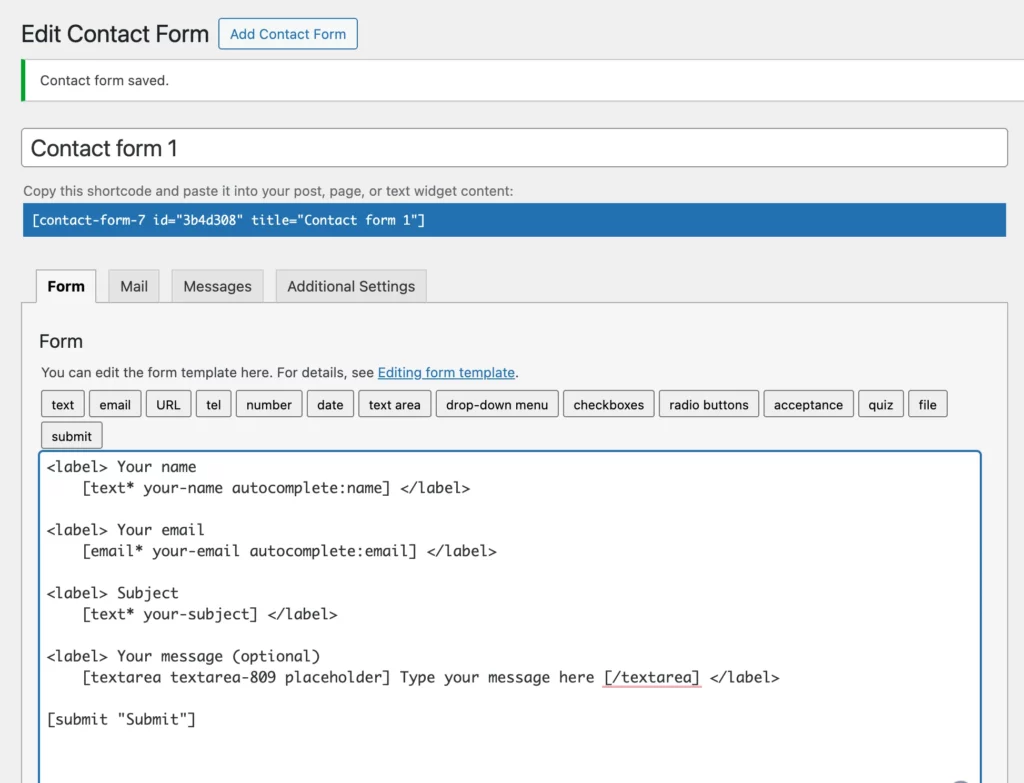
Ease of use
Forminator uses drag and drop.
Contact Form 7 forces you to write HTML-like syntax manually. If you enjoy that, it works. If you do not, it quickly becomes a burden.
Feature depth
Forminator has polls, quizzes, payments, logic, and analytics.
Contact Form 7 has none of these without addons.
Integrations
Both rely on add-ons for advanced features.
But Forminator has official integrations while Contact Form 7 depends heavily on third party ecosystem plugins.
Performance
Contact Form 7 is as light as it gets. No visual builder, no heavy modules, no UI scripting. It loads fast in both frontend and backend. The performance footprint is tiny.
Forminator is heavier due to its visual builder and engagement modules. For users who prioritize pure speed and do not need advanced features, Contact Form 7 remains the lightest option.
Pricing
CF7 is completely free. But Forminator’s free version is more powerful.
Who should pick it
If you like hand coding everything, CF7 gives you full control. For everyone else, Forminator is significantly more practical.
Coming to the decision
When it comes to Forminator alternatives, there is no single winner.
It depends entirely on what you want next from your form builder.
If you want a fast, all in one form builder with strong free features and powerful integrations, Fluent Forms is the most balanced option.
If you need advanced workflows or deep conditional systems, Gravity Forms or WS Form give you that precision.
If you want something simple, clean, and lightweight, Everest Forms feels refreshing.
If you want modular pricing and scalable add-ons, Ninja Forms gives you flexibility.
If you want full manual control, Contact Form 7 remains the classic choice.
Forminator is already strong, but these alternatives give you new options.
Some give you more speed. Some give you more automation. Some give you better long term costs. Some give you more design freedom.
Choose based on your workflow, what keeps you productive, and what helps your forms grow with you.
If you are still confused, drop your questions below. I will help you figure it out.

This is Sumit. He’s a physics major who’s trying to understand both the physical as well as the WordPress worlds. Whenever he’s not busy, plays fifa or spends time with his family.




Leave a Reply