
Contact Form 7 Alternatives: Upgrade Your Workflow with Top Form Builders

Contact Form 7 is a classic. It’s one of the first WordPress form builders ever made – and for many of us, that’s where the story began. But times have changed. Even free users now expect more. Drag and drop, smart integrations, conditional logic – these aren’t premium perks anymore. They’re the basics.
If you’re still using Contact Form 7 and starting to feel like you’ve outgrown it, you’re not alone. I’ve tested multiple form builders over the years, and I can say this with confidence – there are better options now, even for free users.
And because I’ve actually used these tools already, this isn’t a random roundup. It’s a genuine recommendation list built on practical experience. I’ve picked six alternatives that make sense for Contact Form 7 users – tools that don’t overcomplicate your workflow but still give you more power, control, and ease.
Let’s start with the foundation.
TL;DR
- Contact Form 7 started strong but never evolved.
- Its manual setup, limited integrations, and lack of support now make it hard to justify.
- Fluent Forms leads the pack – fast, native, and generous, even in the free version, with integrations for Stripe, Slack, Mailchimp, FluentCRM, and Fluent Support ready to go.
- Forminator and Formidable Forms shine for interactive or data-heavy workflows.
- Ninja Forms and WPForms make form building effortless for beginners.
- Bit Form stands out for automation and affordable integrations.
- Contact Form 7 still works – but if you want modern speed, logic, and reliability, Fluent Forms is the natural next step.
Why people liked Contact Form 7
Contact Form 7 is the flagbearer of WordPress form building. It’s one of the first plugins to ever come to market, and it’s still holding on after all these years. It became so popular that an entire ecosystem of addons and companion plugins grew around it.
Even with the rapid rise of new form builders, Contact Form 7 maintains a steady presence – mostly because it gives a certain kind of freedom. It doesn’t lock you into predefined templates or visual builders. Instead, it lets you write your own HTML and CSS, and structure everything manually.
That level of control appeals to a specific group of users. Developers, or anyone comfortable with code, often find it refreshing. You can embed Bootstrap classes, tweak layouts directly, and feel like you’re building the form from scratch – not dragging boxes around on someone else’s grid.
It’s a basic plugin. But it’s a plugin that gives you ownership. You decide how everything looks and functions. That sense of control is why Contact Form 7 has survived when many early plugins faded away.
Why people are looking for Contact Form 7 alternative
But let’s be honest – this approach doesn’t work for everyone. The same “freedom” that developers love can quickly turn into frustration for non-technical users.
For many, Contact Form 7 now feels like unnecessary work. When other free plugins let you design responsive, conditional, and integrated forms in minutes, spending extra time styling basic inputs starts to feel like wasted effort.
And it’s not just about ease of use. Contact Form 7 has serious functional limitations. It has almost no built-in integrations. No drag and drop. No conditional logic. Even something as simple as managing form entries requires additional plugins.
On top of that, real-world users are facing ongoing issues that never seem to get resolved.
For instance, file attachments don’t work properly when the upload folder is under a symlink, and while this issue has been known for a long time – there’s no planned fix. I’ve personally faced problems like receiving “429 Too Many Requests” errors on GoDaddy hosting when submitting forms.
I also found that Contact Form 7’s lack of active support has become one of its biggest drawbacks. If something breaks, you’re on your own or forced to rely on community threads that often go unanswered.

Then there’s spam. Without proper spam protection, you’ll find your inbox filled with junk submissions. You can add CAPTCHA or Akismet, but again – those require additional setup.
And finally, customization is a nightmare. Sure, you can style it however you want – but that “freedom” comes at the cost of endless tweaking. One small change in layout can mean another round of HTML edits and CSS overrides.
So yes, Contact Form 7 still works – but only for a small fraction of users who love hand-coding every form. For everyone else, the plugin has become more of a roadblock than a resource.
That’s exactly why I decided to test and shortlist the best alternatives that make sense for Contact Form 7 users.
How I lined up the Contact Form 7 alternatives
When you’re looking for a replacement for a free plugin, the first thing that matters is value. Most users who start with Contact Form 7 do so because it’s free, lightweight, and simple. So any good alternative needs to check those boxes too.
Here’s the set of metrics I used while testing:
- Free version strength: The plugin should offer enough in the free tier to handle contact forms, feedback forms, or simple lead captures without forcing you to upgrade.
- Pro pricing: If you do decide to upgrade, the plan should feel fair – not bloated with features you’ll never use.
- Ease of use: The builder should be intuitive, visual, and clean. You shouldn’t need to touch code unless you want to.
- Performance: The plugin shouldn’t slow down your site or depend heavily on external servers.
- Integration readiness: It should connect smoothly with email marketing tools, CRMs, and automation platforms.
Based on these, here are my top six alternatives that are genuinely worth switching to.
Top 6 Contact Form 7 alternatives
Plugin | Free Version Strength | Pro Pricing | Notable Free Features | Ideal For |
Fluent Forms | Excellent – includes conditional logic, multi-step forms, and integrations | From $79/year or $349 lifetime | Conversational Forms, Conditional logic, AI form builder | Small businesses who want full control and speed |
Forminator | Excellent – very generous free version | From $15/month (via WPMU DEV) | Payments, polls, quizzes, Google Sheets integration | Small businesses and interactive projects |
Ninja Forms | Good – clean, basic form builder | From $99/year (add-ons sold separately) | Drag and drop, templates, unlimited submissions | Beginners or client projects |
Formidable Forms | Decent – limited advanced features in free version | From $79/year | Conditional logic, form-to-post, table views | Complex, data-driven forms |
WPForms | Good – easy to start, clean interface | From $99/year | Drag-and-drop builder, pre-built templates, email notifications | Beginners and small business sites |
Bit Form | Strong – many integrations available free | From $39/year | Multi-step forms, webhook, Google Sheets integration | Freelancers and integration-heavy workflows |
Fluent Forms
Fluent Forms is a lightweight WordPress plugin built for speed, flexibility, and full control. It feels native to WordPress – no external dashboards, no syncing issues. Everything runs in your WordPress setup, which means faster loading and complete data ownership.
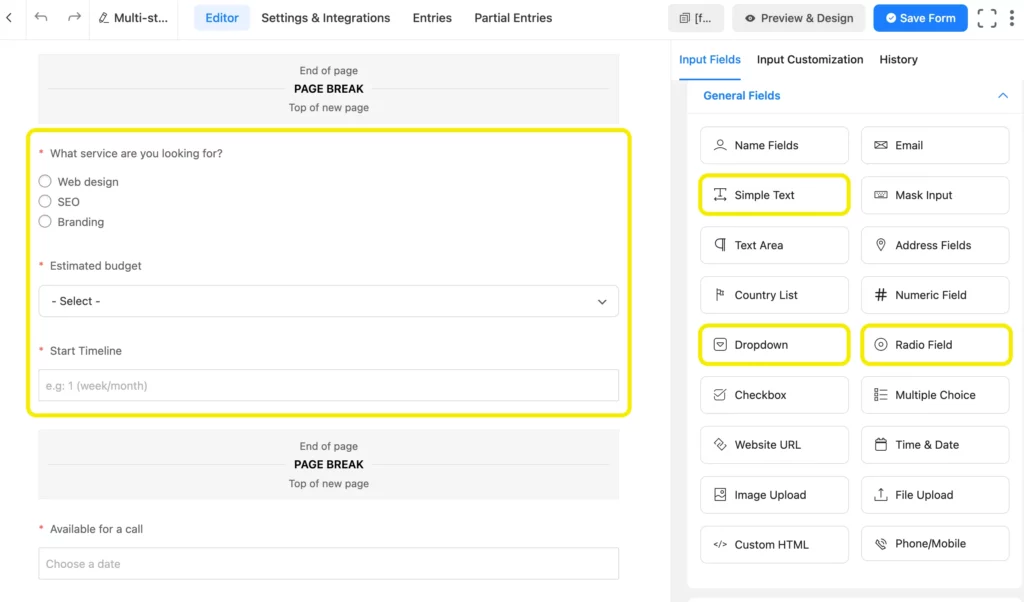
Whether you’re a developer or a first-time user, the interface feels clean and natural. You can see every change in real time, making form creation quick and visual.
Key features
- Conversational forms
- 60+ input fields (30+ in the free version)
- Reporting module (Pro & Free)
- Multi-step forms and advanced conditional logic
- Payment integrations: Stripe, PayPal, Mollie, Razorpay, Square, Paddle, Paystack
- 60+ integrations, including CRMs, automation, support, and community
- Frontend data display, polls, quizzes, and survey forms
Why it’s a good alternative to Contact Form 7
Fluent Forms takes everything that once made Contact Form 7 frustrating – setup, styling, and integrations – and turns it into a smooth, guided experience. You don’t need to touch code or piece together extra add-ons just to make it functional. Everything works natively, right out of the box.
What really defines Fluent Forms is how much it offers for free. Its free version doesn’t just stop at contact forms – it includes advanced features like conditional logic, multi-step and conversational forms, and a surprisingly wide set of integrations that cover real business use cases.
You can collect payments through Stripe, connect your team through Slack, handle customer queries using Fluent Support, manage campaigns with FluentCRM or Mailchimp, and even engage with the FluentCommunity – all without paying extra. These integrations alone give it an edge over almost every other plugin in its class.
The workflow feels fluid. You build visually, see changes in real time, and publish confidently – no shortcode hiccups, no CSS tinkering. It feels like Contact Form 7 rebuilt for modern WordPress: fast, secure, visually clean, and deeply capable.
Fluent Forms doesn’t shout to impress – it just works. Every piece of it feels like it was built by people who actually use forms daily, which makes it both dependable and deeply familiar once you start building.
Pricing
The free version is available at WordPress.org. Fluent Forms Pro starts at $79/year for a single-site license, and you can grab a lifetime plan from $349. Both include unlimited forms and submissions, so you’ll never hit a usage cap.
Bit Form
Bit Form is a newer player in the WordPress ecosystem, but it’s quickly building a reputation as one of the most flexible and integration-focused form builders available.
Key features
- Fast and modern drag-and-drop builder
- 50+ integrations including CRMs, Google Sheets, and email tools
- Conditional logic and multi-step forms
- Payment gateways and webhook support
- Export/import functionality for easy migration
Why it’s a good alternative to Contact Form 7
Bit Form brings modern automation and integrations into the form-building experience. It’s lightweight yet surprisingly powerful, built for users who want to connect forms with other business tools without complex setups.
It’s an especially strong alternative for Contact Form 7 users who’ve struggled with external add-ons or unreliable support. Google Sheets, CRMs, email marketing tools, and even webhooks come integrated for free – making it ready for serious workflows right from the start.
The interface is smooth and minimal, and the onboarding process is refreshingly straightforward. It doesn’t try to dazzle you; it just gets you from setup to launch faster than most plugins can.
Bit Form stands out for its integration value – what you get in its free plan can easily rival paid features elsewhere. If you’re managing multiple forms across different sites or tools, it gives you the control and connectivity Contact Form 7 always lacked.
Pricing
Starts free on WordPress.org, and premium plans begin at $39/year. You get lifetime deals occasionally, which makes it even more affordable.
Forminator
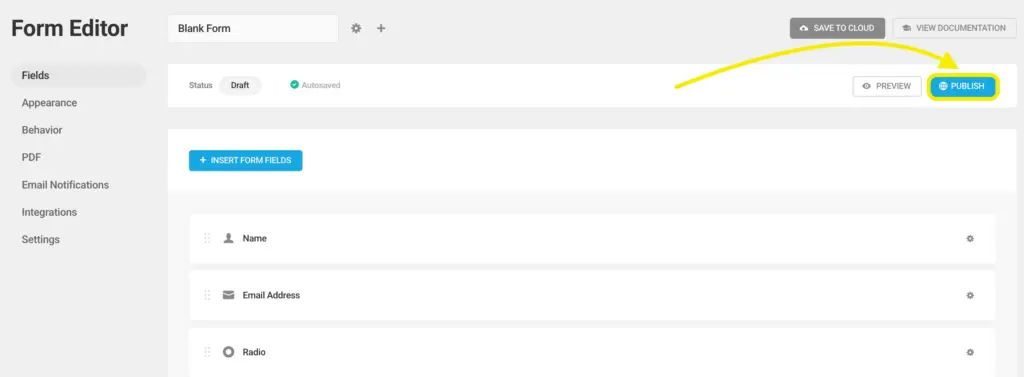
Forminator is a feature-packed form builder by WPMU DEV, known for its solid free version. It’s visual, simple, and has all the essentials that Contact Form 7 misses – without making you feel trapped behind a paywall.
Key features
- Visual drag-and-drop builder
- Conditional logic
- Polls, quizzes, and calculations
- Payment integrations (PayPal and Stripe)
- Google Sheets and Slack integration
- Spam protection and built-in form analytics
Why it’s a good alternative to Contact Form 7
Forminator delivers the kind of instant usability Contact Form 7 never managed. It’s designed to be visual, interactive, and ready for real-world scenarios – whether you’re collecting leads, running polls, or accepting payments.
Instead of building through shortcodes and guesswork, you simply drag, drop, and preview everything live. That simplicity is paired with powerful functionality, like conditional logic, calculations, and form analytics, which help you understand how users interact with your forms.
Where Contact Form 7 often feels like a technical exercise, Forminator feels like productivity. You can create full surveys, run quizzes, or accept payments via PayPal or Stripe without additional plugins. It’s also surprisingly capable in automation – integrations with Google Sheets and Slack come built in, which is rare at the free level.
It doesn’t try to be overly technical or flashy – it just makes sense. If you’ve ever felt like you were “working around” Contact Form 7 to get something done, Forminator removes that struggle completely.
Pricing
You can use most features for free. Formanitor Pro version (via WPMU DEV membership) starts at $15/month and includes advanced integrations and priority support.
Ninja Forms
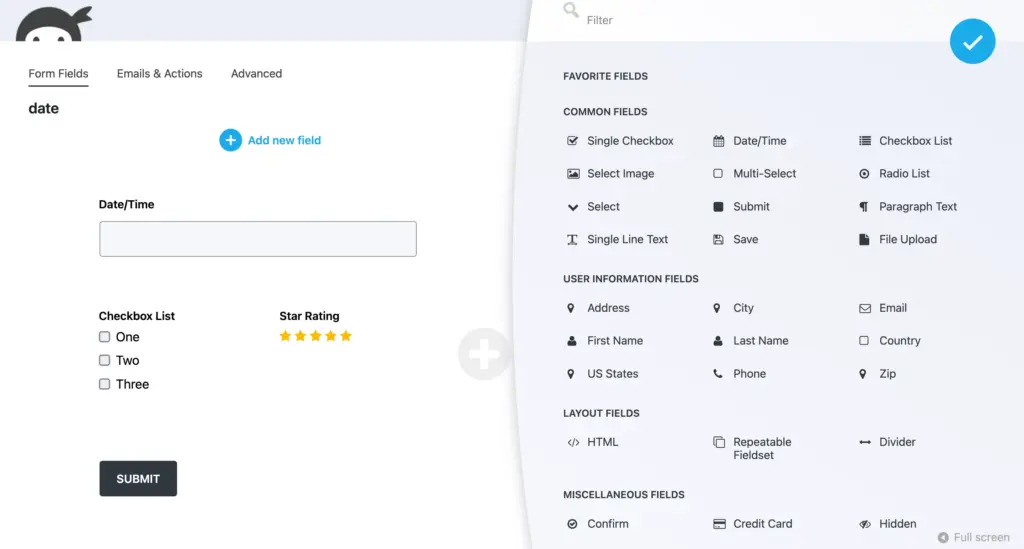
Ninja Forms has been around for years, and it’s often seen as the “friendly” upgrade to Contact Form 7. It focuses on simplicity and accessibility while offering modular add-ons for those who want to scale.
Key features
- Drag-and-drop interface
- Unlimited forms and submissions
- Pre-built templates for faster setup
- Email marketing integrations
- Export and manage entries from the dashboard
Why it’s a good alternative to Contact Form 7
Ninja Forms brings approachability back to form building. It’s made for users who want to create forms quickly without sacrificing quality or design. Everything is drag-and-drop, with no code, no confusion, and no guesswork.
While Contact Form 7 users often rely on manual HTML for layout control, Ninja Forms handles styling and alignment automatically. You can start with a pre-made template, adjust what you need, and hit publish. It’s that simple.
What makes it a fair alternative is flexibility. The core plugin is free and functional, and you can add integrations or premium features only when you actually need them. That modular pricing structure keeps it light and scalable – perfect for small businesses or developers managing multiple client sites.
Ninja Forms won’t overwhelm you with endless settings. It focuses on getting your forms live fast and looking polished from the start – something Contact Form 7 could never do without heavy lifting.
Pricing
Free core plugin available on WordPress.org. Ninja Form’s paid plans start from $99/year for a single site, with add-ons priced separately.
Formidable Forms
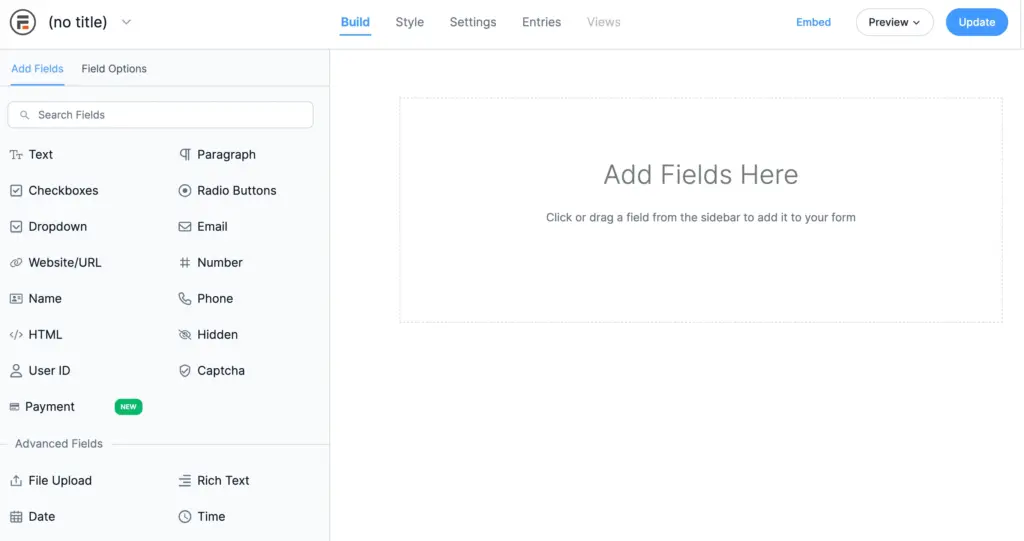
Formidable Forms positions itself as a power tool – ideal for users who need more than just contact forms. It’s robust, flexible, and built to handle data-driven forms like directories, calculators, and applications.
Key features
- Visual form styler
- Advanced conditional logic
- Multi-page forms
- Form to post conversion
- Frontend table views for form entries
- 3rd party integrations including Mailchimp, Zapier, Pabbly Connect, etc.
Why it’s a good alternative to Contact Form 7
Formidable Forms is for users who see forms as more than input fields – it’s for those who want to use collected data intelligently. You can build everything from calculators to directories and even dynamic tables that display entries on the frontend.
It’s still visual and drag-and-drop, but there’s a deeper layer of power underneath. You can turn form submissions into posts, apply logic to filter or display data, and even create dashboards within WordPress.
Compared to Contact Form 7’s static, text-based system, Formidable Forms feels like a complete data solution. You’re not just collecting information – you’re structuring it, displaying it, and using it to build something functional.
For anyone who has outgrown the simplicity of Contact Form 7 and needs something that scales technically, Formidable Forms offers that next step – clean, capable, and deeply configurable.
Pricing
Formidable Forms Pro starts at $79/year for a single site license. Higher plans unlock advanced views, payment gateways, and automation options.
Now the decision part
All these plugins are better than Contact Form 7 – but the right one depends on what you actually need.
If you want a fast, all-in-one form builder with complete data ownership and the best free feature set, Fluent Forms is the most balanced choice. It’s powerful, lightweight, and handles everything from simple contact forms to advanced automations with ease.
If you’re building interactive forms or data-driven workflows, Formidable Forms and Forminator stand out. They’re ideal for applications, directories, and projects where calculations or dynamic content are involved.
If you value simplicity and clean UX, WPForms is a safe, polished option that requires zero technical skill.
If your goal is simplicity and speed, Ninja Forms is your friend. It’s beginner-friendly, visually clean, and perfect for sites that don’t need deep integrations.
And if you care most about integration flexibility and affordability, Bit Form is a smart pick. It offers great value for small businesses and freelancers who want professional features without high pricing.
In short, Contact Form 7 paved the way – but these modern alternatives carry the torch forward. They combine freedom with ease, performance with features, and support with stability.
The next time you’re rebuilding or updating your site, don’t settle for “it works.” Choose a form builder that actually keeps up with what you need today.
Questions in mind? Flood the comments below!

This is Sumit. He’s a physics major who’s trying to understand both the physical as well as the WordPress worlds. Whenever he’s not busy, plays fifa or spends time with his family.




Leave a Reply