

Advanced Features of Fluent Forms
Fluent Forms is more than just a simple form builder. It’s designed to go beyond collecting names and emails, giving you powerful tools to automate workflows, manage data more efficiently, and provide a seamless user experience.
With over 60 input fields, advanced conditional logic, and dozens of integrations, it already covers the basics. The real power, however, comes from its advanced features.
These tools let you create interactive calculators, automate confirmations, generate documents, control access, and even publish user submissions as content.
Below, we’ll go through the most useful advanced features of Fluent Forms, explain what they do, show you how they can be applied in real scenarios, and share resources where you can learn more.
Here’s a quick overview of the top features that make Fluent Forms an advanced form builder, before we dive into details:
Advanced Features | What it helps you do |
Numeric calculation | Perform real-time math for pricing, ROI, or fitness calculators |
Advanced form validation | Enforce custom input rules for accurate data |
Advanced post creation | Turn form entries into WordPress posts or custom content |
Advanced filter for entries | Search, sort, and export exactly the data you need |
PDF add-on | Generate branded PDF copies, or invoices of submissions automatically |
Coupon | Offer discounts and promo codes on payment forms |
Double opt-in confirmation | Verify email addresses before adding subscribers |
Email summaries | Get submission reports delivered to your inbox |
Conditional confirmation | Show tailored thank-you messages or redirects |
Conditional email routing | Forward entries to the right team member automatically |
Save and resume | Let users pause and finish long forms later |
User map location in submission | User map location in submission |
Advanced input & calculations
Numeric calculation
Fluent Forms can instantly perform mathematical operations inside your forms. Instead of relying on third-party tools or manual calculations, you can build formulas with addition, subtraction, multiplication, and division right in the builder.
The results appear immediately after users enter their data, making the experience smooth and interactive.
You’ll just need to use the numeric field and enable calculation.
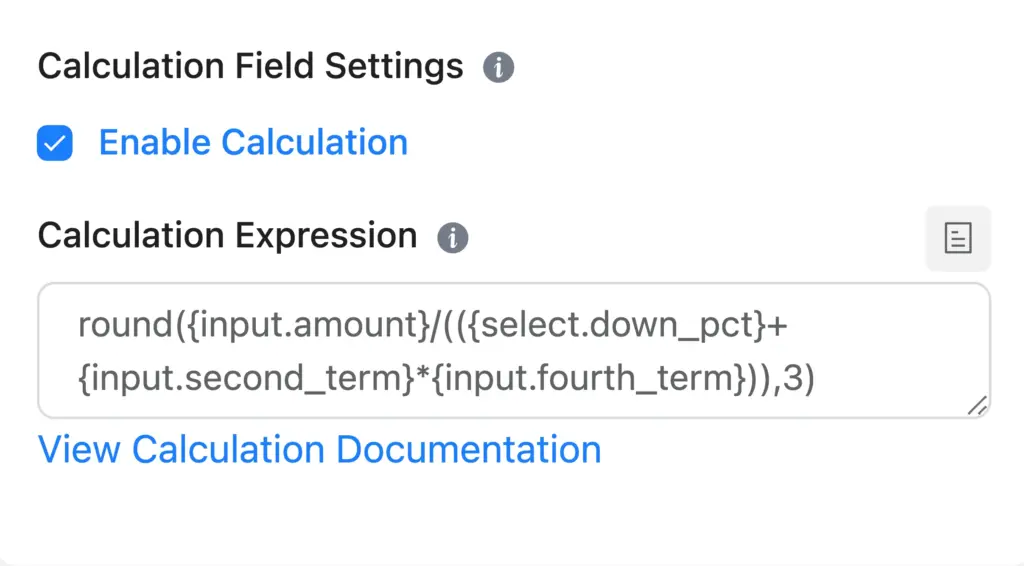
Learn – How to create calculator forms with numeric fields.
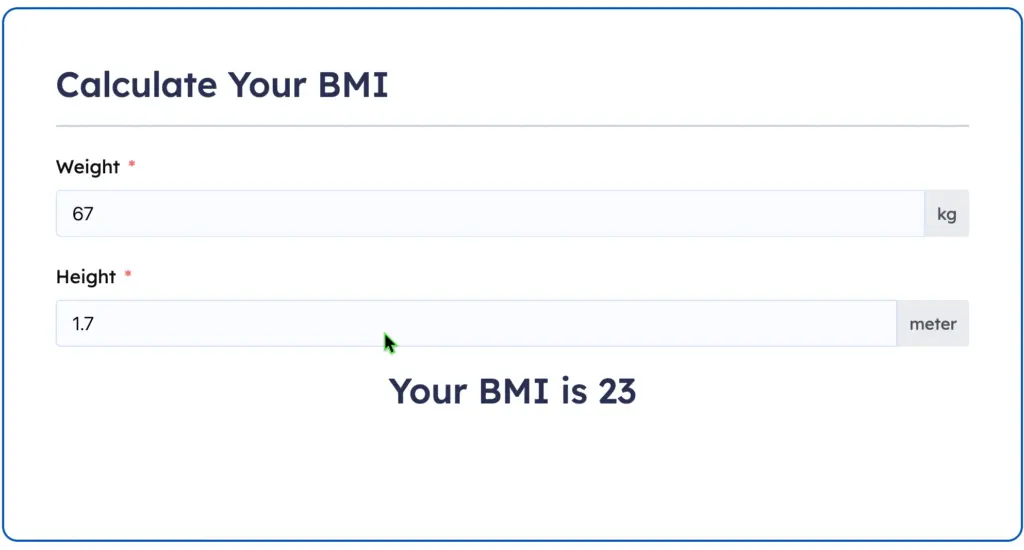
Consider a fitness coach who wants to offer a BMI calculator. Visitors simply type in their height and weight, and the form automatically displays their BMI. No external calculators needed.
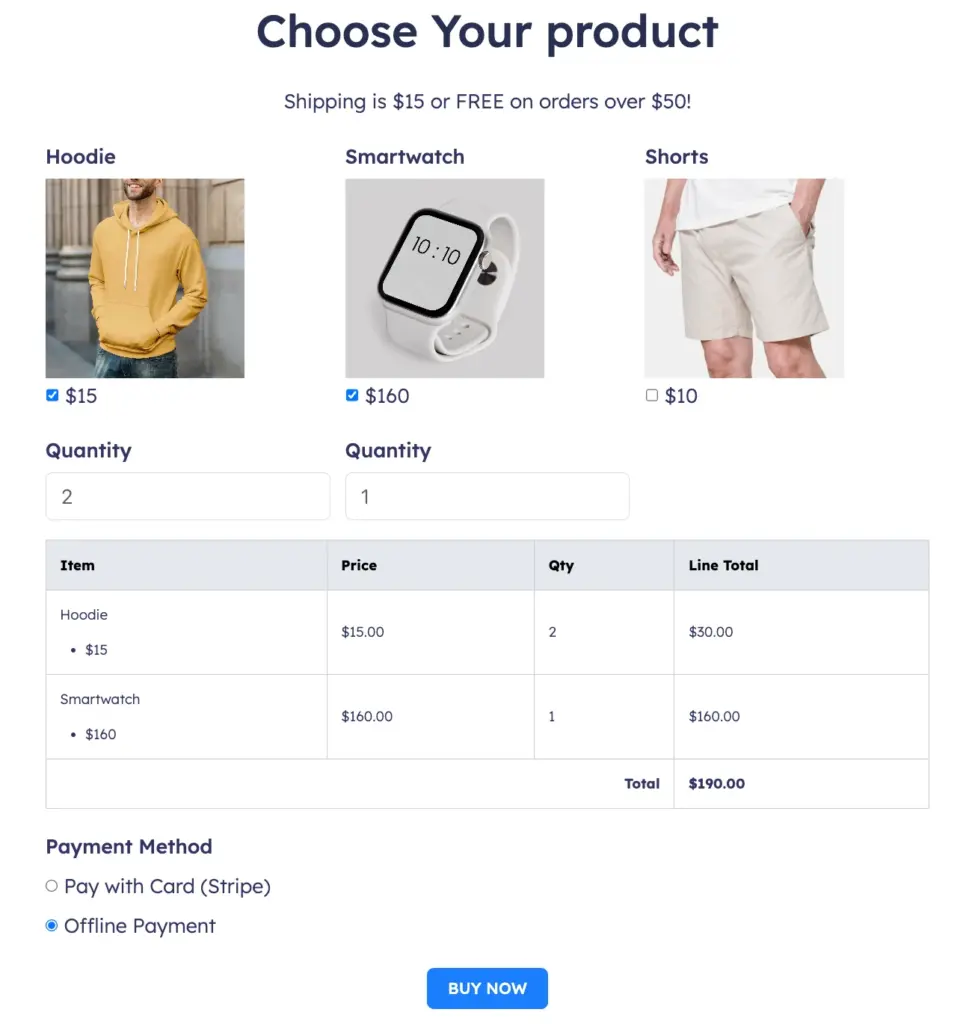
An online store could create a shipping cost calculator for product pricing, calculating total costs with tax and shipping instantly.
Real estate sites can build mortgage or rent estimators to help buyers make decisions faster. By providing instant answers, you make your forms more engaging and practical.
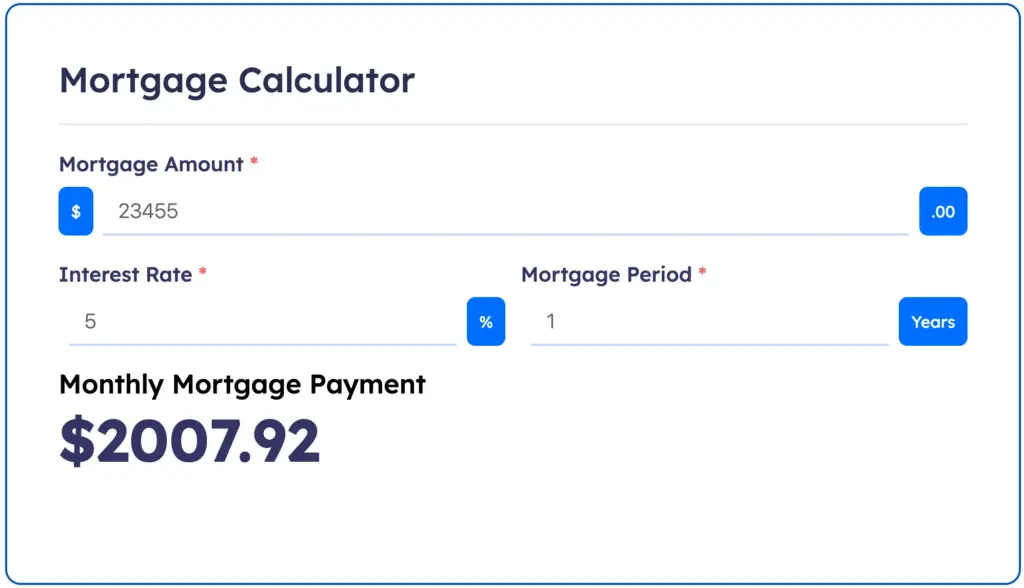
Check out our Calculator demo forms to test various calculators created using Fluent Forms.
Advanced form validation
Accurate data is the foundation of reliable workflows. Even if you do your best on writing a good placeholder text, users can still make mistakes.
When you need the submissions to meet your conditions, the advanced validation feature comes in handy.
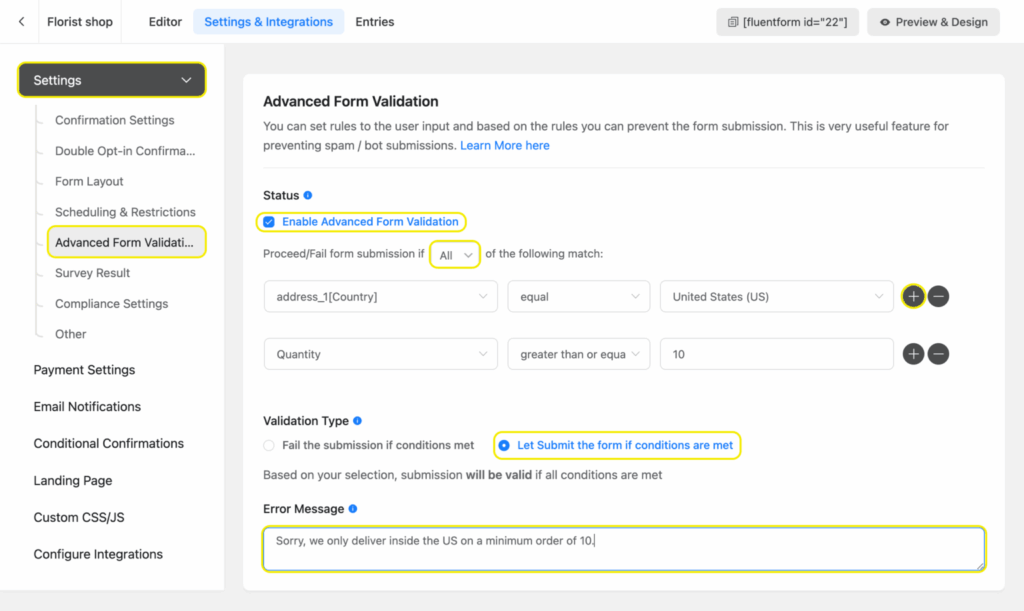
Fluent Forms’ advanced form validation goes beyond “required fields.” You can create rules for specific email types, order quantity, specify countries, and many more. This ensures that the submissions you receive are consistent and useful.
For instance, with an order form you might want to limit the shipping quantity for 10 products only, from the US. With validation rules, you can block incomplete or incorrect inputs. Businesses can also assign specific emails to complete the form for beta testing their digital products.
The result is a database filled with clean, standardized, and trustworthy data.
Content & data management
Advanced post/CPT creation
The advanced post/cpt creation feature transforms your forms into a content engine.
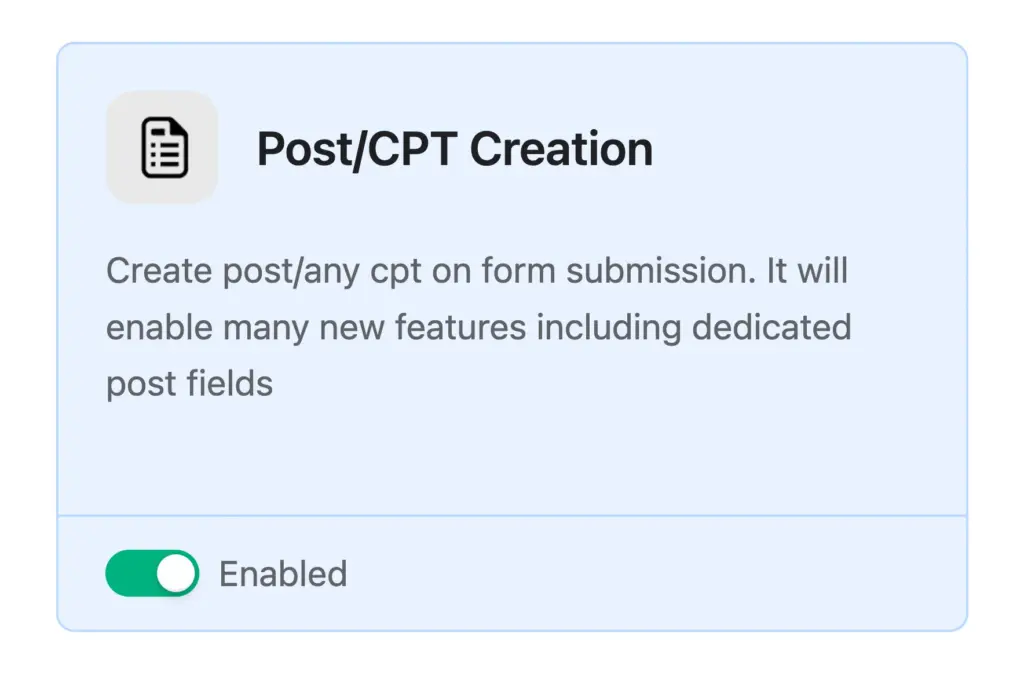
Instead of manually transferring data from submissions into your site, Fluent Forms can generate WordPress posts, pages, or custom post types directly from form entries.
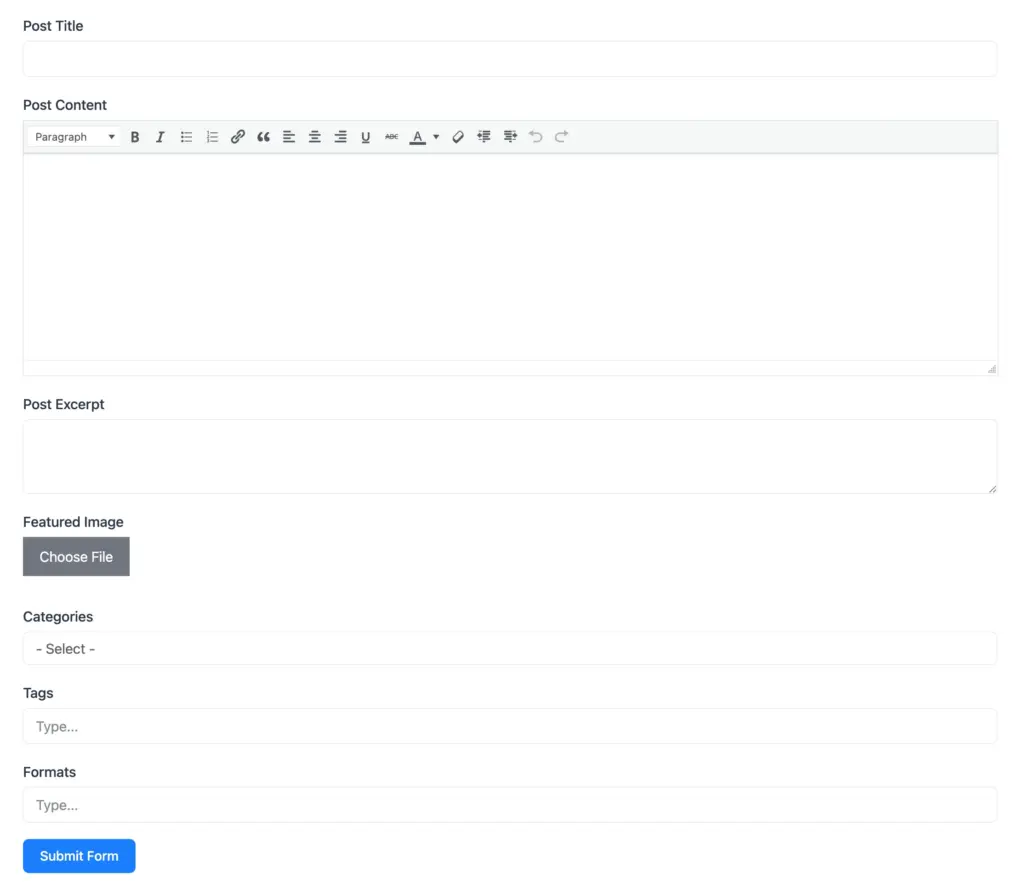
Think of a recipe website that thrives on community submissions. By creating a recipe form with fields for ingredients, instructions, and images, every submission can land in your WordPress dashboard as a draft post. You only need to review and publish.
For job portals, event listings, or testimonial collections, this feature keeps your content pipeline full without adding repetitive admin work. It’s a seamless way to scale user-generated content while staying in control of quality.
Frontend entry view
It’s a cool feature that reassures users about their form submission, by showing their submissions in the frontend.
With frontend entry view feature, Fluent Forms generates a unique hash linked to the submission, which can be included in a confirmation message or in a confirmation email.
Submitters can use this URL to view their own entries without requiring a WordPress login, while admins retain full access to manage submissions.
The shortcode for the entry view, can be used as a button in the confirmation mail or confirmation message.
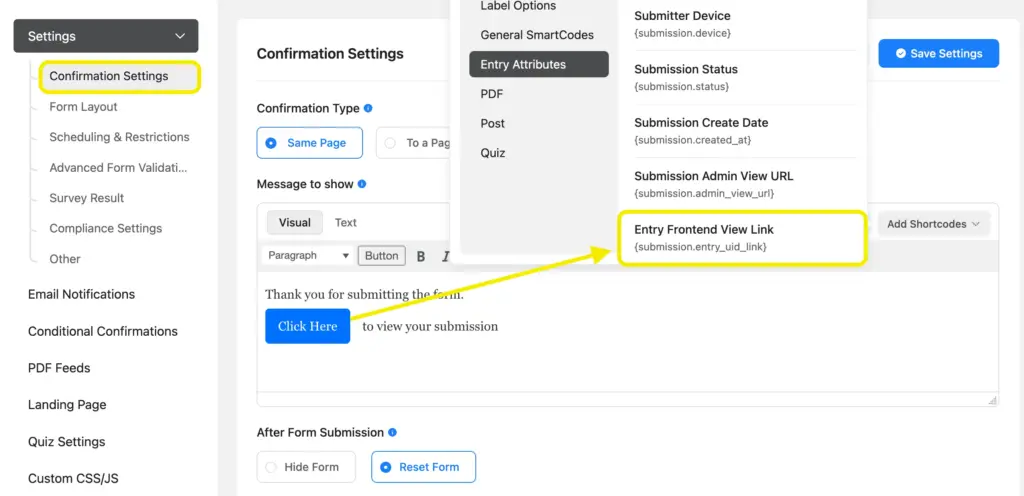
Make sure to enable the feature first.
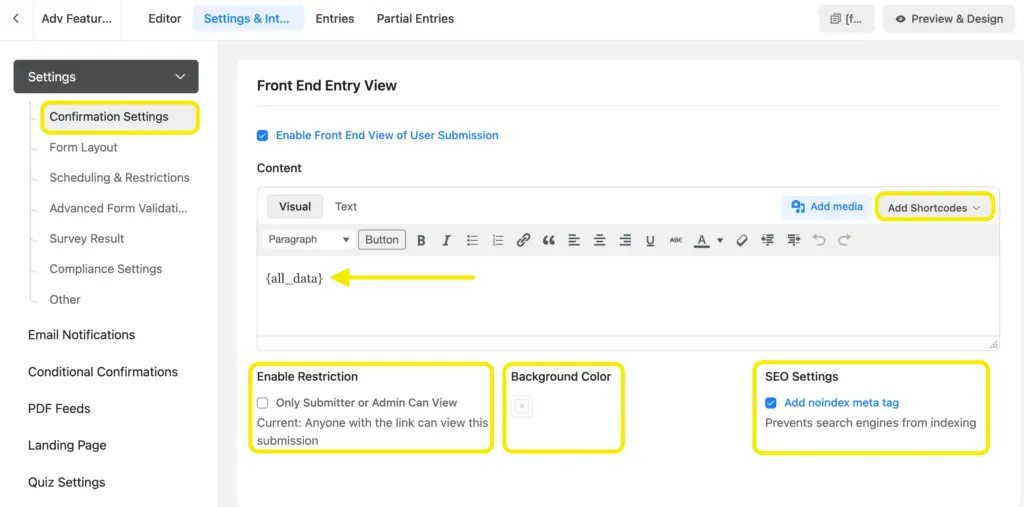
You can enable or disable restrictions for the viewers, customize background color, and choose whether you want it to be indexed or not.
Here’s a glimpse:

This feature enhances security and user experience by providing controlled, direct access to submission data, making it ideal for scenarios like event registrations, user-generated content, or sensitive data collection, all while maintaining simplicity and privacy.
Advanced filter for entries
When forms collect large volumes of data, finding what you need can feel overwhelming.
Fluent Forms’ advanced filter makes this simple by letting you search, sort, and filter submissions based on multiple criteria. You can narrow results by field values, payment status, user roles, or date ranges.
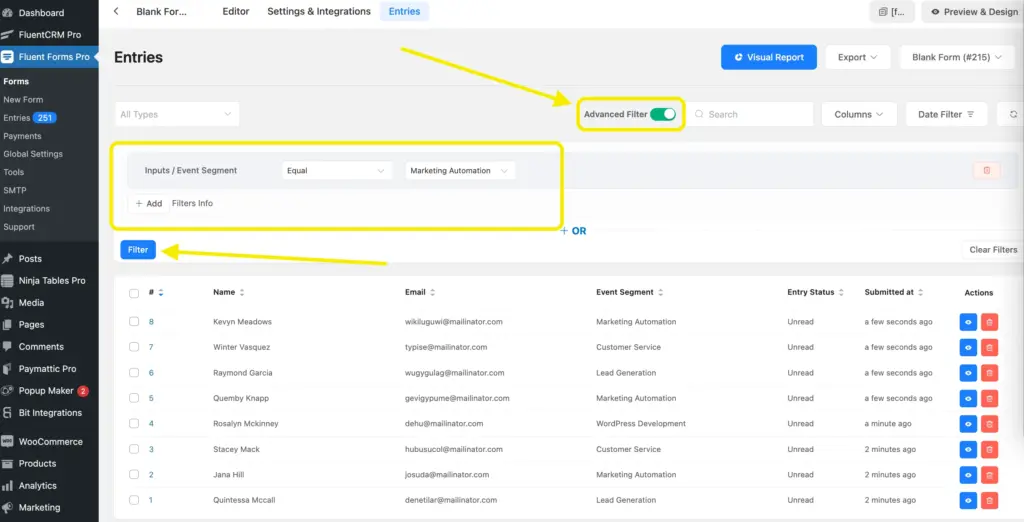
Imagine hosting a three-day virtual summit with different sessions. Hundreds of people register, but you only want to view attendees for the “Marketing Automation” session.
With a quick filter on that field, you have a clean, focused list ready to export.
If you’re selling products, you could filter orders by country or payment method for targeted reporting. It’s a huge time saver when managing data at scale.
PDF add-on
Submissions often need to be shared or stored in a professional format. Fluent Forms’ PDF add-on makes this automatic.
Every form entry can be converted into a clean, branded PDF that you can send to users, attach in emails, or store in your records. You can even customize the layout with your logo, brand colors, and structure.

Every form entry can be converted into a clean, branded PDF that you can send to users, attach in emails, or store in your records. You can even customize the layout with your logo, brand colors, and structure.
Additionally, you can encrypt it with a password for further protection of the data.
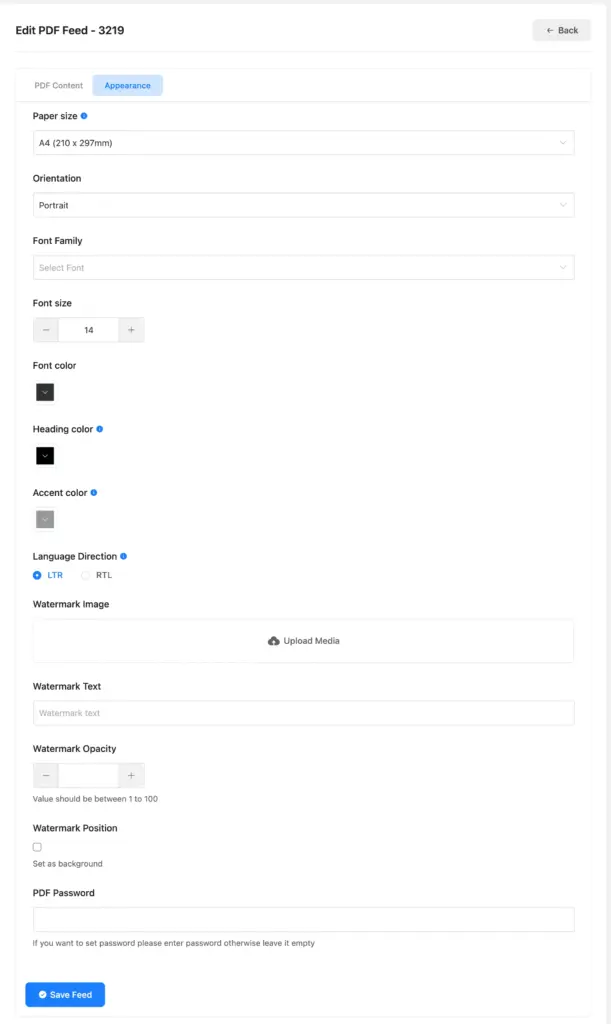
Look at the well organized professional looking pdf it provides:
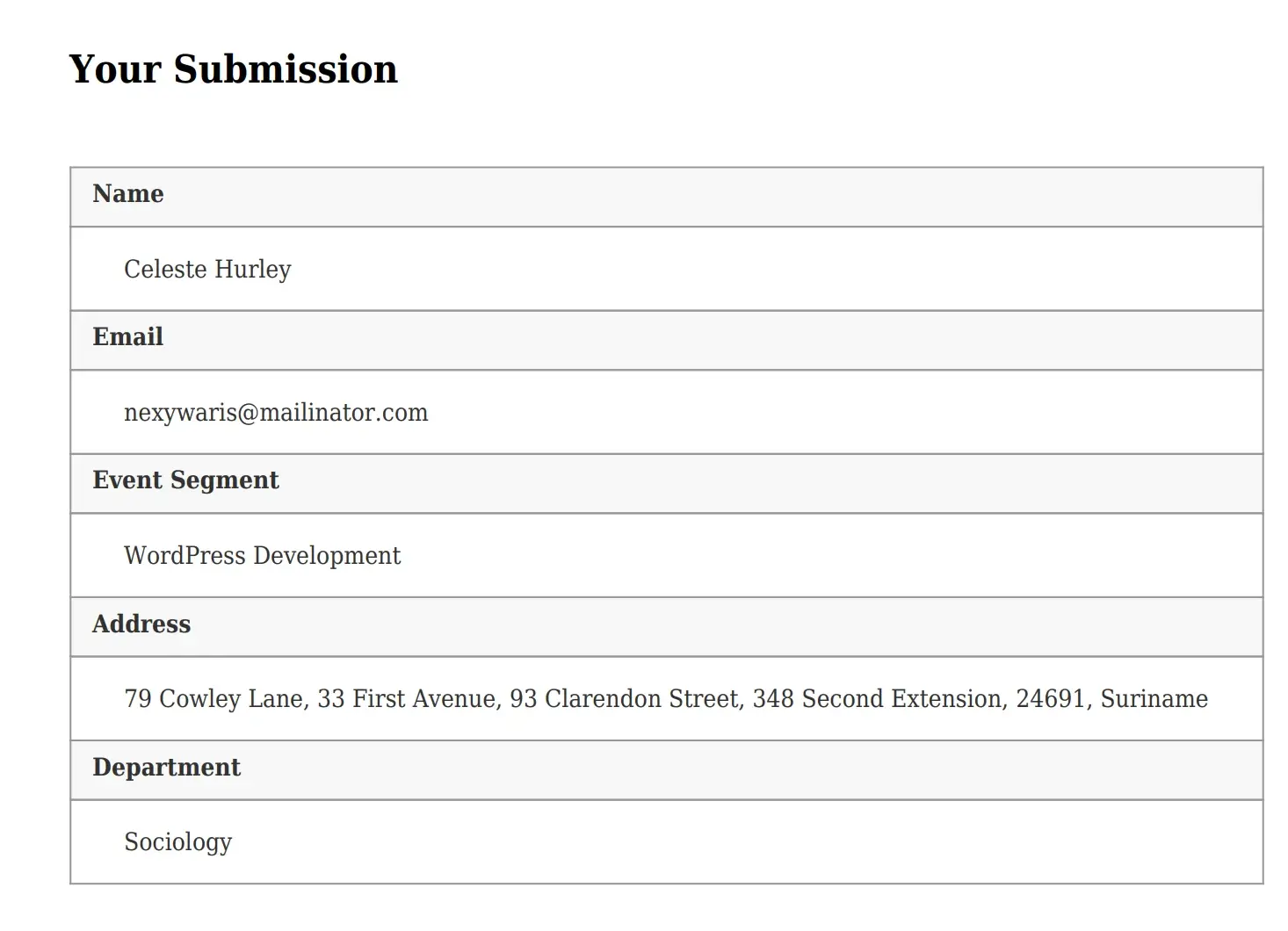
A travel company could use this to create PDF itineraries whenever someone books a trip. Customers get a well-crafted document in their inbox immediately, while your team receives the same file for record keeping.
Schools can issue admission confirmations, while service providers can generate invoices. It’s a practical way to add polish and streamline documentation.
Conversion & engagement tools
Coupon
Coupons are a tried and tested way to drive sales.
Fluent Forms allows you to add a coupon field directly to payment forms, with flexible rules for applying fixed or percentage discounts. You can control expiration dates, usage limits, and even apply conditions for specific products.
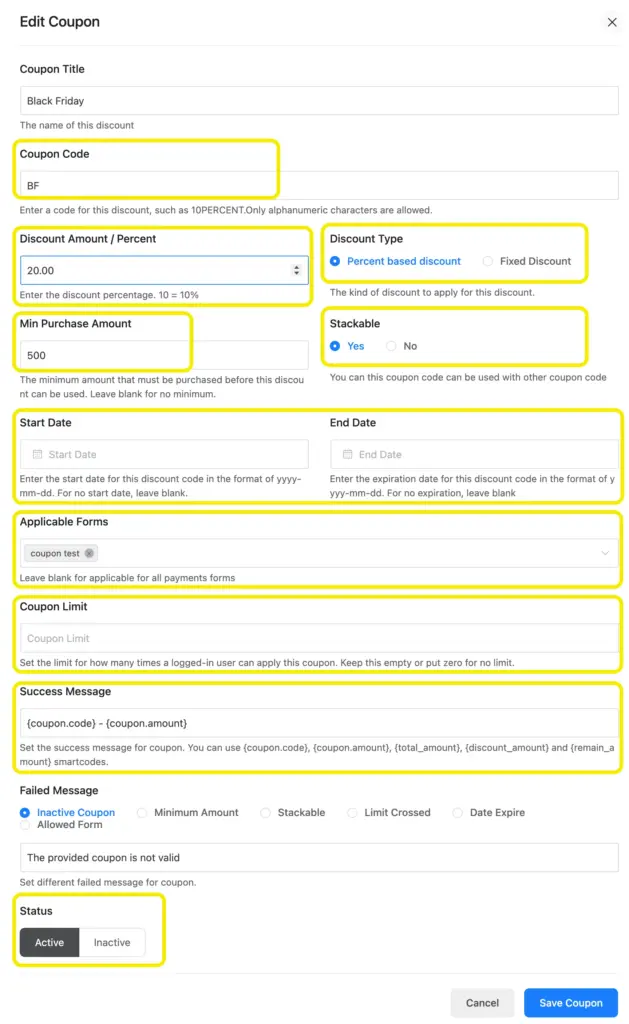
Suppose you are running a holiday promotion for an eCommerce store. You can create a code like “NEWYEAR20” that applies a 20% discount for the first 100 customers. As soon as users enter the code, their total updates instantly.
This approach not only encourages quick decisions but also builds loyalty by rewarding early supporters.
Double opt-in confirmation
When you build an email list, quality is just as important as quantity. Fluent Forms makes this easier with double opt-in.
After someone signs up, they receive an email containing a unique confirmation link. Only when they click it are they added to your list.
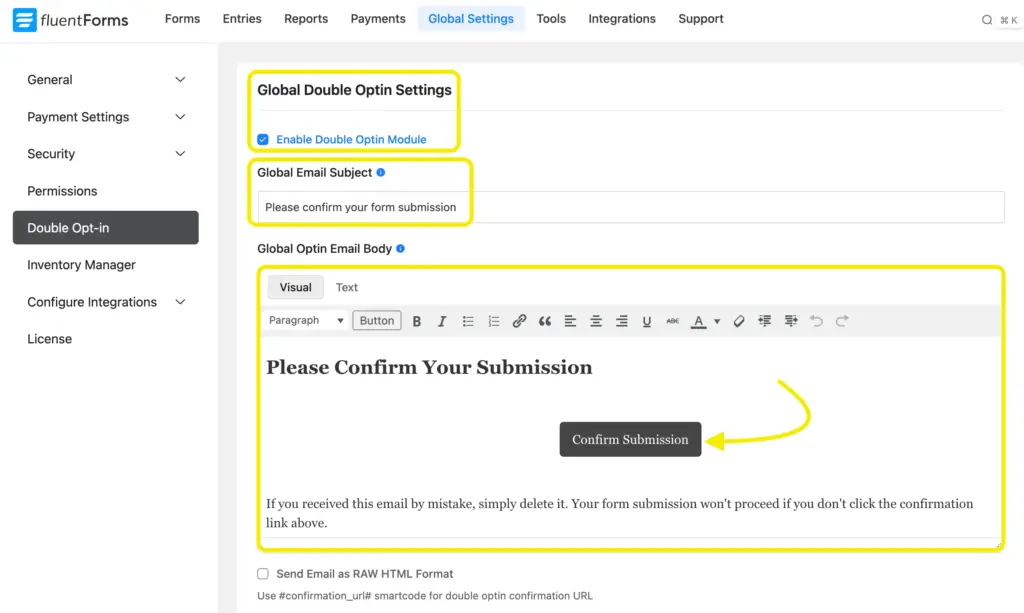
For a company offering free trials, this extra step ensures only real people with valid addresses get through. It stops fake signups, reduces bounce rates, and improves deliverability.
Over time, this helps maintain a strong sender reputation and keeps your list filled with subscribers who genuinely want your updates. That means higher open and click-through rates.
Email summaries
Keeping track of the form submissions is important.
With email summaries feature, Fluent Forms can automatically email you performance snapshots so you don’t have to log in constantly.
These summaries highlight the number of submissions, and overall weekly form performance.
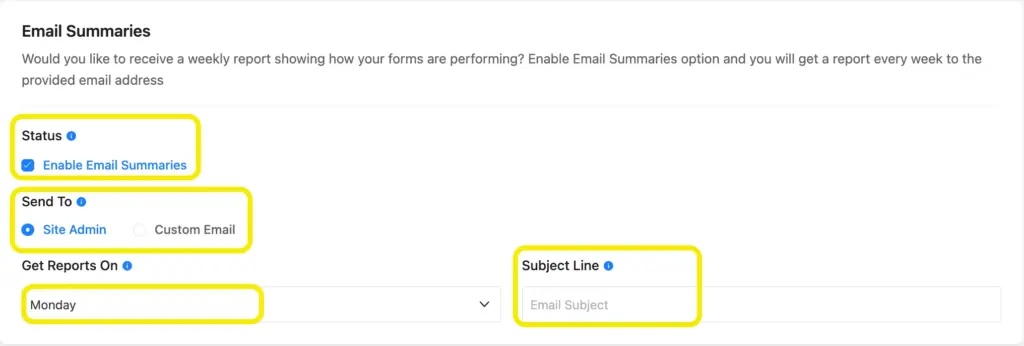
A real estate agency is a good example. With multiple lead forms running, the sales team may not have time to review entries one by one.
A Monday morning summary email showing how many leads signed up for property tours keeps everyone informed and ready to follow up quickly. It’s a hands-off way to stay updated without breaking focus from other tasks.
Workflow & automation
Conditional email notification
Some form submissions deserve more attention than others.
With conditional email notifications, you can create rules that decide which submission triggers a notification email according to what a user selects.
This feature can also send email notifications to the user’s end. With that, you can personalize submission replies as well.
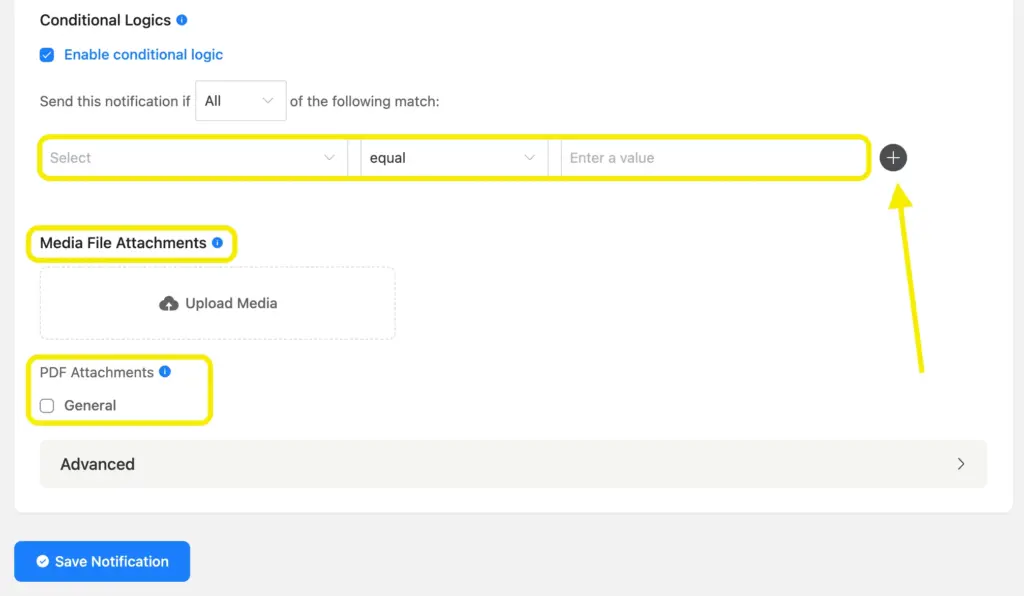
From a recruiter’s point of view, you might want to get notified when a specific skill or department is selected from the options, you can do that with conditional email notifications.
Also, a customer support form might ask whether the issue is technical or billing-related. If a user chooses “technical,” they automatically receive a step-by-step troubleshooting guide.
If they choose “billing,” the system sends them payment support instructions. This ensures the right message reaches the right person, cutting down response times and improving customer satisfaction.
Conditional confirmation
What users see after submitting a form shapes their next step.
With conditional confirmation, you can create unique thank-you messages or redirect users based on their responses. It’s a small change that makes the whole experience feel personalized.
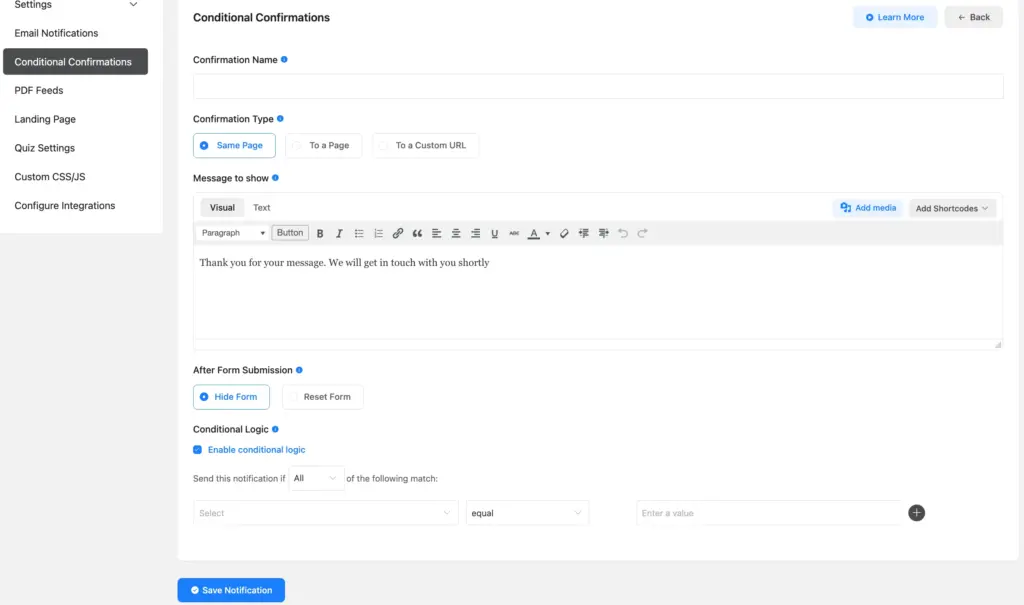
Imagine you run a fitness chain with multiple branches. If someone registers for the downtown branch, the form can redirect them to a page with the correct schedule and trainer details.
Another user choosing the uptown branch sees a different confirmation page with location-specific offers. This reduces confusion and makes the post-submission process much more effective.
Conditional email routing
Sorting form submissions manually is inefficient.
Conditional email routing solves this by automatically sending entries to the right recipient. You define the rules, and Fluent Forms ensures each response reaches the right inbox without delay.
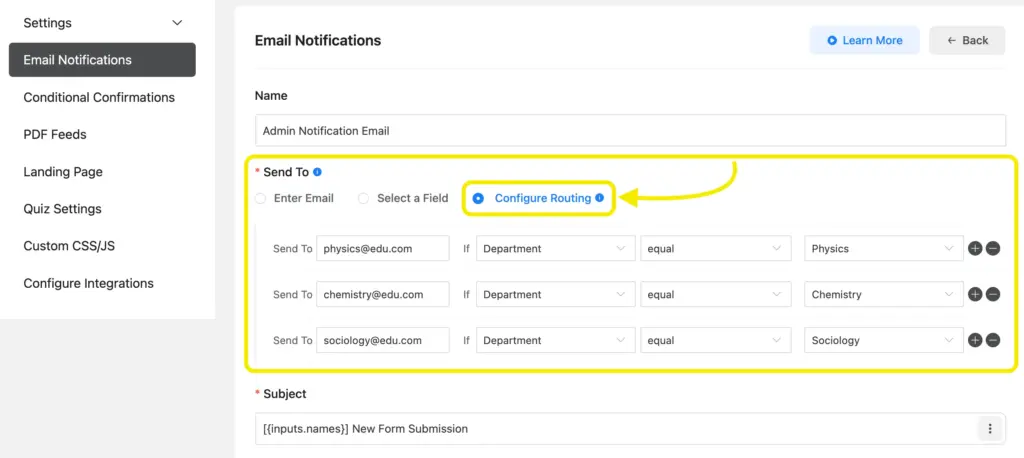
Picture a university admissions form. Undergraduate applications go to the specific departments for review, as they select them from the dropdown.
This not only saves time but also ensures that users receive timely responses from the right person. Your team stays organized, and communication becomes faster.
Admin approval
Sometimes, you need an extra layer of control before processing submissions.
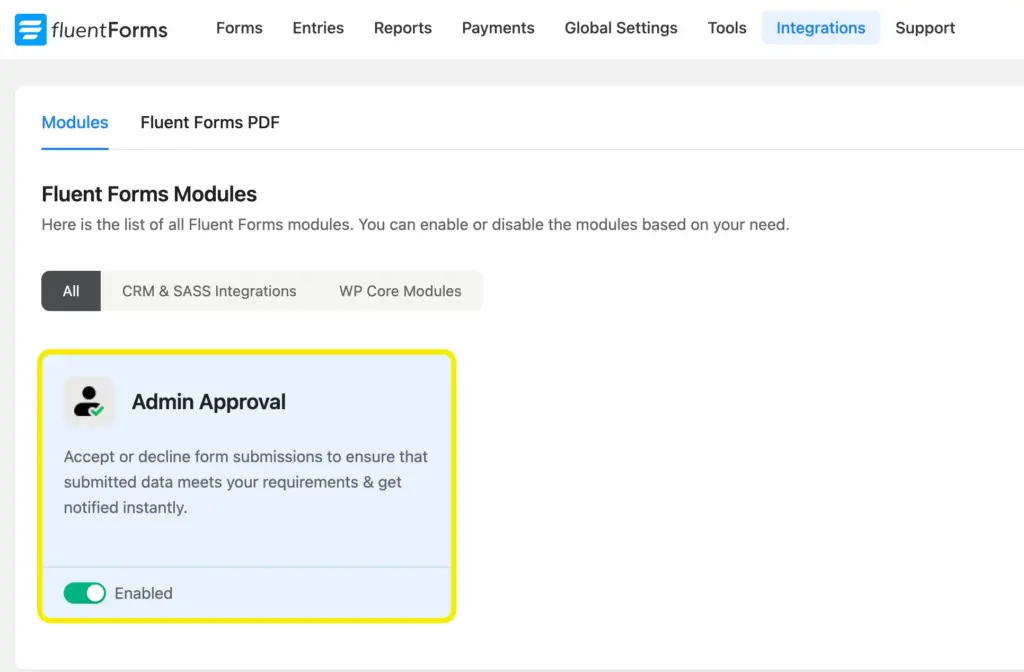
With the admin approval feature, every entry is held until you review and decide to approve, reject, or keep it pending. This gives you complete oversight and prevents spam or low-quality content from slipping through.
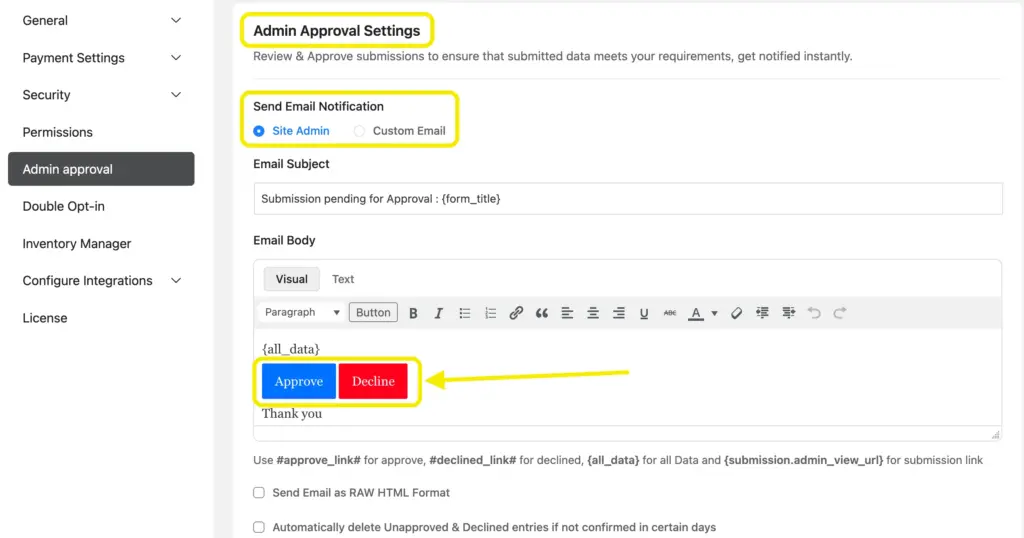
Take a job board as an example. Without moderation, anyone could post irrelevant or fraudulent job ads, which would damage your credibility. By enabling admin approval, you make sure only legitimate listings appear on your site.
The same approach works for guest posts, event submissions, or membership requests where quality and compliance matter.
Access controls
Form scheduling
With form scheduling, you decide when users can access your forms. You can set start and end times so the form is only available during a campaign, event, or application period. Visitors outside that timeframe will see a custom message instead of the form itself.

Suppose you are running a scholarship application. You want it to open on January 1 and close on February 15 at midnight. By enabling scheduling, the form automatically follows this timeline.
You don’t have to log in at odd hours to disable it. This makes your process professional and prevents any confusion about deadlines.
Form restriction
Not all forms need to be open to everyone.
Fluent Forms gives you the ability to control access with flexible restriction rules. You can restrict submissions from specific IP addresses, countries, or keywords.
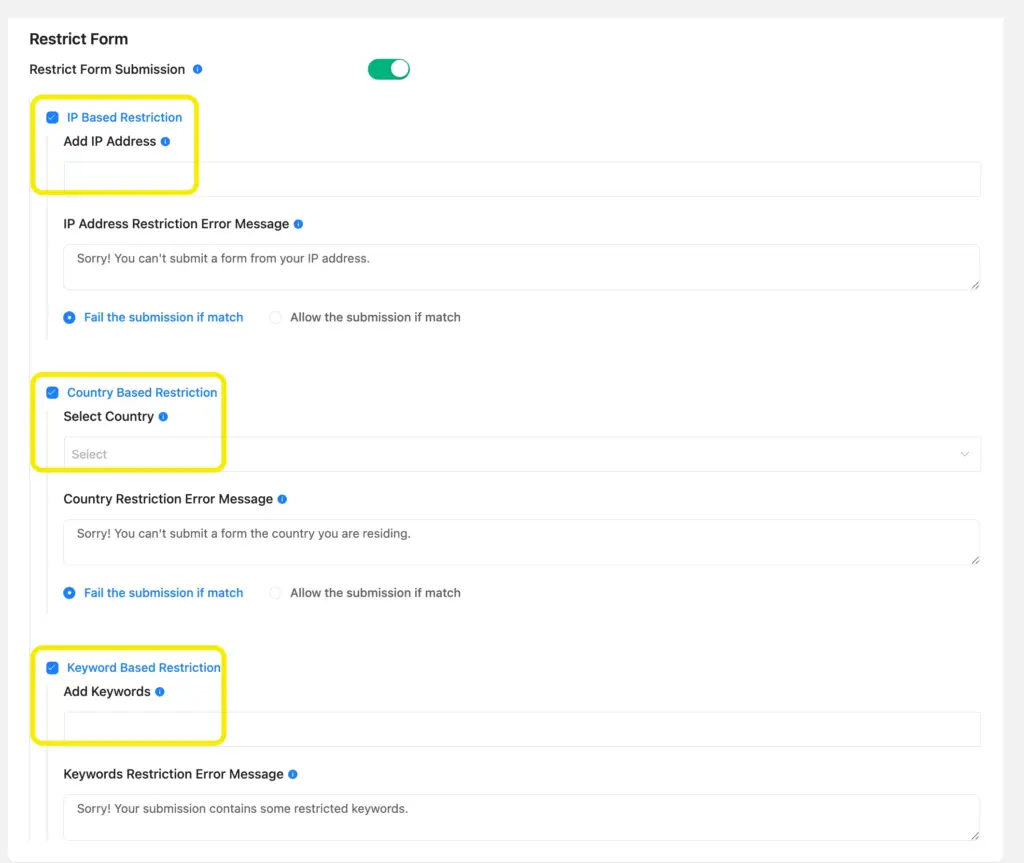
This feature helps you filter out IP addresses even before submissions, avoid hateful words, and specify countries you can’t take orders from.
Token based form restriction
Spam submissions can quickly overwhelm a website.
Token-based spam protection addresses this by assigning unique, time-sensitive tokens to every form.
Each token is generated when a visitor interacts with the form and is validated when the form is submitted.
If the token is missing, expired, or reused, the entry is blocked before it reaches your inbox.
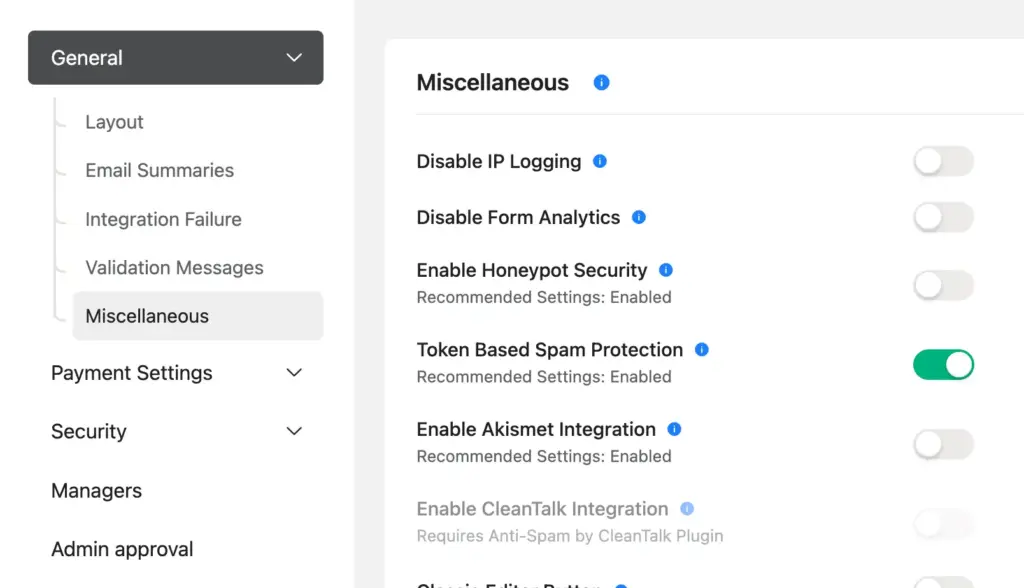
If you are running a customer feedback form, real users can submit their opinions without interruption, while automated bots fail because they cannot generate valid tokens.
This keeps your entries clean and authentic. You spend less time deleting junk responses and more time focusing on valuable feedback from real customers.
Save and resume
Long forms can feel overwhelming and often lead to drop-offs.
With save and resume, Fluent Forms gives users the flexibility to complete forms at their own pace. They can start filling in details, save progress, and receive a secure link to continue later.
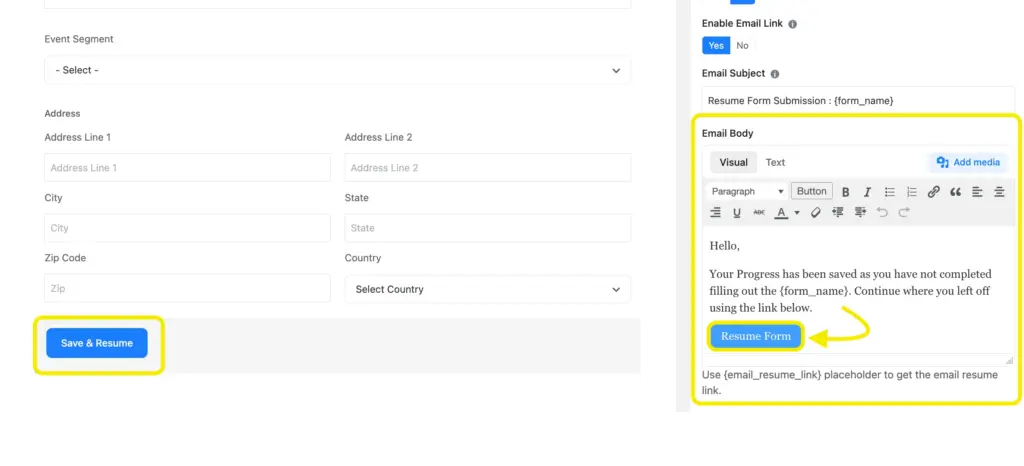
Take a university admission form that requires personal information, essays, and multiple file uploads. Few applicants will finish everything in one sitting.
By allowing them to save and return later, you reduce frustration, give them the time to fill-up the form in their free time, and increase the chances of receiving complete submissions.
This feature is also great for grant applications, surveys, and any process that demands detailed responses.
Location & mapping
User map location in submission
Knowing where your users are can be just as important as what they submit.
Fluent Forms can capture the exact geographic location of a user at the time they submit the form and display it on a map inside your dashboard.
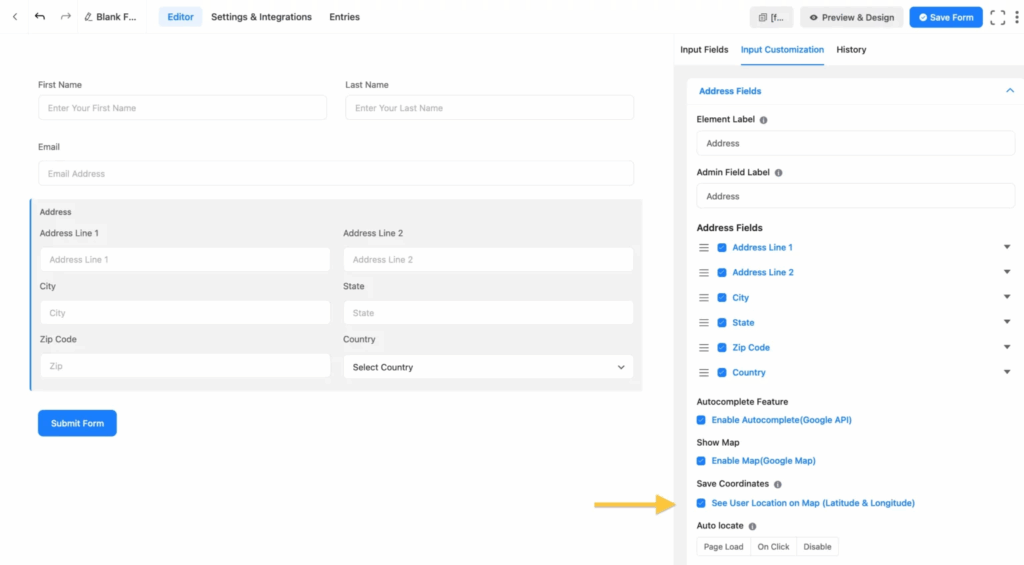
This is particularly valuable for businesses that rely on location data. A delivery company can confirm the pickup or drop-off point automatically, ensuring drivers go to the right place.
Event organizers can track where attendees are checking in, while service providers can see exactly where clients need support.
Having this information attached to submissions makes operations faster, more accurate, and less prone to errors.
Enjoying this article?
We regularly publish actionable content on our blog. Subscribe to get them delivered straight to your inbox.
We won’t spam you. You can unsubscribe whenever you want.
Conclusion
Fluent Forms is built for more than simple contact forms. Its advanced features give you the power to build calculators, automate communication, manage data efficiently, and personalize the user journey.
We covered some of the advanced Fluent Forms features in this blog. Explore Fluent Forms all features from the feature page.
Whether you’re running an online store, a membership site, or a service business, these tools help you save time, boost conversions, and scale without adding complexity.
Dive into the tutorials linked above to see how these features can transform your WordPress forms into powerful business solutions.
Questions about any feature? Hit us in the comments below!

This is Sumit. He’s a physics major who’s trying to understand both the physical as well as the WordPress worlds. Whenever he’s not busy, plays fifa or spends time with his family.


Leave a Reply